

ASP.NET Core 1.0 was initially named ASP.NET 5. I’m dedicating this post to showcase the major features of ASP.NET Core 1.0.
Single aligned web stack
ASP.NET Core 1.0 is a single aligned web stack on top of ASP.NET for Web API and Web UI as in the following figure (image taken from mva):
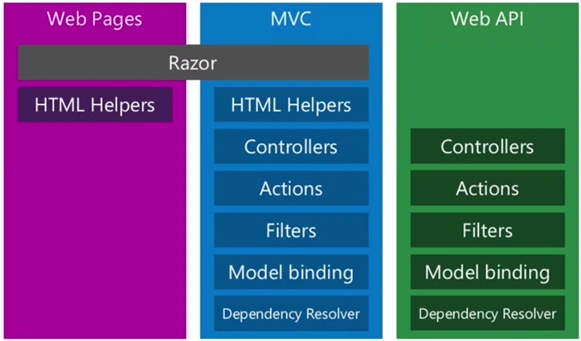
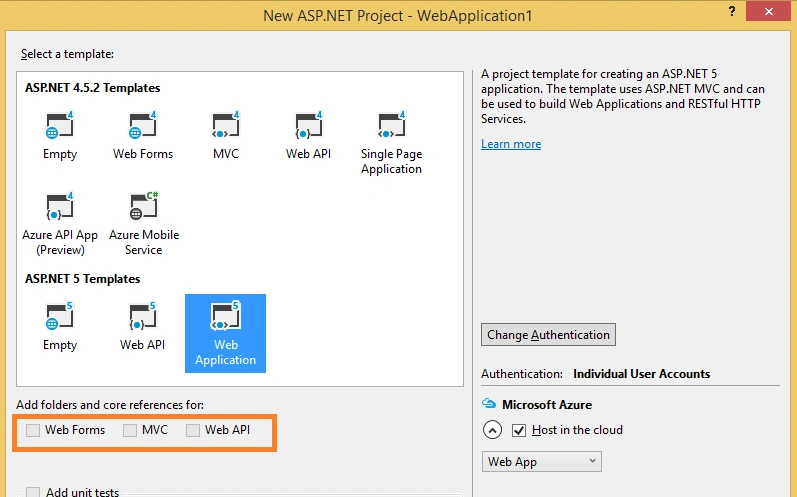
The above figure clearly depict that there is much less sharing between these three stacks. If you will see from ASP.NET template view, you will notice that all the three options are dimmed out as shown below:
Much leaner framework with reduced surface area
ASP.NET Core 1.0 is no longer based on System.Web.dll. As per dzone, typical HTTPContext object graph takes 30K in memory while new implementation takes around 2K. It means now you can take only those NuGet packages which are really required. It strictly follows pay-for-what-you-use model.
project.json file
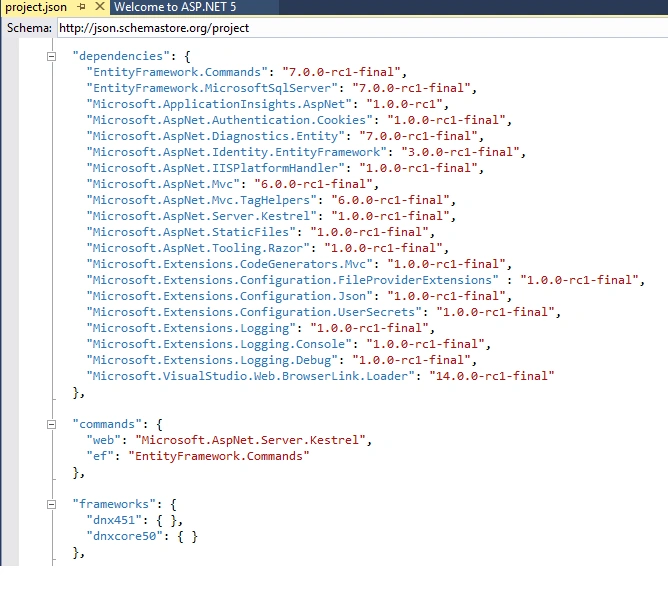
A new JSON file named project.json is introduced which takes care of dependencies and versions. Below is the sample project.json file:
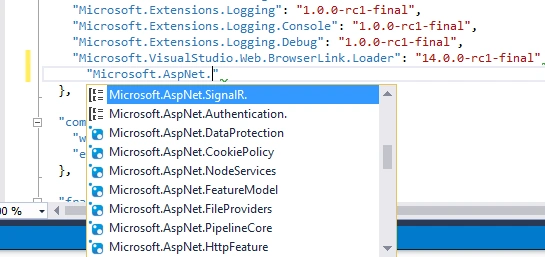
A very good thing is VS2015 provides the IntelliSense support for all the available NuGet packages and versions.
global.json file
This file is used to configure a solution as a whole. By default, it includes the below data:

Options for storing configuration settings
Unlike earlier ASP.NET verisons, Web.config is not the only place for storing the configuration settings. ASP.NET Core 1.0 allows you to read configuration values from range of sources like XML, JSON, environment variables. All the configuration sources can be set in a class file named Startup as shown below:


In cloud environment value of environment variables will automatically be used rather than local configuration values.
Client Side Dependency Management
Dependencies folder contains two subfolders corresponds to two package managers named Bower and npn. These folder tells which client side dependencies are managed by which tool.

Server Side Dependency Management
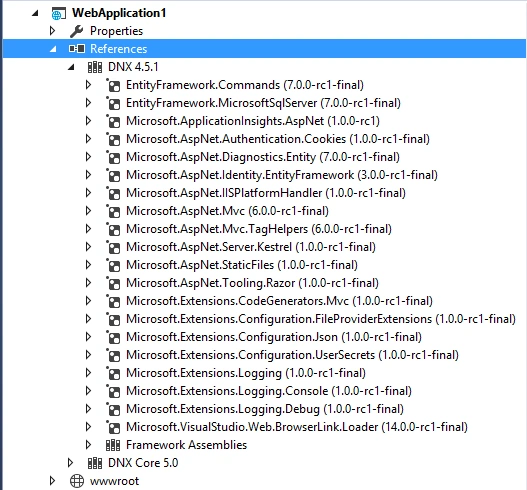
In ASP.NET Core 1.0, server side references are placed in References folder with corresponding target frameworks:
More Options for Hosting
Cross platform support by .NET Core 1.0 opened up the new hosting options. Now user need not to rely only on IIS for web application hosting. This initiative was taken because IIS is not available on other platforms like Mac and Linux. On such platforms, ASP.NET applications can be self-hosted or kestrel web server can be used.
Inbuilt Dependency Injection Support
ASP.NET Core 1.0 includes a simple built-in inversion of control (IoC) container that supports constructor injection by default, but this can be replaced with any other container. Services are made available through dependency injection and can be setup in ConfigureServices method of Startup class. I’ll emphasis more on this in my next blog.
Static files at wwwroot
Static files are those files which are served directly to clients. It includes HTML, image and JavaScript files. In ASP.NET Core 1.0, default location of static files is wwwroot of project and location of this wwwroot is defined in project.json. In other words, static files which are not located to wwwroot will not be accessible. Introducing this feature enhances the security capability of application and one need not to impose any exceptional guidelines to block access to delicate files.

Target Frameworks
In order to support cross platform development, applications built using ASP.NET Core 1.0 can target full .NET and .NET Core framework. It means you can run your application either on Windows or on Mac or Linux.

ASP.NET Core 1.0 features at a glance[reference – scott’s weblogs]:
- Build and run cross-platform ASP.NET apps on Windows, Mac and Linux
- Built on .NET Core, which supports true side-by-side app versioning
- New tooling that simplifies modern Web development
- Single aligned web stack for Web UI and Web APIs
- Cloud-ready environment-based configuration
- Integrated support for creating and using NuGet packages
- Built-in support for dependency injection
- Ability to host on IIS or self-host in your own process.
Basically this new ASP.NET(MVC + Web API + Web Pages = ASP.NET Core 1.0) is much better tuned for modern web development.
Sandeep SinghPosted Aug 31, 2016, 4:40 AM
Thanks for Sharing with us.
Sirisha KPosted Mar 17, 2016, 7:52 AM
Nice explanation mammm
Amit Kumar SinghPosted Feb 24, 2016, 12:20 AM
Nice one mam
Priyank AgrawalPosted Feb 16, 2016, 3:10 AM
Good Article
Thilaka RPosted Feb 12, 2016, 6:39 AM
Hi, Can you pelase share some links for Dotnet core and Dotnet framework features comparision? Mainly, we would like to know, what is missing in Dotnet core?
HimhaPosted Jan 29, 2016, 9:47 PM
Nice writeup
SukaskhaPosted Jan 29, 2016, 9:39 PM
Liked your article
Graeme PariotPosted Jan 29, 2016, 11:13 AM
nice briefing mam
Shantoh SinghPosted Jan 29, 2016, 11:10 AM
Excellent article
Mithun PattankarPosted Jan 29, 2016, 3:15 AM
Great summarized points. I personally liked how ASP.NET Core 1.0 can run on IIS without installing full .NET framework and EnvironmentVariables. Most importantly I was stunned by ASP.NET Core 1.0 can work on linux/ MacOs
Shubham KumarPosted Jan 28, 2016, 1:39 AM
thnx for info helpful
Saravanakumar SekaranPosted Jan 27, 2016, 9:34 PM
Very nice
Santhakumar MunuswamyPosted Jan 27, 2016, 1:53 PM
Thanks for nice share
Muhammad Aqib ShehzadPosted Jan 27, 2016, 9:59 AM
nice dear
Debasis SahaPosted Jan 27, 2016, 8:59 AM
Nice one. Thanks for sharing...
Raja TPosted Jan 27, 2016, 8:04 AM
Nice, Thanks for sharing