

Introduction
In this article, we are going to describe Java applet technology. We also discuss the basics of Java applets; how to develop applets that interact richly with their environment, and how to deploy applets.
An applet is a special Java program that runs in a browser enabled with Java technology (JRE) that can be downloaded from the internet and run. An applet is typically embedded inside a HTML page and runs in the context of a browser. An applet is designed to run remotely in the client browser, so there are some restrictions on it. The applet can't access system resources on the local computer. Applets are used to make the web site more dynamic and entertaining. An applet must be a subclass of the java.applet.Applet class. The Applet class provides the standard interface between the applet and the browser environment.
Life Cycle Of An Applet
These are the different stages involved in the life cycle of an applet.
- Initialization State
- Running State
- Idle or stopped state
- Dead State
- Display State
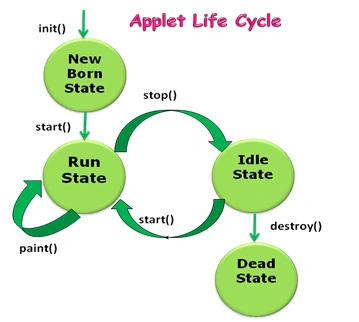
Initialization State
The life cycle of an applet begins when the applet is first loaded into the browser and called the init() method. And the init() method is called exactly once in an applet's life when applet is first loaded. Basically the purpose of the init() method is to read the PARAM tag in the HTML file. It is retrieving the parameters in the param tag.
Syntax
public void init()
{
Statements
}
Running State
This state is the second stage of the applet life cycle. After initialization, this state will automatically occur by invoking the start method of the applet class which again calls the run method and which calls the paint method. And it can occur from the Idle State when the applet is reloaded. This method runs multiple times.
Syntax
public void start()
{
Statements
}
Idle State
This state is the third stage of the applet life cycle; another name for it is Stopped state. There are two conditions when an applet moves to this state; when the currently executed applet is minimized or when the user switches to another page. At this point the stop method is invoked. It is called at least once when the browser leaves the web page when we move from one page to another. This method is called only in the Running State and can be called any number of times.
Syntax
public void stop()
{
Statements
}
Dead State
This state is the fourth stage of the applet life cycle. When the applet program terminates, the destroy function is invoked which makes an applet to be in the Dead State. This stage occurs when the destroy() method is called. And this method is called only one time in the whole life cycle.
Syntax
public void destroy()
{
Statements
}
Display State
After the paint method is called the applet is said to be in the Display State. The applet is said to be in the Display State when the paint method is called. This method can be used when we want to display output in the screen.paint() method. It is required in all applets when we want to draw something on the applet window. And the paint method takes a Graphics object as an argument.
Syntax
public void paint(Graphics g)
{
Statements
}
Advantages of Applet
- The biggest advantage of applets is Java's extensive detail to the user interface. Applets allow more complex user interface options than HTML combined with CGI.
- Applets are cross-platform and can run on the Windows, Mac OS and Linux platforms.
- Applets are to guaranteed to be safe; applets are downloaded into a "safe space" so they can't hurt the client PC.
- They are limited to certain operations on the browser, but can also use JDBC connections (to a database) or distributed objects.
Disadvantages of Java Applet
- All the Browser required Java plug-to run applet
- Java applets are compiled and run on the client side so the first time it takes a significant startup time.
- If an applet is not stored in the browser cached memory then it will be downloaded from the internet and that will take time.
- And the design of an applet is difficult compared to designing a good user interface in HTML.
Example
<applet code="AppletDemo1.class" width="450" height="450">
</applet>
- import java.awt.*;
- import java.applet.*;
- public class AppletDemo1 extends Applet
- {
- Font bigFont;
- Color redColor;
- Color weirdColor;
- Color bgColor;
- public void init()
- {
- bigFont = new Font("Arial", Font.BOLD, 16);
- redColor = Color.red;
- weirdColor = new Color(60, 60, 122);
- bgColor = Color.cyan;
- setBackground(bgColor);
- }
- public void stop()
- {
- }
- public void paint(Graphics g)
- {
- g.setFont(bigFont);
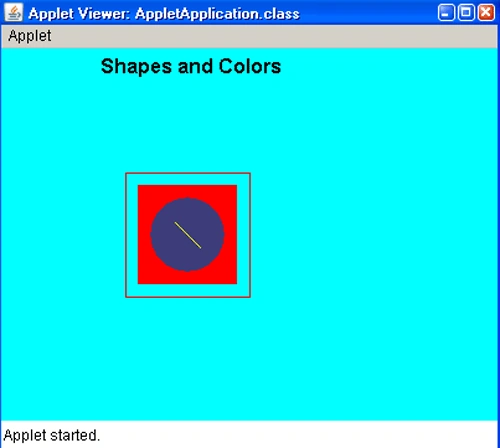
- g.drawString("Shapes and Colors", 80, 20);
- g.setColor(redColor);
- g.drawRect(100, 100, 100, 100);
- g.fillRect(110, 110, 80, 80);
- g.setColor(weirdColor);
- g.fillArc(120, 120, 60, 60, 0, 360);
- g.setColor(Color.yellow);
- g.drawLine(140, 140, 160, 160);
- g.setColor(Color.black);
- }
- }
Join the conversation! Your thoughts help the community grow.