

Introduction
This article describes working with a Tree structure in Java. The Tree is a very common component and I think all of you have seen them in many applications. A control that displays a set of hierarchical data as an outline. You can find task-oriented documentation and examples of using trees in Ebooks content.
A specific node in a tree can be identified either by a TreePath (an object that encapsulates a node and all of its ancestors), or by its display row, where each row in the display area displays one node. An expanded node is a non-leaf node (as identified by TreeModel.isLeaf(node) returning false) that will display its children when all its ancestors are expanded. A collapsed node is one which hides them. A hidden node is one which is under a collapsed ancestor. All of a viewable nodes parents are expanded, but may or may not be displayed. A displayed node is both viewable and in the display area, where it can be seen.
Components Descriptions of the tree
JTree: The tree is a graphical representation of data with the hierarchical properties by adding nodes to nodes and keeps the relation as parent and child.
Node: A node is an object and is available at any position within the JTree where the data associated is represented.
Path: The path is a collection of a contiguous set of nodes that contains one or many nodes. The path is empty or null when the path does not have a node.
Leaf: This is a special type of node at the end of a path. A leaf node is not connected to other nodes.
Root: This is the node at the highest point within the hierarchy in a tree.
Parent: It represents the relationship of node with another node. In object-oriented programming concepts, the parent is a super class
Child: It represents the relationship of node with another node. In object-oriented programming concepts, the child is a subclass of its parent. It inherits all the properties of its parent.
Creating Tree in Java
Step 1: Import the necessary package.
In Java it provides a spate package with in swing named as tree.
- import javax.swing.*;
- import javax.swing.tree.*;
- DefaultMutableTreeNode c = new DefaultMutableTreeNode("Collage", true);
- DefaultMutableTreeNode d = new DefaultMutableTreeNode("Department");
- DefaultMutableTreeNode f = new DefaultMutableTreeNode("Faculty");
- DefaultMutableTreeNode a = new DefaultMutableTreeNode("Acoountant");
- DefaultMutableTreeNode r = new DefaultMutableTreeNode("Resgistrar");
- DefaultMutableTreeNode m = new DefaultMutableTreeNode("Managenent");
- DefaultMutableTreeNode s = new DefaultMutableTreeNode("Security");
- c.add(d);
- d.add(f);
- d.add(a);
- d.add(m);
- m.add(s );
- c.add(a);
- JTree mytree = new JTree(c);
- JFrame frame = new JFrame("Demo of JTree Component!");
- frame.add(mytree);
- frame.setDefaultCloseOperation(JFrame.EXIT_ON_CLOSE);
- frame.setUndecorated(true);
- frame.getRootPane().setWindowDecorationStyle(JRootPane.PLAIN_DIALOG);
- frame.setSize(450,450);
- frame.setVisible(true);
Complete code
- import javax.swing.*;
- import javax.swing.tree.*;
- public class TreeComponent
- {
- public static void main(String[] args)
- {
- DefaultMutableTreeNode c = new DefaultMutableTreeNode("Collage", true);
- DefaultMutableTreeNode d = new DefaultMutableTreeNode("Department");
- DefaultMutableTreeNode f = new DefaultMutableTreeNode("Faculty");
- DefaultMutableTreeNode a = new DefaultMutableTreeNode("Acoountant");
- DefaultMutableTreeNode r = new DefaultMutableTreeNode("Resgistrar");
- DefaultMutableTreeNode m = new DefaultMutableTreeNode("Managenent");
- DefaultMutableTreeNode s = new DefaultMutableTreeNode("Security");
- c.add(d);
- d.add(f);
- d.add(a);
- d.add(m);
- m.add(s);
- c.add(a);
- JTree mytree = new JTree(c);
- JFrame frame = new JFrame("Demo of JTree Component!");
- frame.add(mytree);
- frame.setDefaultCloseOperation(JFrame.EXIT_ON_CLOSE);
- frame.setUndecorated(true);
- frame.getRootPane().setWindowDecorationStyle(JRootPane.PLAIN_DIALOG);
- frame.setSize(450, 450);
- frame.setVisible(true);
- }
- }
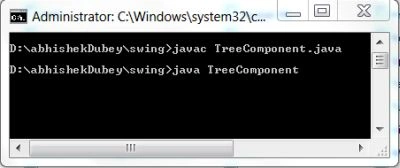
cmd output
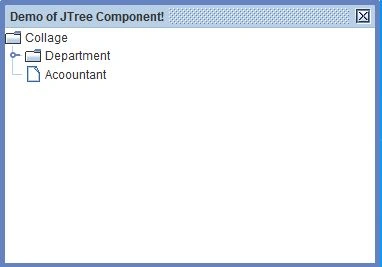
Initial output
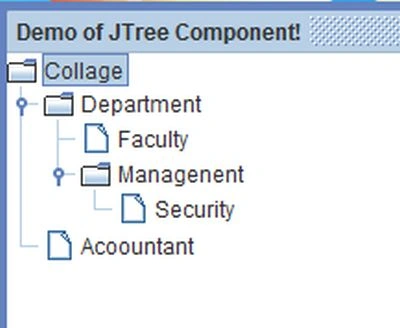
After Expanding the tree
Resources
Ritambhara TechPosted Sep 5, 2012, 9:24 AM
Lot of Interview questions related to Binary Trees are available here <a href="http://www.ritambhara.in/tag/binary-tree/"> http://www.ritambhara.in/tag/binary-tree/</a>