

Background
Our last article explained how to do some operations with the data using the Enterprise Library. In that article, we performed insert and retrieval for the application. We used the Enterprise Library Data Access Application Block and found it extremely easy and simple to integrate and use. We called a web method using jQuery.
Please download College Tracker Project to continue the implementation with the last project.
Getting Started
In this article, we will learn to perform more operations with the data using the Enterprise Library. We will extend the library also to perform the complete CRUD and we will see that with this application we will upgrade the last application with less amount of code.
Step 1
Extract the Zipped file.
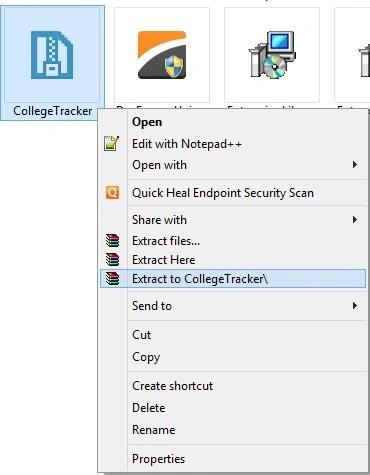 Step 2
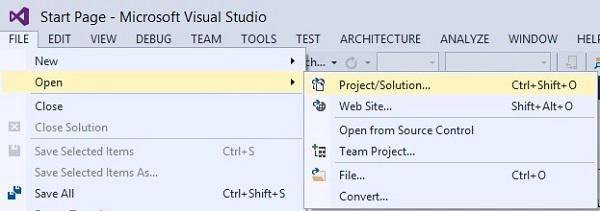
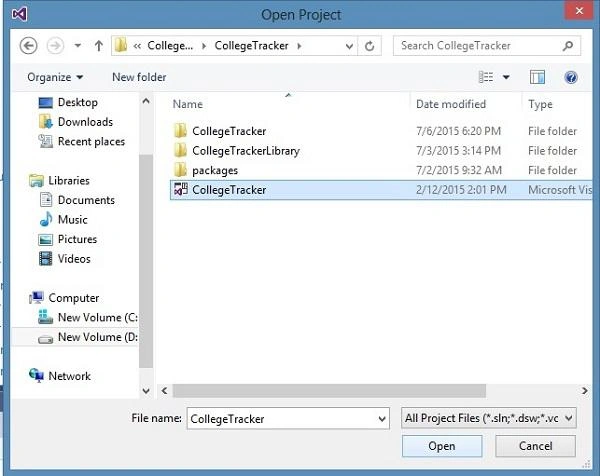
Now open Visual Studio and locate the extracted file path to load the project.
Step 2
Now open Visual Studio and locate the extracted file path to load the project.
 Database Structure
In this section, we will create the following SQL Table and Stored Procedure.
Step 1
Database Structure
In this section, we will create the following SQL Table and Stored Procedure.
Step 1
Create Table
- CREATE TABLE CollegeTracker
- (
- CollegeID int IDENTITY(1, 1) NOT NULL,
- CollegeName varchar(50) NULL,
- CollegeAddress varchar(50) NULL,
- CollegePhone bigint NULL,
- CollegeEmailID varchar(50) NULL,
- ContactPerson varchar(50) NULL,
- State_Name varchar(50) NULL,
- City_Name varchar(50) NULL
- )
- CREATE PROCEDURE [dbo].[CT_CollegeDetails_DELETE] @CollegeID int AS Begin
- DELETE FROM
- CollegeTracker
- WHERE
- CollegeTracker.CollegeID = @CollegeID End CREATE PROCEDURE [dbo].[CT_CollegeDetails_INSERT] @CName varchar(50),
- @CAddress varchar(50),
- @CPhone bigint,
- @CEmailID varchar(50),
- @CPerson varchar(50),
- @SName varchar(50),
- @C_Name varchar(50),
- @Status int output AS Begin INSERT INTO CollegeTracker(
- CollegeName, CollegeAddress, CollegePhone,
- CollegeEmailID, ContactPerson, State_Name,
- City_Name
- )
- VALUES
- (
- @CName, @CAddress, @CPhone, @CEmailID,
- @CPerson, @SName, @C_Name
- )
- SET
- @Status = 1 RETURN @Status End
- CREATE PROCEDURE [dbo].[CT_CollegeDetails_Select]
- AS
- Begin
- SELECT CollegeTracker.CollegeID,
- CollegeTracker.CollegeName,
- CollegeTracker.CollegeAddress,
- CollegeTracker.CollegePhone,
- CollegeTracker.CollegeEmailID,
- CollegeTracker.ContactPerson,
- CollegeTracker.State_Name,
- CollegeTracker.City_Name
- FROM CollegeTracker
- End
- CREATE PROCEDURE [dbo].[CT_CollegeDetails_UPDATE]
- @CollegeId int,
- @CName varchar(50),
- @CAddress varchar(50),
- @CPhone bigint,
- @CEmailID varchar(50),
- @CPerson varchar(50),
- @SName varchar(50),
- @C_Name varchar(50),
- @Status int output
- AS
- Begin
- UPDATE CollegeTracker
- SET
- CollegeName=@CName,
- CollegeAddress=@CAddress,
- CollegePhone=@CPhone,
- CollegeEmailID=@CEmailID,
- ContactPerson=@CPerson,
- State_Name=@SName,
- City_Name=@C_Name
- WHERE CollegeID=@CollegeId
- RETURN @Status
- End
- Create PROCEDURE [dbo].[CT_EditCollegeDetails_Select]
- @CollegeId int
- AS
- Begin
- SELECT * FROM CollegeTracker Where CollegeTracker.CollegeID=@CollegeId
- End
- using CollegeTrackerLibrary.MODEL;
- using Microsoft.Practices.EnterpriseLibrary.Data;
- using Microsoft.Practices.EnterpriseLibrary.Data.Sql;
- using System;
- using System.Collections.Generic;
- using System.Configuration;
- using System.Data;
- using System.Data.Common;
- using System.Data.SqlClient;
- using System.Linq;
- using System.Text;
- using System.Threading.Tasks;
- namespace CollegeTrackerLibrary.DAL {
- public class CollegeDAL {#region Variable
- /// <summary>
- /// Specify the Database variable
- /// </summary>
- Database objDB;
- /// <summary>
- /// Specify the static variable
- /// </summary>
- static string ConnectionString;#endregion
- #region Constructor
- /// <summary>
- /// This constructor is used to get the connectionstring from the config file
- /// </summary>
- public CollegeDAL() {
- ConnectionString = ConfigurationManager.ConnectionStrings["CollegeTrackerConnectionString"].ToString();
- }#endregion
- #region College
- /// <summary>
- /// This method is used to get the college data
- /// </summary>
- /// <returns></returns>
- public DataSet GetCollegeDetails() {
- objDB = new SqlDatabase(ConnectionString);
- using(DbCommand objcmd = objDB.GetStoredProcCommand("CT_CollegeDetails_Select")) {
- try {
- return objDB.ExecuteDataSet(objcmd);
- } catch (Exception ex) {
- throw ex;
- }
- }
- }
- /// <summary>
- /// This method is used to insert the college data into the database
- /// </summary>
- /// <param name="collegeDetails"></param>
- /// <returns></returns>
- public bool InsertCollegeDetails(CollegeDetails collegeDetails) {
- bool result = false;
- objDB = new SqlDatabase(ConnectionString);
- using(DbCommand objCMD = objDB.GetStoredProcCommand("CT_CollegeDetails_INSERT")) {
- //objDB.AddInParameter(objCMD, "@CID", DbType.Int16, 2);
- objDB.AddInParameter(objCMD, "@CName", DbType.String, collegeDetails.CollegeName);
- objDB.AddInParameter(objCMD, "@CAddress", DbType.String, collegeDetails.CollegeAddress);
- objDB.AddInParameter(objCMD, "@CPhone", DbType.Int64, collegeDetails.CollegePhone);
- objDB.AddInParameter(objCMD, "@CEmailID", DbType.String, collegeDetails.CollegeEmailID);
- objDB.AddInParameter(objCMD, "@CPerson", DbType.String, collegeDetails.ContactPerson);
- objDB.AddInParameter(objCMD, "@SName", DbType.String, collegeDetails.State_Name);
- objDB.AddInParameter(objCMD, "@C_Name", DbType.String, collegeDetails.City_Name);
- objDB.AddInParameter(objCMD, "@Status", DbType.Int16, 0);
- try {
- objDB.ExecuteNonQuery(objCMD);
- result = Convert.ToBoolean(objDB.GetParameterValue(objCMD, "@Status"));
- } catch (Exception) {
- throw;
- }
- }
- return result;
- }
- public void DeleteCollegeDetails(int id) {
- objDB = new SqlDatabase(ConnectionString);
- using(DbCommand objCMD = objDB.GetStoredProcCommand("CT_CollegeDetails_DELETE")) {
- objDB.AddInParameter(objCMD, "@CollegeID", DbType.Int32, id);
- try {
- objDB.ExecuteNonQuery(objCMD);
- } catch (Exception) {
- throw;
- }
- }
- }
- public DataSet GetEditCollegeDetails(int id) {
- objDB = new SqlDatabase(ConnectionString);
- using(DbCommand objcmd = objDB.GetStoredProcCommand("CT_EditCollegeDetails_Select")) {
- objDB.AddInParameter(objcmd, "@CollegeId", DbType.Int32, id);
- try {
- return objDB.ExecuteDataSet(objcmd);
- } catch (Exception ex) {
- throw ex;
- }
- }
- }
- public bool UpdateCollegeDetails(CollegeDetails collegeDetails) {
- bool result = false;
- objDB = new SqlDatabase(ConnectionString);
- using(DbCommand objCMD = objDB.GetStoredProcCommand("CT_CollegeDetails_UPDATE")) {
- objDB.AddInParameter(objCMD, "@CollegeId", DbType.Int32, collegeDetails.CollegeID);
- objDB.AddInParameter(objCMD, "@CName", DbType.String, collegeDetails.CollegeName);
- objDB.AddInParameter(objCMD, "@CAddress", DbType.String, collegeDetails.CollegeAddress);
- objDB.AddInParameter(objCMD, "@CPhone", DbType.Int64, collegeDetails.CollegePhone);
- objDB.AddInParameter(objCMD, "@CEmailID", DbType.String, collegeDetails.CollegeEmailID);
- objDB.AddInParameter(objCMD, "@CPerson", DbType.String, collegeDetails.ContactPerson);
- objDB.AddInParameter(objCMD, "@SName", DbType.String, collegeDetails.State_Name);
- objDB.AddInParameter(objCMD, "@C_Name", DbType.String, collegeDetails.City_Name);
- objDB.AddInParameter(objCMD, "@Status", DbType.Int16, 0);
- try {
- objDB.ExecuteNonQuery(objCMD);
- result = Convert.ToBoolean(objDB.GetParameterValue(objCMD, "@Status"));
- } catch (Exception) {
- throw;
- }
- }
- return result;
- }#endregion
- }
- }
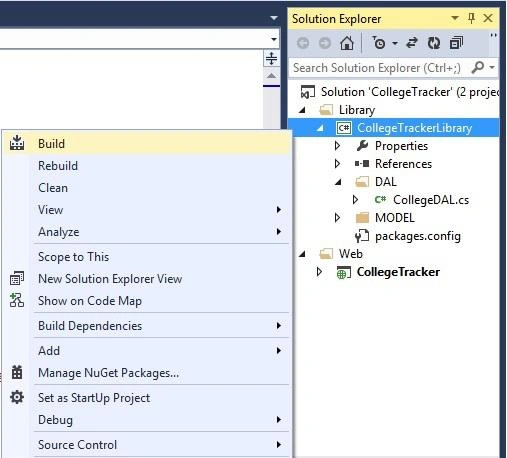
- <%@ Page Language="C#" AutoEventWireup="true" CodeBehind="AddNewCollege.aspx.cs" Inherits="CollegeTracker.AddNewCollege" %>
- <!DOCTYPE html>
- <html xmlns="http://www.w3.org/1999/xhtml">
- <head runat="server">
- <title></title>
- <link href="Content/Site.css" rel="stylesheet" />
- <script src="Scripts/jquery-2.1.3.js"></script>
- <script type="text/javascript">
- $(document).ready(function(){
- $('#BtnSubmit').click(function () {
- var collegeDetails = {};
- collegeDetails.CollegeName = $('#TxtCollegeName').val();
- collegeDetails.CollegeAddress = $('#TxtCollegeAddress').val();
- collegeDetails.CollegePhone = $('#TxtCollegePhone').val();
- collegeDetails.CollegeEmailID = $('#TxtCollegeEmailID').val();
- collegeDetails.ContactPerson = $('#TxtContactPerson').val();
- collegeDetails.State_Name = $('#TxtCollegeState').val();
- collegeDetails.City_Name = $('#TxtCollegeCity').val();
- var pageUrl = '<%=ResolveUrl("~/AddNewCollege.aspx/CreateCollegeData")%>';
- $.ajax({
- type: 'POST',
- url: 'AddNewCollege.aspx/CreateCollegeData',
- data: "{collegeDetails:" + JSON.stringify(collegeDetails) + "}",
- dataType: 'json',
- contentType: 'application/json; charset=utf-8',
- success: function (response) {
- $('#lblResult').html('Inserted Successfully');
- $('#TxtCollegeName').val('');
- $('#TxtCollegeAddress').val('');
- $('#TxtCollegePhone').val('');
- $('#TxtCollegeEmailID').val('');
- $('#TxtContactPerson').val('');
- $('#TxtCollegeState').val('');
- $('#TxtCollegeCity').val('');
- },
- error: function () {
- alert("An error occurred.");
- }
- });
- });
- });
- </script>
- </head>
- <body>
- <form id="form1" runat="server">
- <div id="AddNewCollegeDiv">
- <ul id="AddNewCollege">
- <li>
- <label id="lblCollegeName">College Name</label>
- <input type="text" id="TxtCollegeName" />
- </li>
- <li>
- <label id="lblCollegeAddress">College Address</label>
- <input type="text" id="TxtCollegeAddress" />
- </li>
- <li>
- <label id="lblCollegePhone">College Phone</label>
- <input type="text" id="TxtCollegePhone" />
- </li>
- <li>
- <label id="lblCollegeEmailID">College EmailID</label>
- <input type="text" id="TxtCollegeEmailID" />
- </li>
- <li>
- <label id="lblContactPerson">Contact Person</label>
- <input type="text" id="TxtContactPerson" />
- </li>
- <li>
- <label id="lblCollegeState">State</label>
- <input type="text" id="TxtCollegeState" />
- </li>
- <li>
- <label id="lblCollegeCity">City</label>
- <input type="text" id="TxtCollegeCity" />
- </li>
- <li>
- <input type="button" id="BtnSubmit" value="Submit" />
- <label id="lblResult" />
- </li>
- <li>
- <a href="CollegeDetailsForm.aspx">College Details</a>
- </li>
- </ul>
- </div>
- </form>
- </body>
- </html>
- using CollegeTrackerLibrary.DAL;
- using CollegeTrackerLibrary.MODEL;
- using System;
- using System.Collections.Generic;
- using System.Linq;
- using System.Web;
- using System.Web.Services;
- using System.Web.UI;
- using System.Web.UI.WebControls;
- namespace CollegeTracker
- {
- public partial class AddNewCollege : System.Web.UI.Page
- {
- protected void Page_Load(object sender, EventArgs e)
- {
- }
- [WebMethod]
- public static string CreateCollegeData(CollegeDetails collegeDetails)
- {
- CollegeDAL obj = new CollegeDAL();
- bool b = obj.InsertCollegeDetails(collegeDetails);
- return "success";
- }
- }
- }
- <%@ Page Language="C#" AutoEventWireup="true" CodeBehind="CollegeDetailsForm.aspx.cs" Inherits="CollegeTracker.CollegeDetailsForm" %>
- <!DOCTYPE html>
- <html xmlns="http://www.w3.org/1999/xhtml">
- <head runat="server">
- <title></title>
- <script src="Scripts/jquery-1.7.1.min.js"></script>
- </head>
- <body>
- <form id="form1" runat="server">
- <div>
- <a href="AddNewCollege.aspx">Add New College</a>
- </div>
- <div>
- <asp:GridView ID="CollegeGridView" runat="server"
- BackColor="White" BorderColor="White"
- BorderStyle="Ridge" BorderWidth="2px"
- CellPadding="3" CellSpacing="1"
- GridLines="None" Height="215px"
- Width="363px" AutoGenerateColumns="false"
- DataKeyNames="CollegeID"
- OnRowCommand="CollegeGridView_RowCommand"
- OnRowDataBound="CollegeGridView_RowDataBound"
- OnRowDeleting="CollegeGridView_RowDeleting">
- <FooterStyle BackColor="#C6C3C6" ForeColor="Black" />
- <HeaderStyle BackColor="#4A3C8C" Font-Bold="True" ForeColor="#E7E7FF" />
- <PagerStyle BackColor="#C6C3C6" ForeColor="Black" HorizontalAlign="Right" />
- <RowStyle BackColor="#DEDFDE" ForeColor="Black" />
- <SelectedRowStyle BackColor="#9471DE" Font-Bold="True" ForeColor="White" />
- <SortedAscendingCellStyle BackColor="#F1F1F1" />
- <SortedAscendingHeaderStyle BackColor="#594B9C" />
- <SortedDescendingCellStyle BackColor="#CAC9C9" />
- <SortedDescendingHeaderStyle BackColor="#33276A" />
- <Columns>
- <asp:BoundField DataField="CollegeID" HeaderText="College ID" Visible="false" />
- <asp:BoundField DataField="CollegeName" HeaderText="CollegeName" />
- <asp:BoundField DataField="CollegeAddress" HeaderText="College Address" />
- <asp:BoundField DataField="CollegePhone" HeaderText="Phone" />
- <asp:BoundField DataField="CollegeEmailID" HeaderText="Email Id" />
- <asp:BoundField DataField="ContactPerson" HeaderText="Contact Person" />
- <asp:BoundField DataField="State_Name" HeaderText="State" />
- <asp:BoundField DataField="City_Name" HeaderText="City" />
- <asp:HyperLinkField DataNavigateUrlFields="CollegeID" HeaderText="Links" DataNavigateUrlFormatString="EditCollege.aspx?CollegeID={0}" Text="Edit" />
- <asp:TemplateField HeaderText="Delete">
- <ItemTemplate>
- <asp:LinkButton ID="LinkButton1" CommandArgument='<%# Eval("CollegeID") %>' CommandName="Delete" runat="server"> Delete</asp:LinkButton>
- </ItemTemplate>
- </asp:TemplateField>
- </Columns>
- </asp:GridView>
- </div>
- </form>
- </body>
- </html>
- using CollegeTrackerLibrary.DAL;
- using System;
- using System.Collections.Generic;
- using System.Linq;
- using System.Web;
- using System.Web.Services;
- using System.Web.UI;
- using System.Web.UI.WebControls;
- namespace CollegeTracker
- {
- public partial class CollegeDetailsForm : System.Web.UI.Page
- {
- CollegeDAL objCollege = new CollegeDAL();
- protected void Page_Load(object sender, EventArgs e)
- {
- if (!IsPostBack)
- {
- GetCollegeData();
- }
- }
- public void GetCollegeData()
- {
- CollegeGridView.DataSource = objCollege.GetCollegeDetails();
- CollegeGridView.DataBind();
- }
- protected void CollegeGridView_RowDataBound(object sender, GridViewRowEventArgs e)
- {
- if (e.Row.RowType == DataControlRowType.DataRow)
- {
- LinkButton l = (LinkButton)e.Row.FindControl("LinkButton1");
- l.Attributes.Add("onclick", "javascript:return " +
- "confirm('Are you sure you want to delete')");
- }
- }
- protected void CollegeGridView_RowCommand(object sender, GridViewCommandEventArgs e)
- {
- if (e.CommandName == "Delete")
- {
- int categoryID = Convert.ToInt32(e.CommandArgument);
- }
- }
- protected void CollegeGridView_RowDeleting(object sender, GridViewDeleteEventArgs e)
- {
- GridViewRow row = (GridViewRow)CollegeGridView.Rows[e.RowIndex];
- Label lbldeleteid = (Label)row.FindControl("lblID");
- int id = Convert.ToInt32(CollegeGridView.DataKeys[e.RowIndex].Value.ToString());
- CollegeDAL obj = new CollegeDAL();
- obj.DeleteCollegeDetails(id);
- GetCollegeData();
- }
- }
- }
- <%@ Page Language="C#" AutoEventWireup="true" CodeBehind="EditCollege.aspx.cs" Inherits="CollegeTracker.EditCollege" %>
- <!DOCTYPE html>
- <html xmlns="http://www.w3.org/1999/xhtml">
- <head runat="server">
- <title></title>
- <link href="Content/Site.css" rel="stylesheet" />
- <script src="Scripts/jquery-2.1.3.js"></script>
- <script type="text/javascript">
- $(document).ready(function(){
- $('#BtnSubmit').click(function () {
- var collegeDetails = {};
- collegeDetails.CollegeID = $('#TxtCollegeID').val();
- collegeDetails.CollegeName = $('#TxtCollegeName').val();
- collegeDetails.CollegeAddress = $('#TxtCollegeAddress').val();
- collegeDetails.CollegePhone = $('#TxtCollegePhone').val();
- collegeDetails.CollegeEmailID = $('#TxtCollegeEmailID').val();
- collegeDetails.ContactPerson = $('#TxtContactPerson').val();
- collegeDetails.State_Name = $('#TxtCollegeState').val();
- collegeDetails.City_Name = $('#TxtCollegeCity').val();
- var pageUrl = '<%=ResolveUrl("~/EditCollege.aspx/UpdtCollegeDetails")%>';
- $.ajax({
- type: 'POST',
- url: 'EditCollege.aspx/UpdtCollegeDetails',
- data: "{collegeDetails:" + JSON.stringify(collegeDetails) + "}",
- dataType: 'json',
- contentType: 'application/json; charset=utf-8',
- success: function (response) {
- $('#lblResult').html('Updated Successfully');
- //$('#TxtCollegeName').val('');
- //$('#TxtCollegeAddress').val('');
- //$('#TxtCollegePhone').val('');
- //$('#TxtCollegeEmailID').val('');
- //$('#TxtContactPerson').val('');
- //$('#TxtCollegeState').val('');
- //$('#TxtCollegeCity').val('');
- },
- error: function () {
- alert("An error occurred.");
- }
- });
- });
- });
- </script>
- </head>
- <body>
- <form id="form1" runat="server">
- <div id="AddNewCollegeDiv">
- <ul id="AddNewCollege">
- <li>
- <label id="lblCollegeName" runat="server">College Name</label>
- <input type="text" id="TxtCollegeName" runat="server" />
- </li>
- <li>
- <label id="lblCollegeAddress" runat="server">College Address</label>
- <input type="text" id="TxtCollegeAddress" runat="server" />
- </li>
- <li>
- <label id="lblCollegePhone">College Phone</label>
- <input type="text" id="TxtCollegePhone" runat="server" />
- </li>
- <li>
- <label id="lblCollegeEmailID">College EmailID</label>
- <input type="text" id="TxtCollegeEmailID" runat="server" />
- </li>
- <li>
- <label id="lblContactPerson">Contact Person</label>
- <input type="text" id="TxtContactPerson" runat="server" />
- </li>
- <li>
- <label id="lblCollegeState">State</label>
- <input type="text" id="TxtCollegeState" runat="server" />
- </li>
- <li>
- <label id="lblCollegeCity">City</label>
- <input type="text" id="TxtCollegeCity" runat="server" />
- </li>
- <li>
- <input type="button" id="BtnSubmit" value="Submit" />
- <label id="lblResult" />
- </li>
- <li>
- <a href="CollegeDetailsForm.aspx">Back</a>
- <input type="text" id="TxtCollegeID" runat="server" />
- </li>
- </ul>
- </div>
- </form>
- </body>
- </html>
- using CollegeTrackerLibrary.DAL;
- using CollegeTrackerLibrary.MODEL;
- using System;
- using System.Collections.Generic;
- using System.Linq;
- using System.Web;
- using System.Web.Services;
- using System.Web.UI;
- using System.Web.UI.WebControls;
- using System.Web.UI.HtmlControls;
- namespace CollegeTracker
- {
- public partial class EditCollege : System.Web.UI.Page
- {
- protected void Page_Load(object sender, EventArgs e)
- {
- if (!IsPostBack)
- {
- TxtCollegeID.Value = Request.QueryString["CollegeID"];
- //lblid = Request.QueryString["CollegeID"].ToString();
- int id = Convert.ToInt32(TxtCollegeID.Value);
- CollegeDAL obj = new CollegeDAL();
- TxtCollegeName.Value =obj.GetEditCollegeDetails(id).Tables[0].Rows[0][1].ToString();
- TxtCollegeAddress.Value = obj.GetEditCollegeDetails(id).Tables[0].Rows[0][2].ToString();
- TxtCollegePhone.Value = obj.GetEditCollegeDetails(id).Tables[0].Rows[0][3].ToString();
- TxtCollegeEmailID.Value = obj.GetEditCollegeDetails(id).Tables[0].Rows[0][4].ToString();
- TxtContactPerson.Value = obj.GetEditCollegeDetails(id).Tables[0].Rows[0][5].ToString();
- TxtCollegeState.Value = obj.GetEditCollegeDetails(id).Tables[0].Rows[0][6].ToString();
- TxtCollegeCity.Value = obj.GetEditCollegeDetails(id).Tables[0].Rows[0][7].ToString();
- }
- }
- [WebMethod]
- public static string UpdtCollegeDetails(CollegeDetails collegeDetails)
- {
- CollegeDAL obj = new CollegeDAL();
- //int id = Convert.ToInt32(lblid.InnerText);
- bool b = obj.UpdateCollegeDetails(collegeDetails);
- return "Update success";
- }
- }
- }
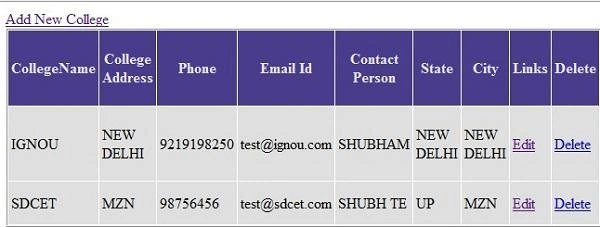
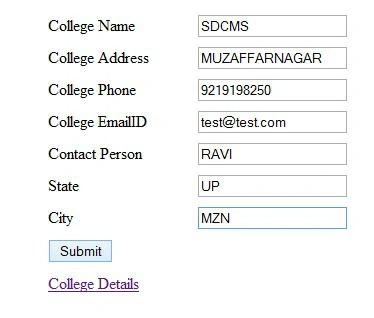
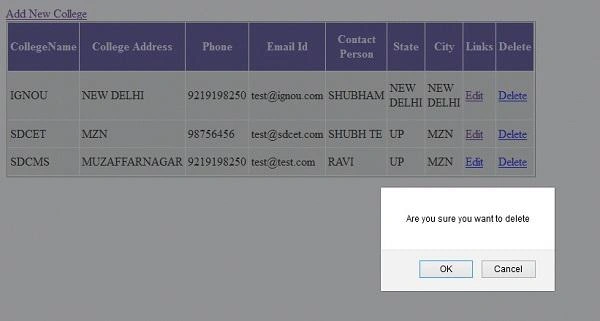
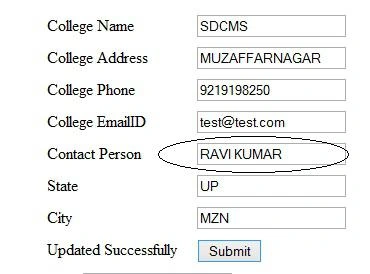
David WoodPosted Dec 18, 2019, 7:07 AM
Did I miss something. Part 1 was only about the theory. Where did you show how to access data?
Mohit KalaPosted Apr 15, 2017, 4:17 AM
Thanks for Sharing Nice Article Sir
Santhakumar MunuswamyPosted Jul 23, 2015, 3:03 PM
Thanks for nice article:)
Nimit JoshiPosted Jul 22, 2015, 11:59 PM
Thanks all...
junaid mPosted Jul 22, 2015, 11:51 PM
good one
Shridhar SharmaPosted Jul 22, 2015, 3:26 PM
Nice one
Gopi ChandPosted Jul 22, 2015, 3:10 PM
Nice presentation
Rahul Kumar SaxenaPosted Jul 22, 2015, 2:21 PM
good Show
RakeshPosted Jul 22, 2015, 10:13 AM
Well explain sir
Sibeesh VenuPosted Jul 22, 2015, 4:03 AM
Nice Share.
Praveen KumarPosted Jul 22, 2015, 3:57 AM
Fabulous!
Nilesh JadavPosted Jul 22, 2015, 12:49 AM
Nice one sir
SharadPosted Jul 22, 2015, 12:21 AM
Excellent...