

This article shows how to bind a dropdownlist in various ways with a database.
I know you have seen many articles regarding dropdownlist but no one is showing binding with a database.
I saw most developers coming from webform development and not find it easy to use this HTML control. There are server controls in ASP.NET webforms that are easy to bind.
And in the same way in an Edit Form this shows how to dropdownlist selected.
I am using dapper to access the data from the database. Please do not be shocked, its an ORM and easy to use compared to Entity Framework.
But it is the same as Entity Framework. Do not worry, in the same way you can use this in Entity Framework.
If you want to see how to do a Cascading Dropdownlist then here is the link, please check it.
Various ways to do the binding
- Using @html.DropDownList Model
@Html.DropDownList("Mobiledropdown1", Model.MobileList) - Using @html.DropDownList with Viewbag
@Html.DropDownList("Mobiledropdown2", ViewBag.VBMobileList as SelectList) - Using @html.DropDownListFor With Model
@Html.DropDownListFor(M => M.MobileList, new SelectList(Model.MobileList,"Value", "Text")) - Using @html.DropDownList With hardcode values on View / with ViewBag.
1.
2.@Html.DropDownList("Mobiledropdown3", new List<SelectListItem> { new SelectListItem { Text = "HTC DESIRE", Value = "1", Selected=true}, new SelectListItem { Text = "Moto G", Value = "2"}, new SelectListItem { Text = "GO mobiles", Value = "3"} }, "Select Mobile")@Html.DropDownList("Dr",ViewData["MyhardcodeValue"] as List<SelectListItem>)
Here is a table snapshot . I am also providing to you the table script in an attachment.
SET ANSI_NULLS ON
GO

SET QUOTED_IDENTIFIER ON
GO

SET ANSI_PADDING ON
GO

CREATE TABLE [dbo].[Mobiledata](
	[MobileID] [int] IDENTITY(1,1) NOT NULL,
	[MobileName] [varchar](50) NULL,
	[MobileIMEno] [varchar](16) NULL,
	[MobileManufactured] [varchar](50) NULL,
	[Mobileprice] [decimal](18, 0) NULL,
 CONSTRAINT [PK_Mobiledata] PRIMARY KEY CLUSTERED
(
	[MobileID] ASC
)WITH (PAD_INDEX  = OFF, STATISTICS_NORECOMPUTE  = OFF, IGNORE_DUP_KEY = OFF, ALLOW_ROW_LOCKS  = ON, ALLOW_PAGE_LOCKS  = ON) ON [PRIMARY]
) ON [PRIMARY]

GO

SET ANSI_PADDING OFF
GO
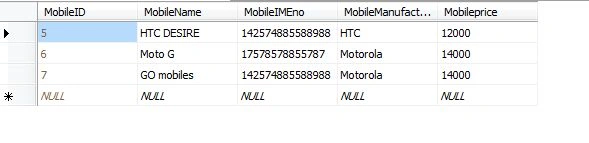
Let's start by creating the Model first.
I am adding the model with the name Mobiledata.
Adding all the fields that are present in the SQL Table and SelectList to get the data in the Collection.
[Table("Mobiledata")]
public class Mobiledata
{
    [Key]
    public int MobileID { get; set; }
    public string MobileName { get; set; }
    public string MobileIMEno { get; set; }
    public string MobileManufactured { get; set; }
    public Nullable<decimal> Mobileprice { get; set; }
    [NotMapped]
    public SelectList MobileList { get; set; }

}
For a Dapper User I am adding another class with the name MobileContext.
public class MobileContext
{
    SqlConnection con = new   SqlConnection(ConfigurationManager.ConnectionStrings["MYConnector"].ToString());
    public IEnumerable<Mobiledata> GetMobileList()
    {
        string query = "SELECT [MobileID],[MobileName]FROM [MobileDB].[dbo].[Mobiledata]";
        var result = con.Query<Mobiledata>(query);
        return result;
    }
}
This class will return an Enumerable list of MobileData.
We are complete with the Model part. I will now show you the Controller part.
I am adding the Controller with the name MobileDisplayController.
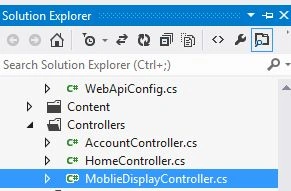
After adding the Controller you will see a similar view.
I have also added a Mobilecontext class; you can view it here.
MobileDisplayController.cs
using System;
using System.Collections.Generic;
using System.Linq;
using System.Web;
using System.Web.Mvc;
using BindingDropdownListandSavingIT.Models;

namespace BindingDropdownListandSavingIT.Controllers
{
    public class MoblieDisplayController : Controller
    {
        MobileContext MCon = new MobileContext();

        public ActionResult Index()
        {
            return View(MD);
        }
    }
}
After adding the Controller now the main purpose is to pass a value to the view from the Controller.
Let's pass values.
MobileContext MCon = new MobileContext();
The following is the MobileContext class for getting the Enumerable List .
Mobiledata MD = new Mobiledata();
Mobiledata is the model that I am passing to the View.
In that Model you can see MobileList that is Enumerable.
MD.MobileList = new SelectList(MCon.GetMobileList(), "MobileID", "MobileName");
Now to that MobileList I am passing SelectList with Enumerable List from MobileContext Class and also value and Text that I want to display.
First way to Binding Dropdownlist.
MobileDisplayController.cs
using System;
using System.Collections.Generic;
using System.Linq;
using System.Web;
using System.Web.Mvc;
using BindingDropdownListandSavingIT.Models;

namespace BindingDropdownListandSavingIT.Controllers
{
    public class MoblieDisplayController : Controller
    {
        MobileContext MCon = new MobileContext();

        public ActionResult Index()
        {
            Mobiledata MD = new Mobiledata();
            MD.MobileList = new SelectList(MCon.GetMobileList(), "MobileID", "MobileName"); // model binding
            return View(MD);
        }
    }
}
After passing the data now to display it in the View.
For that add a View by right-clicking inside ActionResult and select AddView and provide its name as Index.
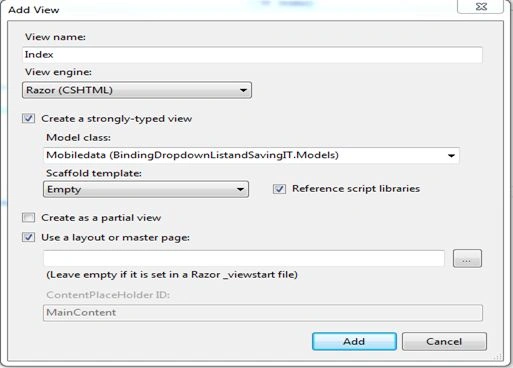
After adding the View add a Namespace to the Model as shown below.
@model BindingDropdownListandSavingIT.Models.Mobiledata
@{
    ViewBag.Title = "ALL DROPDOWNLIST FUN AND LEARN";
}

<h2>ALL DROPDOWNLIST FUN AND LEARN</h2>
The following is a snapshot of the binding of the Dropdownlist:
<tr>
    <td>
        <div>
            @Html.Label("Normal Dropdownlist Binding")
        </div>
    </td>
    <td>
        <div class="editor-label">
            @Html.Label("Select Mobile Name")
        </div>
    </td>
    <td>
        <div class="editor-field">
            @Html.DropDownList("Mobiledropdown1", Model.MobileList, "Select Mobile")
        </div>
    </td>
</tr>
Here we can directly access the MobileList from the Model.
Now just run the application and just check it.
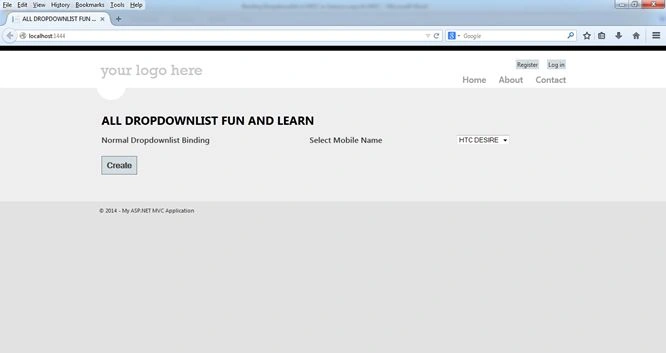
It's done.
Second way to Bind Dropdownlist
Now in the second way we just need to pass the same list to the Viewbag.
As in the first way we have passed a value to the model now in the same way we would pass a list to the Viewbag.
<tr>
    <td>
        <div>
            @Html.Label("Dropdownlist Binding Using ViewBag")
        </div>
    </td>
    <td>
        <div class="editor-label">
            @Html.Label("Select Mobile Name")
        </div>
    </td>
    <td>
        <div class="editor-field">
            @Html.DropDownList("Mobiledropdown2", ViewBag.VBMobileList as SelectList, "Select Mobile")
        </div>
    </td>
</tr>
ViewBag.VBMobileList = new SelectList(MCon.GetMobileList(), "MobileID", "MobileName");
// Viewbag
For your reference you can run and check it.
Third way to Binding Dropdownlist
In the third way everything will be the same but the binding to the DropdownlistFor is different.
Using the same model that was used for the first way to do the binding .
MD.MobileList = new SelectList(MCon.GetMobileList(), "MobileID", "MobileName");
Here is a snapshot to show how to bind.
<tr>
    <td>
        <div>
            @Html.Label("Dropdownlist Binding Using Model (Lamda Expression)")
        </div>
    </td>
    <td>
        <div class="editor-label">
            @Html.Label("Select Mobile Name")
        </div>
    </td>
    <td>
        <div class="editor-field">
            @Html.DropDownListFor(M => M.MobileID, new SelectList(Model.MobileList, "Value", "Text"), "Select Mobile")
        </div>
    </td>
</tr>
For binding the dropdownlist we require a LINQ expression and IEnumreable list.
As you have seen if you are creating a view directly using the scafffloding technique then you can see a LINQ lamda expression.
For example. @Html.TextboxFor(m => m.MobileName)
Fourth way to Binding Dropdownlist
In the last way we can pass hardcoded values to the dropdownlist on the View only.
1. Directly View
<tr>
    <td>
        <div>
            @Html.Label("Dropdownlist Binding on View Directly")
        </div>
    </td>
    <td>
        <div class="editor-label">
            @Html.Label("Select Mobile Name")
        </div>
    </td>
    <td>
        <div class="editor-field">
            @Html.DropDownList("Mobiledropdown3", new List<SelectListItem>
                      {
                      new SelectListItem { Text = "HTC DESIRE", Value = "1"},
                      new SelectListItem { Text = "Moto G", Value = "2"},
                      new SelectListItem { Text = "GO mobiles", Value = "3"}
                      }, "Select Mobile")
        </div>
    </td>
</tr>
2. Binding directly using ViewBag
The same List<SelectListItem> that we pass in the view directly can also be sent from the Controller and bound directly using a ViewBag.
<tr>
    <td>
        <div>
            @Html.Label("Dropdownlist Binding using SelectListitem and Viewbag")
        </div>
    </td>
    <td>
        <div class="editor-label">
            @Html.Label("Select Mobile Name")
        </div>
    </td>
    <td>
        @Html.DropDownList("Dr", ViewData["MyhardcodeVal"] as List<SelectListItem>)
    </td>
</tr>
Now we completed the binding of the Dropdownlist.
Now you may have a question of how to read the Dropdownlist values.
You can read using a FromCollection or Model.
Here you need to create a Post Method .
If you want to read all the values of the dropdownlist or any HTML control then you will get in FormCollection.
Post method from MobileDisplayController:
[HttpPost]
public ActionResult Index(FormCollection objfrm, Mobiledata objMd)
{
    string mobile1 = objfrm["Mobiledropdown1"];
    string mobile2 = objfrm["Mobiledropdown2"];
    string mobile3 = objfrm["Mobiledropdown3"];
    return View(objMd);
}
How to set a selected value of Dropdownlist on EditPage
Here I am showing how to show a selected dropdownlist value on Edit Page because this small thing will take time when you are new to this kind of technology.
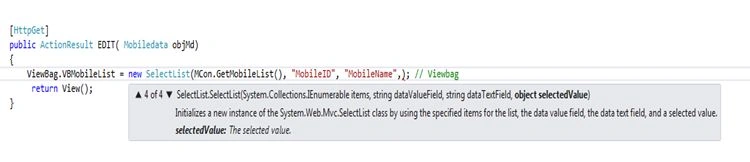
Get the method of the Edit page from MobileDisplayController.

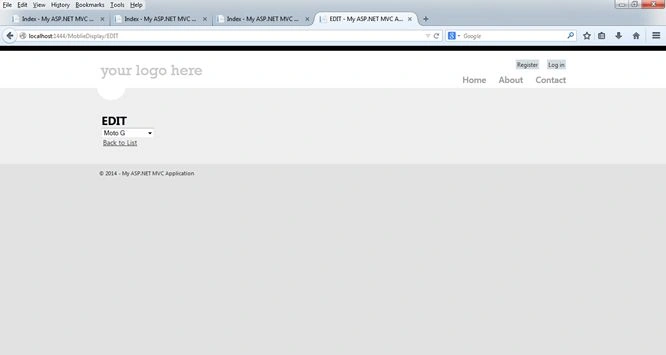
Output after editing.
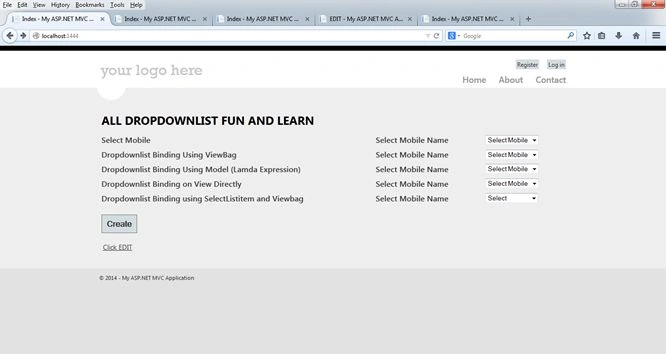
How to add a Select at the top of the selection list.
Just add a String value at the end of the Dropdownlist.
<div class="editor-field">
   @Html.DropDownList("Mobiledropdown1", Model.MobileList, "Select Mobile")
</div>
Enjoy programming and Enjoy Sharing.
It SavPosted Jul 23, 2023, 7:16 PM
Thanks, from Mexico, this complete tutorial
IMAD AYOUBPosted Mar 26, 2021, 11:28 PM
Excellent tutorial. Thanks a lot.
Edward AbreuPosted Jul 16, 2018, 2:36 PM
Estimados, necesito hacer una lista desplegable con las siguientes condiciones, cuando se seleccione de un radio button la opcion cliente natural o juridico, se muestre en la lista desplegable las opciones (V, E) para cliente natural y (J, G, O) para cliente juridico, ya tengo mostrando todas las opciones desde un model pero no logro hacer que solo se muestren las opciones que requiero podrian colaborar con alguna opcion. <div class="form-group"> <div class="col-sm-6"> <label class="radio-inline"><input type="radio" name="tipo" value="personaFisica" checked="checked">Persona Natural</label> <label class="radio-inline"><input type="radio" name="tipo" value="personaJuridica">Persona Juridica</label> </div> </div><div class="form-group"> <div class="campoPersonaJuridica col-sm-6"> @Html.LabelFor(model => model.IdTipoDocumento, htmlAttributes: new { @class = "control-label" }) @Html.DropDownListFor(model => model.IdTipoDocumento, Model.TipoDocumentos, new { @class = "form-control" }) @Html.ValidationMessageFor(model => model.IdTipoDocumento, "", new { @class = "text-danger" }) </div> <div class="campoPersonaJuridica col-sm-6"> @Html.LabelFor(model => model.NumeroDocumento, htmlAttributes: new { @class = "control-label" }) @Html.EditorFor(model => model.NumeroDocumento, new { htmlAttributes = new { @class = "form-control" } }) @Html.ValidationMessageFor(model => model.NumeroDocumento, "", new { @class = "text-danger" }) </div> <div class="campoPersonaNatural col-sm-6"> @Html.LabelFor(model => model.IdTipoDocumento, htmlAttributes: new { @class = "control-label" }) @Html.DropDownListFor(model => model.IdTipoDocumento, Model.TipoDocumentos, new { @class = "form-control" }) @Html.ValidationMessageFor(model => model.IdTipoDocumento, "", new { @class = "text-danger" }) </div> <div class="campoPersonaNatural col-sm-6"> @Html.LabelFor(model => model.NumeroDocumento, htmlAttributes: new { @class = "control-label" }) @Html.EditorFor(model => model.NumeroDocumento, new { htmlAttributes = new { @class = "form-control" } }) @Html.ValidationMessageFor(model => model.NumeroDocumento, "", new { @class = "text-danger" }) </div> </div>@section Scripts{ @Scripts.Render("~/bundles/validation/js") <script type="text/javascript"> $(document).ready(function () { $("#Telefono").mask('(000)(0000) 000-0000'); $("#Telefono2").mask('(000)(0000) 000-0000'); $("#TelefonoContacto1").mask('(000)(0000) 000-0000'); $("#TelefonoContacto2").mask('(000)(0000) 000-0000'); }); $(document).ready(function () { $(".campoPersonaJuridica").hide(); }); $("input:radio[name=tipo]").on("change", function () { if ($(this).val() == "personaFisica") { $(".campoPersonaNatural").show("swing"); $(".campoPersonaJuridica").hide("linear"); } else if ($(this).val() == "personaJuridica") { $(".campoPersonaNatural").hide("linear"); $(".campoPersonaJuridica").show("swing"); } }); </script> }
Patel SoniyaPosted May 3, 2018, 12:50 AM
That's nice article!!!
Bhavesh JadavPosted Jan 25, 2018, 3:54 AM
Well explaination..........
raj12321ify raj12321ifyPosted Jul 8, 2017, 2:32 AM
I need to know how to add data subtext to drop down list values.
Duke JianPosted Jun 28, 2017, 10:37 AM
That's nice article!!!
Tomas VeraPosted Apr 21, 2017, 11:45 AM
Nice write up. Good examples. Well done!
Jaydeep BhattPosted Apr 10, 2017, 8:11 AM
This was great, I used the second method Using @html.DropDownList with [email protected]("Mobiledropdown2", ViewBag.VBMobileList as SelectList) My question is, can we also do the same or RadioButtonList? How?
Jim FarnworthPosted Mar 24, 2017, 3:09 AM
PS: Apologies I am a Newbee
Jim FarnworthPosted Mar 24, 2017, 3:08 AM
What is the Item Type for model with the name Mobiledata?
Osama HassanPosted Mar 22, 2017, 7:28 AM
How to populate textboxes based on item selected from DDL with database data?
Vijaya Chandran UvarajanPosted Mar 8, 2017, 8:34 AM
How Can I Use Hardcode Value List In Dropdownlistfor To Show Value From DB?
La TunPosted Dec 3, 2016, 6:00 PM
Ive got error at initializing new SQLconnection.An exception of type 'System.NullReferenceException' occurred in RestrauntOrderSystem.dll but was not handled in user code
Ravi PatelPosted Sep 26, 2016, 1:44 AM
Nice article
Anu VPosted Sep 1, 2016, 2:49 AM
Nice...
Bhuvanesh MohankumarPosted Jul 26, 2016, 9:34 AM
Worth article
kalu singh raoPosted Jul 25, 2016, 4:09 AM
Nice share
Pawan TiwariPosted Mar 4, 2016, 2:15 AM
Great job (y)
YogeshPosted Jul 8, 2015, 3:04 AM
This is the format @Html.DropDownList("Mobiledropdown1", Model.MobileList, "Select Mobile")
YogeshPosted Jul 8, 2015, 3:03 AM
how to validate a dropdownlist in the given format :
Paritosh KumarPosted Jun 28, 2015, 1:23 AM
after going around the internet in circles, cam here and boom! problem solved! Thanks a ton.
Paritosh KumarPosted Jun 28, 2015, 1:22 AM
great work.
Aniket NarvankarPosted Jun 17, 2015, 1:52 AM
it is showing me an error Query does not exist in current context
Aniket NarvankarPosted Jun 17, 2015, 1:52 AM
what is con.Query actually doing,did not understood
Zeeshan AzimPosted May 12, 2015, 2:46 PM
Very nice demonstartion Saineshwar ! Thank Buddy
Saineshwar BageriPosted Apr 28, 2015, 2:59 AM
download my demo and check its web.config file whiz
Whiz kidPosted Apr 28, 2015, 2:39 AM
I think its my connectionstring. Could you show what it should be, sorry I just started using MVC
Whiz kidPosted Apr 27, 2015, 8:40 PM
i followed everything exactly from step one until the first way to bind data
Whiz kidPosted Apr 27, 2015, 8:37 PM
Hi, sorry to disturb but my SqlConnection con keeps returning null and I cant figure out why
Saineshwar BageriPosted Feb 19, 2015, 5:51 AM
MAYANK MANI PANDEY this has been done using Dapper ORM you just need at your little logic for entity framework
MAYANK MANI PANDEYPosted Feb 19, 2015, 2:04 AM
what is "Query" property of SqlConnection object [con.Query] in the first method where you have created MobileContext Class in Model Folder ???
Rajesh BPosted Jan 27, 2015, 8:09 AM
Hi Saineshwar...Thanks for very good post which showcase step by step explanation to bind dropdown. Downloaded the source and debuged when on click of create button objMd.MobileList is showing as null, is there any way to get the ModileList back to the controller on click of create button. Kindly help.....
Saineshwar BageriPosted Jan 18, 2015, 5:25 AM
hey Lalit Raghuvanshi sir thanks for commeting
Lalit RaghuvanshiPosted Jan 18, 2015, 3:36 AM
After searching lots of blogs and website , i found the the clear step by step and easiest solution to bind dropdownlist from sql database on :Dynamically bind Asp.Net MVC Dropdownlist from Sql Server Database using entity framework http://www.webcodeexpert.com/2015/01/how-to-dynamically-bind-aspnet-mvc.html
mathan kumarPosted Dec 16, 2014, 5:14 AM
ya nyc but i need a help...how to use ajax script in dropdowlistbox for...if i have a two dropdownlist box bt i select the value one dropdownlist box value tat value depends on another dropdownlist box to show the another database i was used the inner join and also i used in ajax created but i cannot get values..will show only error..
Navis XPSPosted Aug 23, 2014, 5:51 AM
very nice
Rakesh ShahPosted Aug 20, 2014, 8:47 AM
nice article
Sasi ReddyPosted Aug 19, 2014, 9:53 AM
Thank you for this article
Saineshwar BageriPosted Aug 17, 2014, 11:55 PM
THANKS PRADEEP
Pradeep ShetPosted Aug 17, 2014, 1:48 PM
good 1