


The images are from:
If you want to develop this for ASP.NET Web forms then you can refer to the link Encrypt in JavaScript and Decrypt in C# With AES Algorithm.
What AES algorithm is
Advanced Encryption Standard (AES) is a symmetric encryption algorithm.
The algorithm was developed by two Belgian cryptographers, Joan Daemen and Vincent Rijmen.
AES was designed to be efficient in both hardware and software and supports a block length of 128 bits and key lengths of 128, 192 and 256 bits.
Best of all, AES Crypt is completely free open source software.
Since it is open source, several people have contributed to the software and have reviewed the software source code to ensure that it works properly to secure information.
The definition is taken from: http://aesencryption.net/.
Where to use ASE
In today's world we are usually using web based applications where we are prone to various attacks. To prevent attacks from being successful we can use this technique where the data is encrypted at the client side and when the user posts information to the server the data is decrypted at the server side. In MVC 4 we have Html.AntiForgeryToken() for prevention against Cross Site Request Forgery CSRF (XSRF) attacks.
But if we want to encrypt data at the client side then there is nothing available readily for that so for that I am writing this article.
Procedure
- Create the solution.
- Create the Model.
- Add the Controller.
- Add a View.
- Add an AES JavaScript file.
- Add hidden field controls on the forms.
- Write the JavaScript for the encryption of field values.
- Add AESEncrytDecry code for decrypting.
- Finally decrypt on a button click event and get the plain text value from it.
Let's start.
Step 1
Create a new project in ASP.NET MVC 4 with the name MvcEncrypandDecryp. See that in the following snapshot.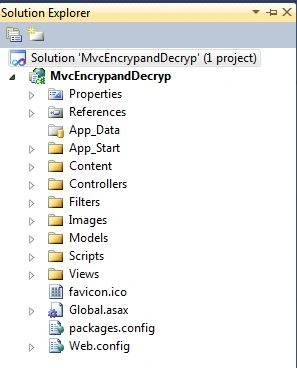
Step 2
After creating a solution I will now add a Model with 4 fields to show the demo.
- Username
- Password
- HDUser
- HDpass
For adding the Model just right-click on the Model folder and from the list select Add Class and name it [Userlogin.cs]. See that in the following snapshot.
See that in the following snapshot.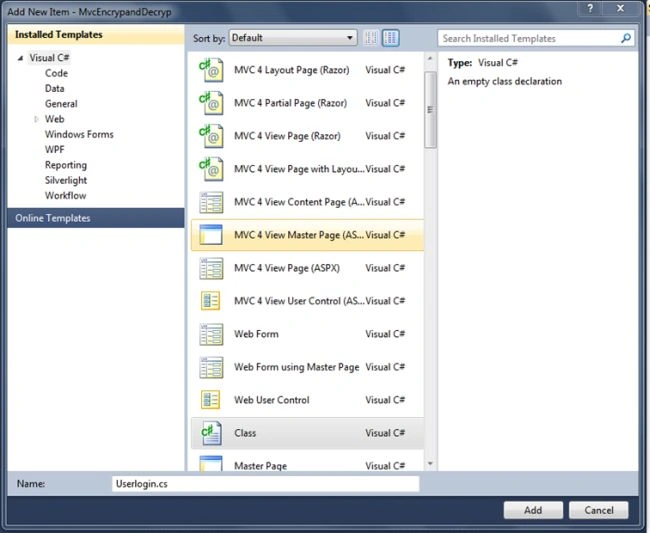
After adding the Model you can see a similar view of your project. See that in the following snapshot.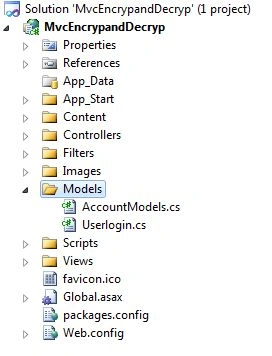
After adding the Model now let's add Properties to it.
- Username
- Password
- HDUser
- HDpass
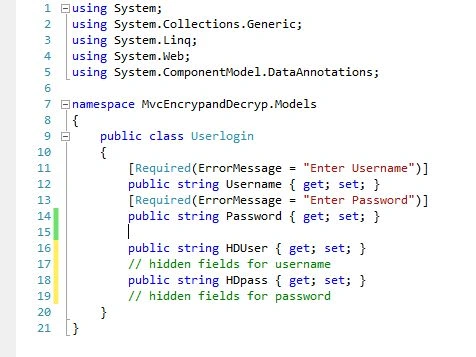
After adding the Model let's add the Controller. Before adding it just build the application.
Step 3
For adding the Controller just right-click on the Controller folder and select Add -> Controller.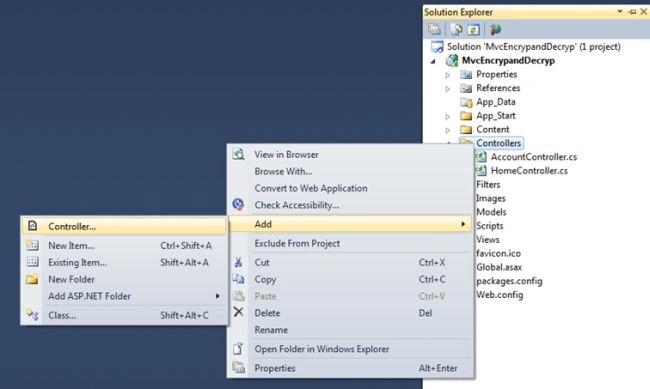
After clicking on Controller from the menus list a new dialog pop will pop up as in the following snapshot.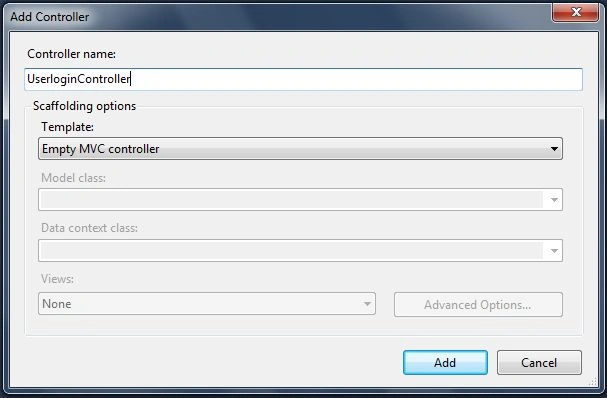
Just add the name of the Controller and click on the Add button. I am naming it UserloginController.
After adding the Controller you will see UserloginController in the Controller folder. See that in the following snapshot.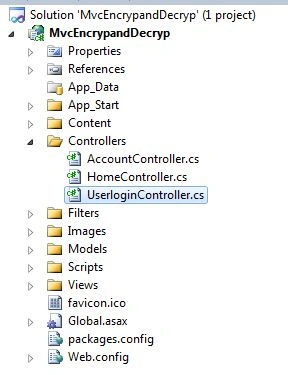
See UserloginController.cs in the following snapshot of after adding the Controller.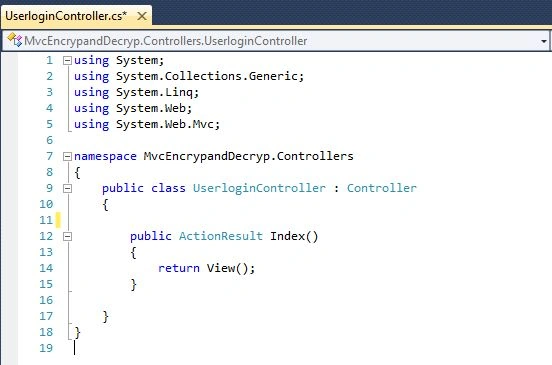
Now let's modify ActionResult of UserloginController as in the following snapshot.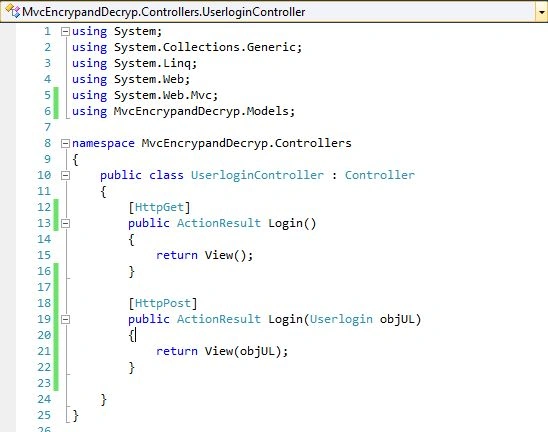
After changing the UserloginController ActionResult, create 2 methods, one for GET and another for POST, as you can see in the preceding snapshot.
Step 4
Now let's add the View.
To add the View just right-click inside the Action result. See that in the following snapshot.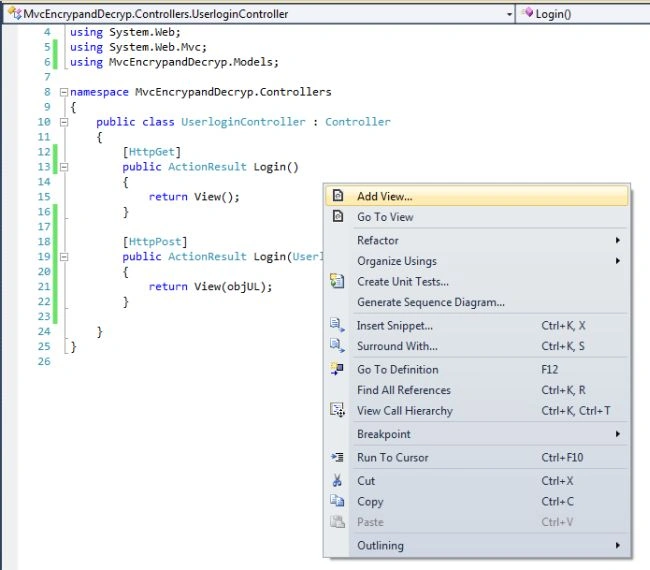
A new dialog will open asking for the View Name. See that in the following snapshot.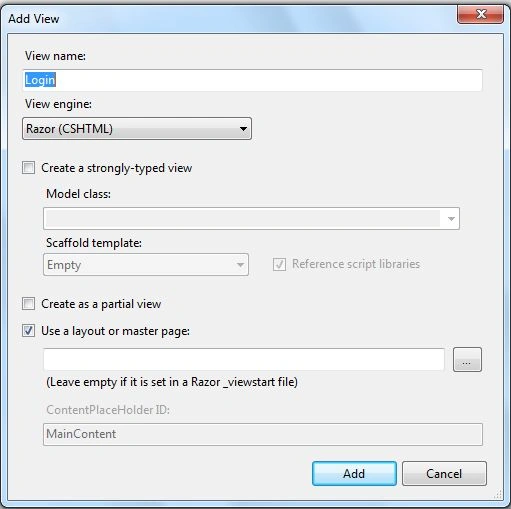
I will not change the name of the view.
From the View Engine I will select Razor View Engine. And there is a checkbox asking whether to Create a Strongly-typed view; mark it as checked.
In the Model class select the Model Name “ UserLogin ”.
Then in the Scaffold template select the “ Create ” option from the preceding dropdown list.
Now finally click on the Add Button. See that in the following snapshot.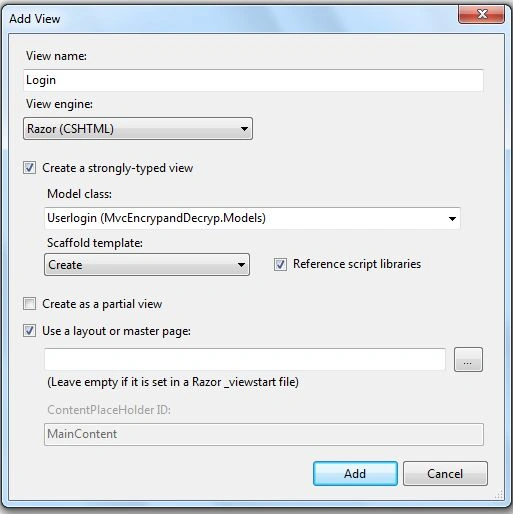
After clicking the Add button this kind of View with Code will be generated. See that in the following snapshot.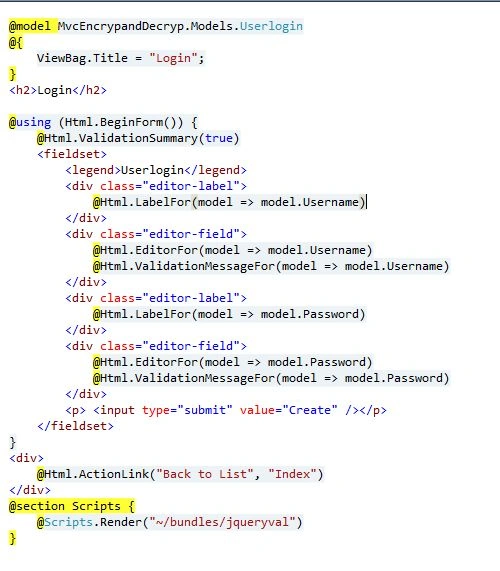
Step 5
After adding the view now let's add the AES JavaScript file to the script folder. If you want download this file then you can download it from link. For adding it just copy and paste the aes.js file into the scripts folder. See that in the following snapshot.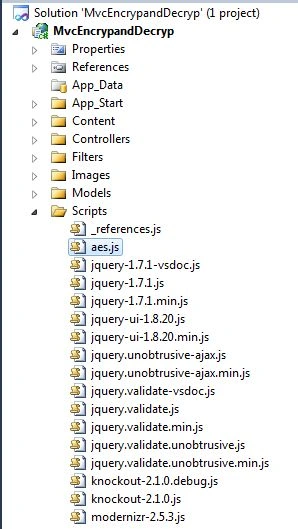
After adding aes.js to the script folder just reference it on the login page where we are going to encrypt the data.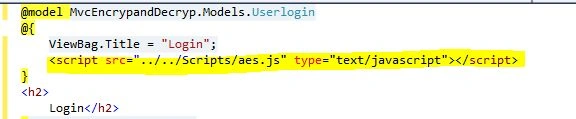
Step 6
Now I am adding 2 hidden fields to the form for storing the encrypted data. See that in the following snapshot.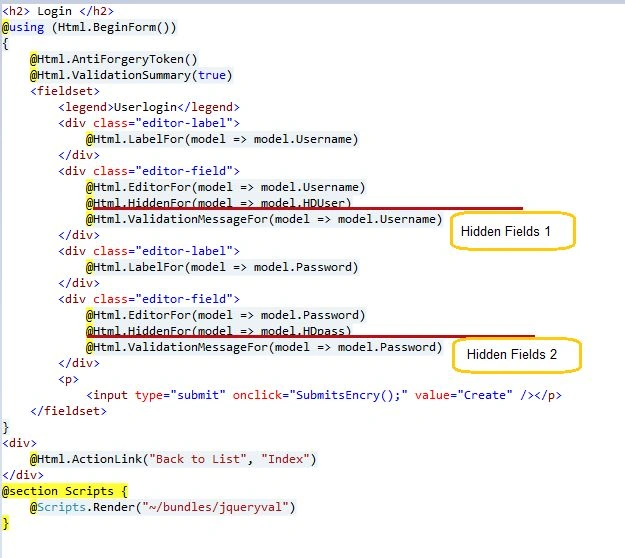
Step 7
After adding it I am adding fields to the forms and now I am writing JavaScript code for encrypting the data on a button submit. See that in the following snapshot.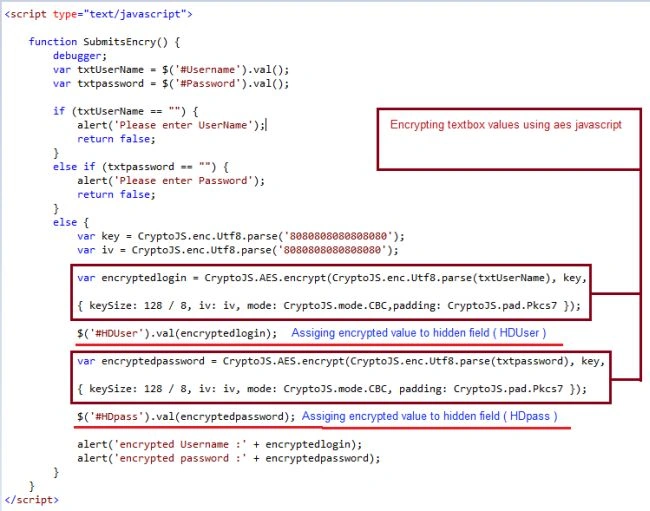
Now for details of the JavaScript function.
Here in this code I am getting a value from a TextBox (whatever the user enters) in the username and password fields.
- var txtUserName = $('#Username').val();
- var txtpassword = $('#Password').val();
- var key = CryptoJS.enc.Utf8.parse('8080808080808080');
- var iv = CryptoJS.enc.Utf8.parse('8080808080808080');
- var encryptedlogin = CryptoJS.AES.encrypt(CryptoJS.enc.Utf8.parse(txtUserName), key,
- {
- keySize: 128 / 8,
- iv: iv,
- mode: CryptoJS.mode.CBC,
- padding: CryptoJS.pad.Pkcs7
- });
- $('#HDUser').val(encryptedlogin);
- var encryptedpassword = CryptoJS.AES.encrypt(CryptoJS.enc.Utf8.parse(txtpassword), key,
- {
- keySize: 128 / 8,
- iv: iv,
- mode: CryptoJS.mode.CBC,
- padding: CryptoJS.pad.Pkcs7
- });
- $('#HDpass').val(encryptedpassword);
- alert('encrypted login :' + encryptedlogin);
- alert('encrypted password :' + encryptedpassword);
Step 8
For that we need to add a class to be the decrypted fields that we have encrypted.
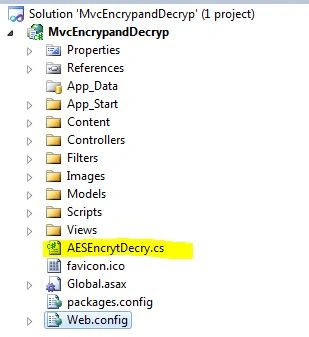
For that I have created a class with the name AESEncrytDecry.cs.
It has the following 2 methods:
- DecryptStringFromBytes
- EncryptStringToBytes
And DecryptStringAES is custom-created for decrypting values.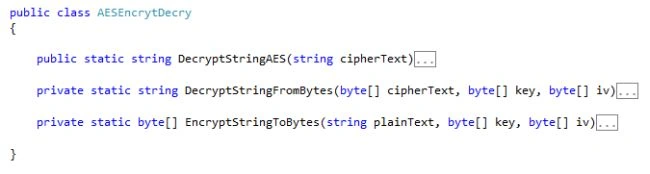
DecryptStringFromBytes Method
- private static string DecryptStringFromBytes(byte[] cipherText, byte[] key, byte[] iv)
- {
- // Check arguments.
- if (cipherText == null || cipherText.Length <= 0)
- {
- throw new ArgumentNullException("cipherText");
- }
- if (key == null || key.Length <= 0)
- {
- throw new ArgumentNullException("key");
- }
- if (iv == null || iv.Length <= 0)
- {
- throw new ArgumentNullException("key");
- }
- // Declare the string used to hold
- // the decrypted text.
- string plaintext = null;
- // Create an RijndaelManaged object
- // with the specified key and IV.
- using (var rijAlg = new RijndaelManaged())
- {
- //Settings
- rijAlg.Mode = CipherMode.CBC;
- rijAlg.Padding = PaddingMode.PKCS7;
- rijAlg.FeedbackSize = 128;
- rijAlg.Key = key;
- rijAlg.IV = iv;
- // Create a decrytor to perform the stream transform.
- var decryptor = rijAlg.CreateDecryptor(rijAlg.Key, rijAlg.IV);
- try
- {
- // Create the streams used for decryption.
- using (var msDecrypt = new MemoryStream(cipherText))
- {
- ing (var csDecrypt = new CryptoStream(msDecrypt, decryptor, CryptoStreamMode.Read))
- {
- using (var srDecrypt = new StreamReader(csDecrypt))
- {
- // Read the decrypted bytes from the decrypting stream
- // and place them in a string.
- plaintext = srDecrypt.ReadToEnd();
- }
- }
- }
- }
- catch
- {
- plaintext = "keyError";
- }
- }
- return plaintext;
- }
- private static byte[] EncryptStringToBytes(string plainText, byte[] key, byte[] iv)
- {
- // Check arguments.
- if (plainText == null || plainText.Length <= 0)
- {
- throw new ArgumentNullException("plainText");
- }
- if (key == null || key.Length <= 0)
- {
- throw new ArgumentNullException("key");
- }
- if (iv == null || iv.Length <= 0)
- {
- throw new ArgumentNullException("key");
- }
- byte[] encrypted;
- // Create a RijndaelManaged object
- // with the specified key and IV.
- using (var rijAlg = new RijndaelManaged())
- {
- rijAlg.Mode = CipherMode.CBC;
- rijAlg.Padding = PaddingMode.PKCS7;
- rijAlg.FeedbackSize = 128;
- rijAlg.Key = key;
- rijAlg.IV = iv;
- // Create a decrytor to perform the stream transform.
- var encryptor = rijAlg.CreateEncryptor(rijAlg.Key, rijAlg.IV);
- // Create the streams used for encryption.
- using (var msEncrypt = new MemoryStream())
- {
- using (var csEncrypt = new CryptoStream(msEncrypt, encryptor, CryptoStreamMode.Write))
- {
- using (var swEncrypt = new StreamWriter(csEncrypt))
- {
- //Write all data to the stream.
- swEncrypt.Write(plainText);
- }
- encrypted = msEncrypt.ToArray();
- }
- }
- }
- // Return the encrypted bytes from the memory stream.
- return encrypted;
- }
- public static string DecryptStringAES(string cipherText)
- {
- var keybytes = Encoding.UTF8.GetBytes("8080808080808080");
- var iv = Encoding.UTF8.GetBytes("8080808080808080");
- var encrypted = Convert.FromBase64String(cipherText);
- var decriptedFromJavascript = DecryptStringFromBytes(encrypted, keybytes, iv);
- return string.Format(decriptedFromJavascript);
- }
Now on the button's onclick="return SubmitsEncry();" submit I will call the first JavaScript to Encrypt the data.
And then on the Post of this button I will decrypt the data sent from the client side.
- <input type="submit" onclick="SubmitsEncry();" value="Create" />
Passing the value to this method below.
- public static string DecryptStringAES(string cipherText)
- {
- var keybytes = Encoding.UTF8.GetBytes("8080808080808080");
- var iv = Encoding.UTF8.GetBytes("8080808080808080");
- var encrypted = Convert.FromBase64String(cipherText);
- var decriptedFromJavascript = DecryptStringFromBytes(encrypted, keybytes, iv);
- return string.Format(decriptedFromJavascript);
- }
Then it will only decrypt the values else give an error.
Step 9
Server-side code for Decryption
- using System;
- using System.Collections.Generic;
- using System.Linq;
- using System.Web;
- using System.Web.Mvc;
- using MvcEncrypandDecryp.Models;
- using ClientsideEncryption;
- namespace MvcEncrypandDecryp.Controllers
- {
- public class UserloginController : Controller
- {
- [HttpGet]
- public ActionResult Login()
- {
- return View();
- }
- [HttpPost]
- [ValidateAntiForgeryToken]
- public ActionResult Login(Userlogin objUL )
- {
- if (ModelState.IsValid)
- {
- var username = AESEncrytDecry.DecryptStringAES(objUL.HDUser);
- var password = AESEncrytDecry.DecryptStringAES(objUL.HDpass);
- if (username == "keyError" && password == "keyError")
- {
- TempData["notice"] = "Invalid Login";
- }
- else
- {
- TempData["notice"] = "login successfully";
- }
- return View(objUL);
- }
- else
- {
- ModelState.AddModelError(string.Empty, "Invalid Login");
- return View(objUL);
- }
- }
- }
- }
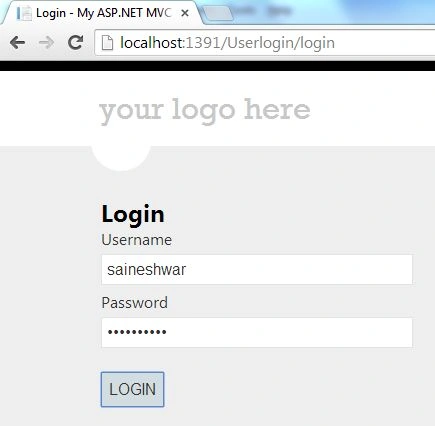
The login page view.
See that in the following snapshot.
Username Encrypted value.
See that in the following snapshot.
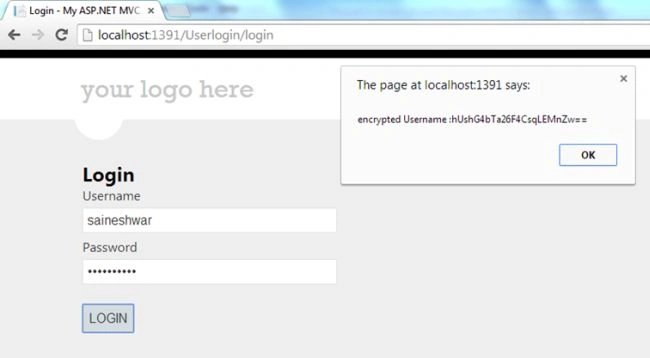
Password Encrypted value.
See that in the following snapshot.
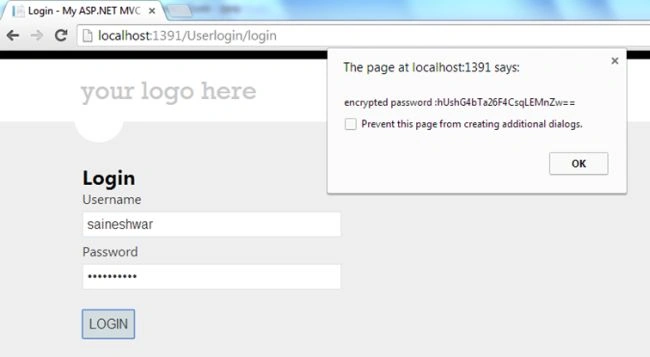
The value of the client side is posted to the server side as shown here in the following snapshot.
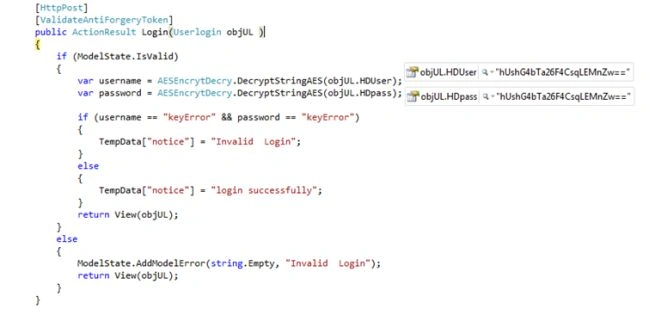
After decryption the value is shown in the following snapshot.
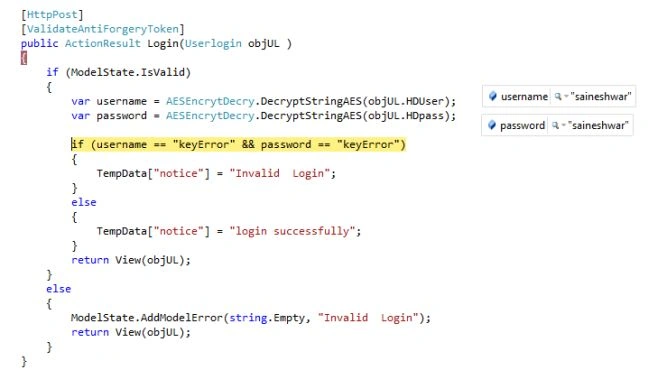
To protect sensitive data, the best practice is to use HTTPS instead of HTTP.
The HTTPS protocol will automatically encrypt sensitive information that is posted from the client to the server, so nobody can use network sniffers to intercept and read the information.
Finally we have completed the encryption in JavaScript and decryption in C# with the AES algorithm in ASP.Net in MVC 4.
Pandurang RanePosted Dec 9, 2022, 12:07 PM
How can we encrypt string in C#
Jinesh PrajapatiPosted Sep 15, 2022, 7:17 AM
This project gives error while running
UdayPosted Mar 17, 2022, 12:36 PM
Hi, thanks for the wonderful article! In "DecryptStringAES" method, do we need last line "string.Format(decriptedFromJavascript);" ? It is throwing "Input string was not in a correct format" error when plainText value contains "{" or "}".
Santhosh NPosted Mar 16, 2022, 2:32 PM
Hello, Thank you so much for the blog. I really appreciate the effort.
Nilesh MondePosted Nov 26, 2021, 8:26 AM
;(function (root, factory, undef) { if (typeof exports === "object") { // CommonJS module.exports = exports = factory(require("./core"), require("./enc-base64"), require("./md5"), require("./evpkdf"), require("./cipher-core")); } else if (typeof define === "function" && define.amd) { // AMD define(["./core", "./enc-base64", "./md5", "./evpkdf", "./cipher-core"], factory); } else { // Global (browser) factory(root.CryptoJS); } }(this, function (CryptoJS) { (function () { // Shortcuts var C = CryptoJS; var C_lib = C.lib; var BlockCipher = C_lib.BlockCipher; var C_algo = C.algo; // Lookup tables var SBOX = []; var INV_SBOX = []; var SUB_MIX_0 = []; var SUB_MIX_1 = []; var SUB_MIX_2 = []; var SUB_MIX_3 = []; var INV_SUB_MIX_0 = []; var INV_SUB_MIX_1 = []; var INV_SUB_MIX_2 = []; var INV_SUB_MIX_3 = []; // Compute lookup tables (function () { // Compute double table var d = []; for (var i = 0; i < 256; i++) { if (i < 128) { d[i] = i << 1; } else { d[i] = (i << 1) ^ 0x11b; } } // Walk GF(2^8) var x = 0; var xi = 0; for (var i = 0; i < 256; i++) { // Compute sbox var sx = xi ^ (xi << 1) ^ (xi << 2) ^ (xi << 3) ^ (xi << 4); sx = (sx >>> 8) ^ (sx & 0xff) ^ 0x63; SBOX[x] = sx; INV_SBOX[sx] = x; // Compute multiplication var x2 = d[x]; var x4 = d[x2]; var x8 = d[x4]; // Compute sub bytes, mix columns tables var t = (d[sx] * 0x101) ^ (sx * 0x1010100); SUB_MIX_0[x] = (t << 24) | (t >>> 8); SUB_MIX_1[x] = (t << 16) | (t >>> 16); SUB_MIX_2[x] = (t << 8) | (t >>> 24); SUB_MIX_3[x] = t; // Compute inv sub bytes, inv mix columns tables var t = (x8 * 0x1010101) ^ (x4 * 0x10001) ^ (x2 * 0x101) ^ (x * 0x1010100); INV_SUB_MIX_0[sx] = (t << 24) | (t >>> 8); INV_SUB_MIX_1[sx] = (t << 16) | (t >>> 16); INV_SUB_MIX_2[sx] = (t << 8) | (t >>> 24); INV_SUB_MIX_3[sx] = t; // Compute next counter if (!x) { x = xi = 1; } else { x = x2 ^ d[d[d[x8 ^ x2]]]; xi ^= d[d[xi]]; } } }()); // Precomputed Rcon lookup var RCON = [0x00, 0x01, 0x02, 0x04, 0x08, 0x10, 0x20, 0x40, 0x80, 0x1b, 0x36]; /** * AES block cipher algorithm. */ var AES = C_algo.AES = BlockCipher.extend({ _doReset: function () { var t; // Skip reset of nRounds has been set before and key did not change if (this._nRounds && this._keyPriorReset === this._key) { return; } // Shortcuts var key = this._keyPriorReset = this._key; var keyWords = key.words; var keySize = key.sigBytes / 4; // Compute number of rounds var nRounds = this._nRounds = keySize + 6; // Compute number of key schedule rows var ksRows = (nRounds + 1) * 4; // Compute key schedule var keySchedule = this._keySchedule = []; for (var ksRow = 0; ksRow < ksRows; ksRow++) { if (ksRow < keySize) { keySchedule[ksRow] = keyWords[ksRow]; } else { t = keySchedule[ksRow - 1]; if (!(ksRow % keySize)) { // Rot word t = (t << 8) | (t >>> 24); // Sub word t = (SBOX[t >>> 24] << 24) | (SBOX[(t >>> 16) & 0xff] << 16) | (SBOX[(t >>> 8) & 0xff] << 8) | SBOX[t & 0xff]; // Mix Rcon t ^= RCON[(ksRow / keySize) | 0] << 24; } else if (keySize > 6 && ksRow % keySize == 4) { // Sub word t = (SBOX[t >>> 24] << 24) | (SBOX[(t >>> 16) & 0xff] << 16) | (SBOX[(t >>> 8) & 0xff] << 8) | SBOX[t & 0xff]; } keySchedule[ksRow] = keySchedule[ksRow - keySize] ^ t; } } // Compute inv key schedule var invKeySchedule = this._invKeySchedule = []; for (var invKsRow = 0; invKsRow < ksRows; invKsRow++) { var ksRow = ksRows - invKsRow; if (invKsRow % 4) { var t = keySchedule[ksRow]; } else { var t = keySchedule[ksRow - 4]; } if (invKsRow < 4 || ksRow <= 4) { invKeySchedule[invKsRow] = t; } else { invKeySchedule[invKsRow] = INV_SUB_MIX_0[SBOX[t >>> 24]] ^ INV_SUB_MIX_1[SBOX[(t >>> 16) & 0xff]] ^ INV_SUB_MIX_2[SBOX[(t >>> 8) & 0xff]] ^ INV_SUB_MIX_3[SBOX[t & 0xff]]; } } }, encryptBlock: function (M, offset) { this._doCryptBlock(M, offset, this._keySchedule, SUB_MIX_0, SUB_MIX_1, SUB_MIX_2, SUB_MIX_3, SBOX); }, decryptBlock: function (M, offset) { // Swap 2nd and 4th rows var t = M[offset + 1]; M[offset + 1] = M[offset + 3]; M[offset + 3] = t; this._doCryptBlock(M, offset, this._invKeySchedule, INV_SUB_MIX_0, INV_SUB_MIX_1, INV_SUB_MIX_2, INV_SUB_MIX_3, INV_SBOX); // Inv swap 2nd and 4th rows var t = M[offset + 1]; M[offset + 1] = M[offset + 3]; M[offset + 3] = t; }, _doCryptBlock: function (M, offset, keySchedule, SUB_MIX_0, SUB_MIX_1, SUB_MIX_2, SUB_MIX_3, SBOX) { // Shortcut var nRounds = this._nRounds; // Get input, add round key var s0 = M[offset] ^ keySchedule[0]; var s1 = M[offset + 1] ^ keySchedule[1]; var s2 = M[offset + 2] ^ keySchedule[2]; var s3 = M[offset + 3] ^ keySchedule[3]; // Key schedule row counter var ksRow = 4; // Rounds for (var round = 1; round < nRounds; round++) { // Shift rows, sub bytes, mix columns, add round key var t0 = SUB_MIX_0[s0 >>> 24] ^ SUB_MIX_1[(s1 >>> 16) & 0xff] ^ SUB_MIX_2[(s2 >>> 8) & 0xff] ^ SUB_MIX_3[s3 & 0xff] ^ keySchedule[ksRow++]; var t1 = SUB_MIX_0[s1 >>> 24] ^ SUB_MIX_1[(s2 >>> 16) & 0xff] ^ SUB_MIX_2[(s3 >>> 8) & 0xff] ^ SUB_MIX_3[s0 & 0xff] ^ keySchedule[ksRow++]; var t2 = SUB_MIX_0[s2 >>> 24] ^ SUB_MIX_1[(s3 >>> 16) & 0xff] ^ SUB_MIX_2[(s0 >>> 8) & 0xff] ^ SUB_MIX_3[s1 & 0xff] ^ keySchedule[ksRow++]; var t3 = SUB_MIX_0[s3 >>> 24] ^ SUB_MIX_1[(s0 >>> 16) & 0xff] ^ SUB_MIX_2[(s1 >>> 8) & 0xff] ^ SUB_MIX_3[s2 & 0xff] ^ keySchedule[ksRow++]; // Update state s0 = t0; s1 = t1; s2 = t2; s3 = t3; } // Shift rows, sub bytes, add round key var t0 = ((SBOX[s0 >>> 24] << 24) | (SBOX[(s1 >>> 16) & 0xff] << 16) | (SBOX[(s2 >>> 8) & 0xff] << 8) | SBOX[s3 & 0xff]) ^ keySchedule[ksRow++]; var t1 = ((SBOX[s1 >>> 24] << 24) | (SBOX[(s2 >>> 16) & 0xff] << 16) | (SBOX[(s3 >>> 8) & 0xff] << 8) | SBOX[s0 & 0xff]) ^ keySchedule[ksRow++]; var t2 = ((SBOX[s2 >>> 24] << 24) | (SBOX[(s3 >>> 16) & 0xff] << 16) | (SBOX[(s0 >>> 8) & 0xff] << 8) | SBOX[s1 & 0xff]) ^ keySchedule[ksRow++]; var t3 = ((SBOX[s3 >>> 24] << 24) | (SBOX[(s0 >>> 16) & 0xff] << 16) | (SBOX[(s1 >>> 8) & 0xff] << 8) | SBOX[s2 & 0xff]) ^ keySchedule[ksRow++]; // Set output M[offset] = t0; M[offset + 1] = t1; M[offset + 2] = t2; M[offset + 3] = t3; }, keySize: 256/32 }); /** * Shortcut functions to the cipher's object interface. * * @example * * var ciphertext = CryptoJS.AES.encrypt(message, key, cfg); * var plaintext = CryptoJS.AES.decrypt(ciphertext, key, cfg); */ C.AES = BlockCipher._createHelper(AES); }()); return CryptoJS.AES; })); -- i am getting error at c.lib cannot read properties of undefined
abu arqamPosted Oct 13, 2021, 1:00 PM
Is there a way, we can generate dynamic key?
ArunPrasad RamasamyPosted Dec 25, 2020, 11:27 AM
Its working fine only after i added the crypto-js.js, if we are not added means error throw like 'cryptojs is not defined'. Thanks,
mahima maheshwariPosted Jul 6, 2020, 11:20 PM
Is there any way to hide the key? I can read the key from javascript and decrypt the password.
Deborah OpeyemiPosted Jun 5, 2020, 6:39 AM
Hello sir, the link to download the AES javascript is broken, how do I get it. thank
venkat tejaPosted May 22, 2020, 2:55 AM
Hi I'm getting undefined in plaintext.
Lucky LaxmanPosted Mar 3, 2020, 5:06 AM
Perfect solution for UI Encrypt and class level Decrypt.
santhi vanambhathinaPosted Jul 24, 2019, 1:48 AM
Hi Sir, while decrypting in api i am getting this error 'msDecrypt.ReadTimeout' threw an exception of type 'System.InvalidOperationException'
Niranjan SwainPosted Dec 7, 2018, 12:32 AM
Hi Sir, I have implement your code.when i use method name "DecryptStringAES" in c# each time getting "true" value but i am not getting proper value.Please help me.
Puneet KankarPosted Sep 10, 2018, 4:53 AM
Hi sir , In DecryptStringFromBytes method line number 41 using strat not proper.
SUNANDA RANAPosted Mar 14, 2018, 10:08 AM
Hi sir ....nice one..! I have implemented the above code and it successfully implemented also, but I want this encryption and decryption in .netcore environment can you please suggest me some idea or steps so that it can be easier for me
Tridip BhattacharjeePosted Feb 28, 2018, 3:34 AM
What is the below code....need some explanation to understand below two line's objective. what is this line for keySize: 128 / 8, var key = CryptoJS.enc.Utf8.parse('8080808080808080'); var iv = CryptoJS.enc.Utf8.parse('8080808080808080');
Tridip BhattacharjeePosted Feb 28, 2018, 3:33 AM
Sir please tell me why you choose AES algorithm...so many algo exist for encryption why AES ? any special reason.
Dan TruongPosted Dec 4, 2017, 4:23 AM
Is there any way to hide the key? I can read the key from javascript and decrypt the password
Haribabu ChimataPosted Nov 14, 2017, 5:07 AM
I am getting issue like: Invalid length for a Base-64 char array or string .. Please any one help on this
JyotiPosted Oct 7, 2017, 1:12 AM
I followed this article in my web application to encrypt the text using vs 2010 but same function when i am using in web api for decrypt the text which is encrypted in web application it gives me error 'msDecrypt.ReadTimeout error CS0103: The name 'msDecrypt' does not exist in the current context'. Thank you in advance
Ignacio ElfiPosted Jun 14, 2017, 10:55 AM
Perfect Article! Thank you Saineshwar!
chetna balaniPosted May 9, 2017, 5:53 AM
How can i decrypt the value(encrypted in js) in JS
Abraham ChavesPosted Nov 3, 2016, 1:28 PM
Hi, It's possible to get "keyError" as a result?
Deepak TiwariPosted Jan 13, 2016, 4:11 AM
When we are changing the value form "8080808080808080" to something else like "8684888184878784" in each side (client and server) it is throwing error. It seems it is fixed to this only.
Sai SherlekarPosted Oct 9, 2015, 6:54 AM
nice article, but i can read key from javascript and descrypt code
Yashwanth MuthineniPosted Aug 27, 2015, 3:17 AM
Nice Share
deepak mohantyPosted Aug 13, 2015, 9:02 AM
Hi,
S.Ravi KumarPosted Jun 2, 2015, 4:23 AM
Nice Article
Rahul Kumar SaxenaPosted Feb 28, 2015, 4:21 AM
Good Show...