

Introduction
Flyout represents a control that displays lightweight UI that is either information or requires user interaction. Unlike a dialog, a Flyout can be lightly dismissed by clicking or tapping outside of it, pressing the device’s back button, or pressing the ‘Esc’ key. While a MenuFlyout represents a Flyout that displays a menu of commands.
Step 1
Open a blank app and copy the following XAML code into your grid which will add a Button with MenuFlyout to your plane.
- <TextBlock Text="Flyout Menu" FontSize="25"></TextBlock>
- <StackPanel>
- <StackPanel Margin="10,80,0,0" Orientation="Horizontal">
- <TextBlock Text="Flyout Menu" VerticalAlignment="Center" ></TextBlock>
- <Button Name="flyoutMenuButton" Content="FlyoutMenu" Margin="10,0,0,0">
- <Button.Flyout>
- <MenuFlyout Placement="Bottom">
- <MenuFlyoutItem Text="Item 1" Click="MenuFlyoutItem_Click"/>
- <MenuFlyoutItem Text="Item 2" Click="MenuFlyoutItem_Click"/>
- <MenuFlyoutItem Text="Item 3" Click="MenuFlyoutItem_Click"/>
- <MenuFlyoutSubItem Text="Item 4">
- <MenuFlyoutItem Text="Item 5" Click="MenuFlyoutItem_Click"/>
- </MenuFlyoutSubItem>
- <MenuFlyoutSubItem Text="Item 6">
- <MenuFlyoutItem Text="Item 7" Click="MenuFlyoutItem_Click"/>
- <MenuFlyoutItem Text="Item 8" Click="MenuFlyoutItem_Click"/>
- </MenuFlyoutSubItem>
- <MenuFlyoutItem Text="Item 9" Click="MenuFlyoutItem_Click"/>
- </MenuFlyout>
- </Button.Flyout>
- </Button>
- </StackPanel>
- <TextBlock Name="selectedItem" Foreground="Green" Margin="10,10,0,0"></TextBlock>
- </StackPanel>
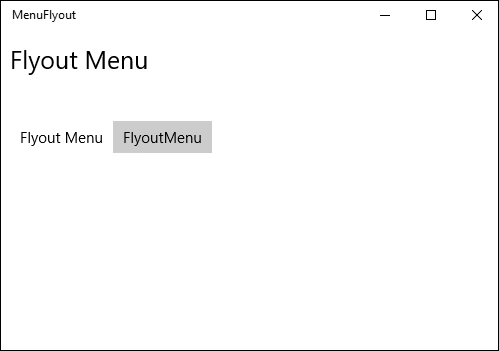
Step 2
Copy and paste the following code to the MenuFlyoutItem_Click event on the cs page.
- MenuFlyoutItem selectedItemFlyout = sender as MenuFlyoutItem;
- selectedItem.Text = "Selected item is " + selectedItemFlyout.Text.ToString();
Step 3
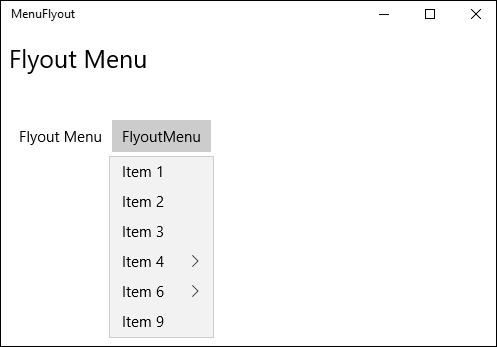
Run your application and clicking on any the corresponding item content will be shown in our assigned Textblock.

Summary
In this article, we learned about MenuFlyout Control For Windows 10.
Kuppurasu NagarajPosted Feb 11, 2016, 12:38 PM
Nice Ramees..
Nilesh JadavPosted Oct 31, 2015, 11:25 AM
Great Good work
Mukesh KumarPosted Oct 31, 2015, 11:18 AM
Good One