

Here are the steps:
Step 1: Create the basic structure of your project, View, multiple partial views View Model,
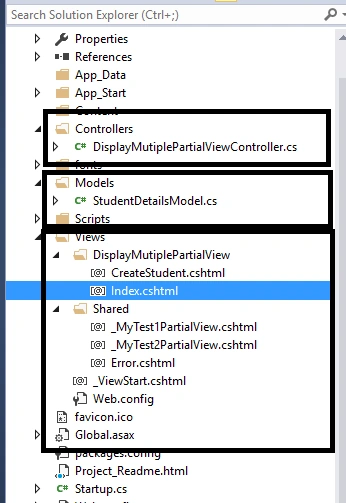
Step 2: Create your base Controller as in the following,
- public class BaseController: Controller
- {
- protected internal virtual CustomJsonResult CustomJson(object json = null, bool allowGet = true)
- {
- return new CustomJsonResult(json)
- {
- JsonRequestBehavior = allowGet ? JsonRequestBehavior.AllowGet : JsonRequestBehavior.DenyGet
- };
- }
- }
Step 3: Add Class Controller helper which helps you to convert partial view into the string format as in the following,
- public static class ControllerHelper
- {
- public static string RenderPartialViewToString(ControllerContext context, string viewName, object model)
- {
- var controller = context.Controller;
- var partialView = ViewEngines.Engines.FindPartialView(controller.ControllerContext, viewName);
- var stringBuilder = new StringBuilder();
- using(var stringWriter = new StringWriter(stringBuilder))
- {
- using(var htmlWriter = new HtmlTextWriter(stringWriter))
- {
- controller.ViewData.Model = model;
- partialView.View.Render(new ViewContext(controller.ControllerContext, partialView.View, controller.ViewData, new TempDataDictionary(), htmlWriter), htmlWriter);
- }
- }
- return stringBuilder.ToString();
- }
- }
- public JsonResult CreatePartialView()
- {
- MyMultipleUpdateViewModel obj = new MyMultipleUpdateViewModel();
- obj.myTest1ViewModel = new MyTest1ViewModel();
- obj.myTest1ViewModel.MyTestUpdate = "Test1" + DateTime.Now.ToString();
- obj.myTest2ViewModel = new MyTest2ViewModel();
- obj.myTest2ViewModel.MyTestUpdate = "Test2" + DateTime.Now.ToString();
- var json = new
- {
- Header = "Header", Footer = "Footer"
- };
- return CustomJson(json).AddPartialView("_MyTest1PartialView", obj).AddPartialView("_MyTest2PartialView", obj);
- }
- <h2>Index</h2>
- <script type="text/javascript" src="@Url.Content(" ~/Scripts/jquery-1.10.2.js ")"></script>
- <script type="text/javascript" src="@Url.Content(" ~/Scripts/jquery.unobtrusive-ajax.min.js ")"></script>
- <script>
- function GetData(url, onSuccess)
- {
- $.ajax(
- {
- type: "GET",
- cache: false,
- url: url,
- dataType: "json",
- success: function(data, textStatus, jqxhr)
- {
- onSuccess(data.Json, data.Html);
- },
- error: function(data, text, error)
- {
- alert("Error: " + error);
- }
- });
- return false;
- }
- function UpdateDiv(json, html)
- {
- $("#PartialViewDiv1").html(html[0]);
- $("#PartialViewDiv2").html(html[1]);
- }
- </script>
- <input type="button" onclick="GetData('/DisplayMutiplePartialView/CreatePartialView', UpdateDiv);" value="Display Multiple Partial View" />
- <br>
- <br>
- <div id="PartialViewDiv1"></div>
- <br>
- <br>
- <div id="PartialViewDiv2"></div>
- <br>
- <br>
It will appear as below.
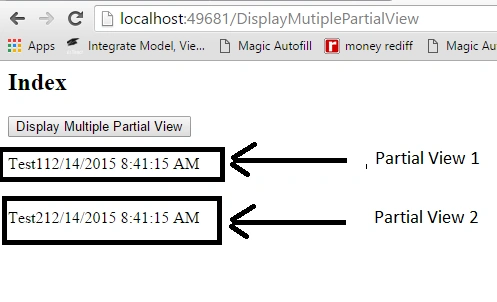
I hope this article will help you to load multiple partial views in single action.
Chandra Shekhar GuptaPosted Feb 25, 2021, 9:11 PM
It is not working with asp.net core mvc. Could you please provide me any soltion which will work with asp.net core mvc.
Ajay GandhiPosted Dec 15, 2015, 6:20 AM
Thanks Sarang
Ajay GandhiPosted Dec 15, 2015, 6:19 AM
Thanks Everyone
Sarang JamgaonkarPosted Dec 15, 2015, 1:28 AM
Nice post..
Ankur MistryPosted Dec 14, 2015, 10:28 AM
Useful information thanks
Raja TPosted Dec 14, 2015, 7:49 AM
Nice, Thanks for sharing
Humayun Kabir MamunPosted Dec 14, 2015, 5:48 AM
Nice...