

Here are the steps:
Step 1: Verify you have Microsoft jQuery Unobtrusive Ajax in your script folder,
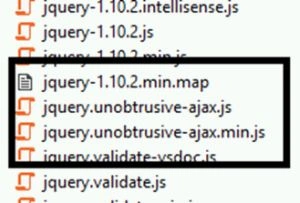
If not then install package using the following command in Nuget:
Install-PackageMicrosoft.jQuery.Unobtrusive.Ajax
You may refer the following link to install.
Step 2: Create Controller, Model and View in your MVC application.
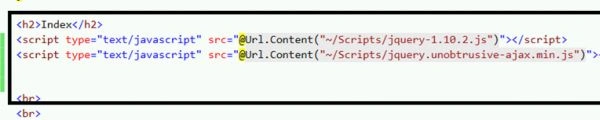
Step 3: Include the following two important script file in your project.
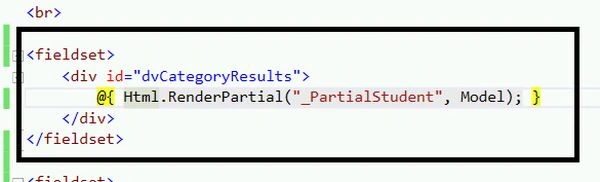
Step 4: Create Partial view which you want to update in the Ajax.Begin form submit button. You may add this at the end of BeginForm,
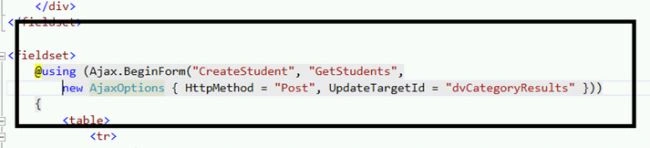
Step 5: Add Ajax.BeginForm.
It has the following parameters:
If not then install package using the following command in Nuget:
Install-PackageMicrosoft.jQuery.Unobtrusive.Ajax
You may refer the following link to install.
Step 2: Create Controller, Model and View in your MVC application.
Step 3: Include the following two important script file in your project.
Step 4: Create Partial view which you want to update in the Ajax.Begin form submit button. You may add this at the end of BeginForm,
Step 5: Add Ajax.BeginForm.
It has the following parameters:
- Action Name
- Controller Name
- AjaxOption (mention HttpMethod =post , UpdateTargetId = “Traget Div to update”.

My Ajax.BegineForm is like the following:
And My Final View is as below:
- @model DropdownGrid.Models.StudentDetailsModel
- @{
- ViewBag.Title = "Index";
- }
- < h2 >
- Index
- < /h2>
- < script type = "text/javascript"
- src = "@Url.Content("~/Scripts/jquery - 1.10.2. js ")" >
- < /script>
- < script type = "text/javascript"
- src = "@Url.Content("~/Scripts/jquery.unobtrusive - ajax.min.js ")" >
- < /script>
- < br >
- < br >
- < br >
- < br >
- < fieldset >
- < div id = "dvCategoryResults" >
- @
- {
- Html.RenderPartial("_PartialStudent", Model);
- }
- < /div>
- < /fieldset>
- < fieldset >
- @using(Ajax.BeginForm("CreateStudent", "GetStudents",
- new AjaxOptions
- {
- HttpMethod = "Post", UpdateTargetId = "dvCategoryResults"
- }))
- {
- < table >
- < tr >
- < td >
- @Html.LabelFor(M =>
- M.SelectedStudent.Id)
- < /td>
- < td >
- @Html.TextBoxFor(M =>
- M.SelectedStudent.Id)
- < td >
- < /tr>
- < tr >
- < td >
- @Html.LabelFor(M =>
- M.SelectedStudent.Name)
- < /td>
- < td >
- @Html.TextBoxFor(M =>
- M.SelectedStudent.Name)
- < td >
- < /tr>
- < tr >
- < td >
- @Html.LabelFor(M =>
- M.SelectedStudent.Address)
- < /td>
- < td >
- @Html.TextBoxFor(M =>
- M.SelectedStudent.Address)
- < td >
- < /tr>
- < tr >
- < td >
- @Html.LabelFor(M =>
- M.SelectedStudent.Class)
- < /td>
- < td >
- @Html.TextBoxFor(M =>
- M.SelectedStudent.Class)
- < td >
- < /tr>
- < tr >
- < td >
- @Html.LabelFor(M =>
- M.SelectedStudent.Section)
- < /td>
- < td >
- @Html.TextBoxFor(M =>
- M.SelectedStudent.Section)
- < td >
- < /tr>
- < /table>
- < input type = "submit"
- value = "Submit" / >
- }
- < /fieldset>
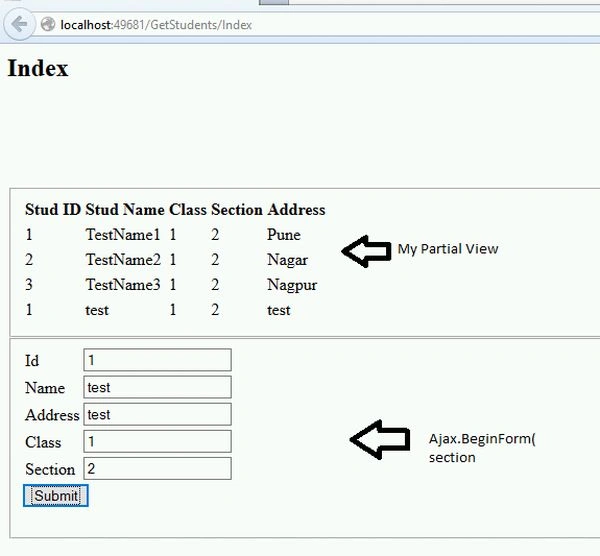
On Submit button my partial view updates without postback.
Mhd KhanPosted Oct 16, 2017, 6:40 PM
Anyone can tell me please what is '_PartialStudent' I am getting error on this? I am not sure what will be in @{ Html.RenderPartial("_Layout.cshtml", Model); }
Dhanik SahniPosted Nov 4, 2015, 5:05 AM
Good tip
Ajay GandhiPosted Nov 4, 2015, 2:08 AM
Thanks
Sibeesh VenuPosted Nov 4, 2015, 12:28 AM
Nice Share
Ajay GandhiPosted Nov 3, 2015, 9:27 AM
Thanks
Harshad PansuriyaPosted Nov 3, 2015, 6:14 AM
Nice one