

Introduction
Today, in this article let's play around with one of the interesting and most useful concepts in SharePoint 2010.
Question: What is TermSet?
In simple terms "It allows you to define terms in a hierarchical collection centrally, and create a managed metadata field that references term sets".
Step 1: Open SharePoint 2010 Central Administration and navigate to a specific site.
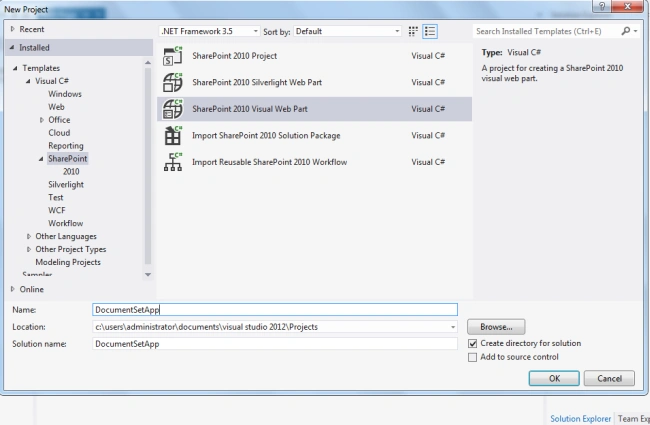
Step 2: Open up Visual Studio 2012 and try to select "SharePoint Visual Web Part" project, as in:
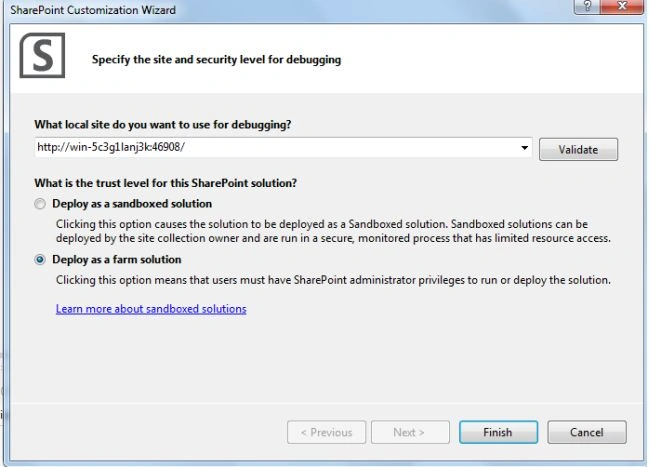
Step 3: Select "Deploy as a farm solution" as in the following and click the "Finish" button.
Step 4: The complete code of visualwebpart1usercontrol.ascx looks like this:
<%@ Assembly Name="$SharePoint.Project.AssemblyFullName$" %>
<%@ Assembly Name="Microsoft.Web.CommandUI, Version=14.0.0.0, Culture=neutral, PublicKeyToken=71e9bce111e9429c" %>
<%@ Register TagPrefix="SharePoint" Namespace="Microsoft.SharePoint.WebControls"
Assembly="Microsoft.SharePoint, Version=14.0.0.0, Culture=neutral, PublicKeyToken=71e9bce111e9429c" %>
<%@ Register TagPrefix="Utilities" Namespace="Microsoft.SharePoint.Utilities" Assembly="Microsoft.SharePoint, Version=14.0.0.0, Culture=neutral, PublicKeyToken=71e9bce111e9429c" %>
<%@ Register TagPrefix="asp" Namespace="System.Web.UI" Assembly="System.Web.Extensions, Version=3.5.0.0, Culture=neutral, PublicKeyToken=31bf3856ad364e35" %>
<%@ Import Namespace="Microsoft.SharePoint" %>
<%@ Register TagPrefix="WebPartPages" Namespace="Microsoft.SharePoint.WebPartPages"
Assembly="Microsoft.SharePoint, Version=14.0.0.0, Culture=neutral, PublicKeyToken=71e9bce111e9429c" %>
<%@ Control Language="C#" AutoEventWireup="true" CodeBehind="VisualWebPart1.ascx.cs"
Inherits="DeleteTermSetApp.VisualWebPart1.VisualWebPart1" %>
<center>
<div>
<table style="font-family: Verdana; text-align: center;">
<tr>
<td colspan="2">
<asp:label id="Label1" runat="server" text="Delete Term Set - SharePoint 2010 via Visual Studio 2012"
font-bold="true" forecolor="Maroon" font-size="Large"></asp:label>
</td>
</tr>
<tr>
<td>
<asp:label id="Label2" runat="server" text="Please Enter Group Name:"></asp:label>
</td>
<td>
<asp:textbox id="TextBox1" runat="server"></asp:textbox>
</td>
</tr>
<tr>
<td>
<asp:label id="Label3" runat="server" text="Please Enter TermSet Name:"></asp:label>
</td>
<td>
<asp:textbox id="TextBox2" runat="server"></asp:textbox>
</td>
</tr>
<tr>
<td colspan="2">
<asp:button id="Button1" runat="server" text="Delete TermSet " forecolor="Orange"
font-bold="true" backcolor="Black" onclick="Button1_Click" width="167px" />
</td>
</tr>
<tr>
<td colspan="2">
<asp:label id="Label4" runat="server" font-bold="true"></asp:label>
</td>
</tr>
</table>
</div>
</center>
Step 5: The complete code of visualwebpart1usercontrol.ascx.cs looks like this:
using Microsoft.SharePoint;
using Microsoft.SharePoint.Taxonomy;
using System;
using System.ComponentModel;
using System.Web.UI.WebControls.WebParts;namespace DeleteTermSetApp.VisualWebPart1
{
[ToolboxItemAttribute(false)]
public partial class VisualWebPart1 : WebPart
{
// Uncomment the following SecurityPermission attribute only when doing Performance Profiling using
// the Instrumentation method, and then remove the SecurityPermission attribute when the code is ready
// for production. Because the SecurityPermission attribute bypasses the security check for callers of
// your constructor, it's not recommended for production purposes.
// [System.Security.Permissions.SecurityPermission(System.Security.Permissions.SecurityAction.Assert, UnmanagedCode = true)]
public VisualWebPart1(){}protected override void OnInit(EventArgs e)
{
base.OnInit(e);InitializeControl();
}
protected void Page_Load(object sender, EventArgs e)
{
TextBox1.Focus();
}
protected void Button1_Click(object sender, EventArgs e)
{
if (string.IsNullOrEmpty(TextBox1.Text) || string.IsNullOrEmpty(TextBox2.Text))
{
Label4.Text = "Please Enter Some Values";
Label4.ForeColor = System.Drawing.Color.Red;
}
else
{
SPSite site = new SPSite("http://win-5c3g1lanj3k:16101/");
TaxonomySession session = new TaxonomySession(site);
TermStore termStore = session.TermStores["Managed Metadata Service"];
Group group = termStore.Groups[TextBox1.Text];
TermSet termSet = group.TermSets[TextBox2.Text];
termSet.Delete();termStore.CommitAll();
Label4.Text = TextBox2.Text + " - Taxonomy TermSet Delete Successfully";
Label4.ForeColor = System.Drawing.Color.Green;
TextBox1.Text = string.Empty;
TextBox2.Text = string.Empty;
}
}
}
}
Step 6: Deploy the solution file and add the new webpart to a SharePoint site.
Step 7: The output of the application looks like this:
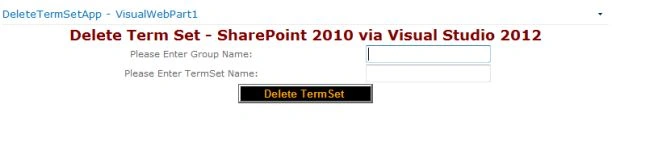
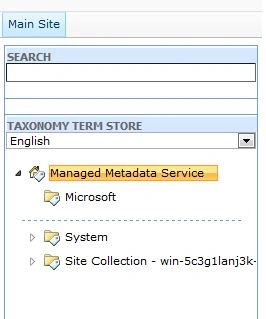
Step 8: The term set before deleting output of the application looks like this:

Step 9: Data entering output of the application looks like this:

Step 10: Term set deleted output of the application looks like this:
I hope this article is useful for you.
Join the conversation! Your thoughts help the community grow.