

Introduction
Today, in this article let's play around with one of the interesting and most useful concepts in .NET 4.5.
Question: What is enhanced editing support?
In simple terms "It provides enhanced editing support with various methods invocation as per the usage".
Step 1: Create a new "ASP.Net Web Forms Application", as in:

Step 2: Create an Entity Data Model Framework and set it up with an appropriate database.
Step 3: The complete code of webform1.aspx looks like this:
<%@ Page Language="C#" AutoEventWireup="true" CodeBehind="WebForm1.aspx.cs" Inherits="EnhancedEditingSupportApp.WebForm1" %>
<!DOCTYPE html>
<html xmlns="http://www.w3.org/1999/xhtml">
<head id="Head1" runat="server">
<title></title>
</head>
<body>
<form id="form1" runat="server">
<center>
<div>
<asp:GridView ID="GridView1" runat="server" BackColor="LightGoldenrodYellow" ItemType="EnhancedEditingSupportApp.Employee"
BorderColor="Tan" BorderWidth="1px" CellPadding="2" ForeColor="Black" GridLines="None"
AutoGenerateColumns="false" SelectMethod="GetData" UpdateMethod="UpdateData"
AutoGenerateEditButton="true">
<AlternatingRowStyle BackColor="PaleGoldenrod"></AlternatingRowStyle>
<FooterStyle BackColor="Tan"></FooterStyle>
<HeaderStyle BackColor="Tan" Font-Bold="True"></HeaderStyle>
<PagerStyle HorizontalAlign="Center" BackColor="PaleGoldenrod" ForeColor="DarkSlateBlue">
</PagerStyle>
<SelectedRowStyle BackColor="DarkSlateBlue" ForeColor="GhostWhite"></SelectedRowStyle>
<SortedAscendingCellStyle BackColor="#FAFAE7"></SortedAscendingCellStyle>
<SortedAscendingHeaderStyle BackColor="#DAC09E"></SortedAscendingHeaderStyle>
<SortedDescendingCellStyle BackColor="#E1DB9C"></SortedDescendingCellStyle>
<SortedDescendingHeaderStyle BackColor="#C2A47B"></SortedDescendingHeaderStyle>
<Columns>
<asp:BoundField DataField="Id" HeaderText="ID" ReadOnly="true" />
<asp:BoundField DataField="FirstName" HeaderText="FirstName" SortExpression="FirstName" />
<asp:BoundField DataField="LastName" HeaderText="LastName" SortExpression="LastName" />
<asp:BoundField DataField="Age" HeaderText="Age" SortExpression="Age" />
</Columns>
</asp:GridView>
</div>
</center>
</form>
</body>
</html>
Step 4: The complete code of webform1.aspx.cs looks like this:
using System;
using System.Collections.Generic;
using System.Linq;
using System.Web;
using System.Web.UI;
using System.Web.UI.WebControls;
namespace ModelBindersSelectApp
{
public partial class WebForm1 : System.Web.UI.Page
{
protected void Page_Load(object sender, EventArgs e)
{
}
public IQueryable GetData()
{
return objEntities.Employee;
}
public void UpdateData(Employee employee)
{
objEntities.Entry(employee).State = System.Data.EntityState.Modified;
objEntities.SaveChanges();
}
#region Instance VariablesCompanyEntities objEntities = new CompanyEntities();
#endregion
}
}
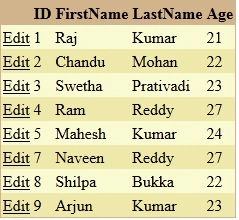
Step 5: The output of the application looks like this:
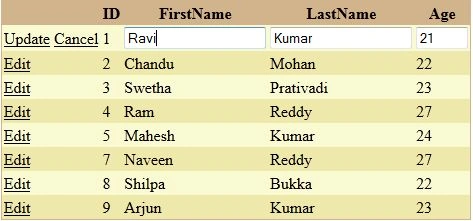
Step 6: The data editing output of the application looks like this:
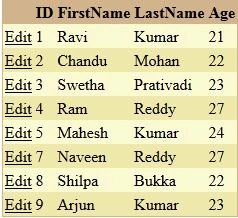
Step 7: The data edited output of the application looks like this:
Swati AgarwalPosted Oct 10, 2012, 12:43 AM
nice article Vijay, helps me a lot....