

Before reading this article, please go through the following article:
In the framework of this article we will explore ways to support strong date and time data formats. With the .NET Framework you do not need to spend time building a class for storing and processing time. Instead we can use the immensely powerful built-in library that supports nearly all calculations that will save you so much time.
1. DATETIME FORMAT STRING
Since we learned about the standard formats for dates in previous posts, normally the DateTime data type returns the string value in the format: 6/3/2011 10:00:00 PM. The .NET framework supports a strong DateTime format to help make it easier to format the resulting dates as desired. To better understand this issue see the example below.
FOOTNOTES
- MMM: display month as the first 3 letters of the name of the month
- ddd: display the first 3 letters of the name of the week
- d: display day
- HH: display now in 24-hour format
- mm: display the first 2 letters of the minutes
- yyyy: displayed in the form of 4 numbers
using System;
using System.Collections.Generic;
using System.Linq;
using System.Text;
namespace ConsoleApplication2
{
class Program
{
static void Main(string[] args)
{
DateTime date =DateTime.Now;
// Before Format
Console.WriteLine(date);
// After Format by string format
string format = "HH:mm:ss ddd MMM-d-yyyy";
Console.WriteLine(date.ToString(format));
System.Console.Read();
}
}
}
2. SINGLE LETTER FORMAT STRING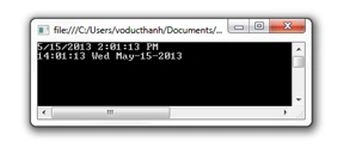
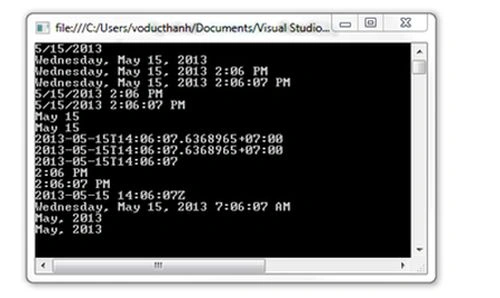
The example below outlines the format of the string with only one character. I'm sure you can easily understand the meaning of each character format.
using System;
using System.Collections.Generic;
using System.Linq;
using System.Text;
namespace ConsoleApplication2
{
class Program
{
static void Main(string[] args)
{
DateTime date = DateTime.Now;
Console.WriteLine(date.ToString("d"));
Console.WriteLine(date.ToString("D"));
Console.WriteLine(date.ToString("f"));
Console.WriteLine(date.ToString("F"));
Console.WriteLine(date.ToString("g"));
Console.WriteLine(date.ToString("G"));
Console.WriteLine(date.ToString("m"));
Console.WriteLine(date.ToString("M"));
Console.WriteLine(date.ToString("o"));
Console.WriteLine(date.ToString("O"));
Console.WriteLine(date.ToString("s"));
Console.WriteLine(date.ToString("t"));
Console.WriteLine(date.ToString("T"));
Console.WriteLine(date.ToString("u"));
Console.WriteLine(date.ToString("U"));
Console.WriteLine(date.ToString("y"));
Console.WriteLine(date.ToString("Y"));
System.Console.Read();
}
}
}
3. DATE STRING FORMAT
using System;
using System.Collections.Generic;
using System.Linq;
using System.Text;
namespace ConsoleApplication2
{
class Program
{
static void Main(string[] args)
{
DateTime date = DateTime.Now;
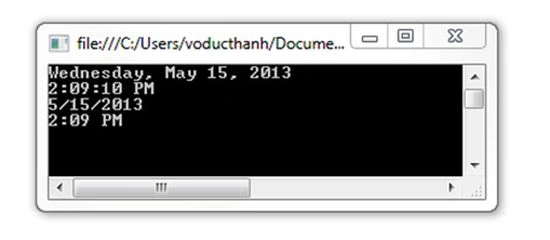
Console.WriteLine(date.ToLongDateString());
Console.WriteLine(date.ToLongTimeString());
Console.WriteLine(date.ToShortDateString());
Console.WriteLine(date.ToShortTimeString());
System.Console.Read();
}
}
}
4. FULL FORMAT STRING LETTER DAY
using System;
using System.Collections.Generic;
using System.Linq;
using System.Text;
namespace ConsoleApplication2
{
class Program
{
static void Main(string[] args)
{
DateTime date = DateTime.Now;
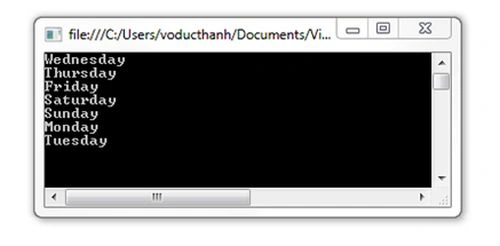
for (int i = 0; i < 7; i++)
{
Console.WriteLine(date.ToString("dddd"));
date = date.AddDays(1);
}
System.Console.Read();
}
}
}
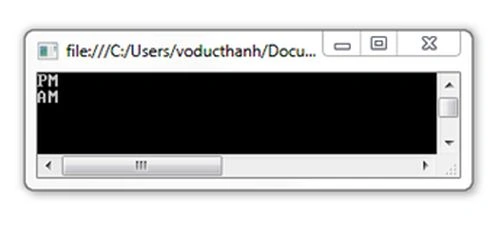
5. DISPLAY AM / PM
using System;
using System.Collections.Generic;
using System.Linq;
using System.Text;
namespace ConsoleApplication2
{
class Program
{
static void Main(string[] args)
{
DateTime date = DateTime.Now;
for (int i = 0; i < 2; i++)
{
Console.WriteLine(date.ToString("tt"));
date = date.AddHours(12);
}
System.Console.Read();
}
}
}
From My Site: microsofttech.net/lap-trinh/xu-ly-kieu-du-lieu-datetime-trong-csharp-phan-2.html
Join the conversation! Your thoughts help the community grow.