

Introduction
In this article we will learn how to show or hide columns in Excel. I hope you will like it.
Background
Today I was working on a report. It contains my debit/credit details of a month. And I was in a need of hiding a column “Credit” from the report and generate a PDF file. And I did that. I thought of sharing it with you all. I hope you may find it is useful.
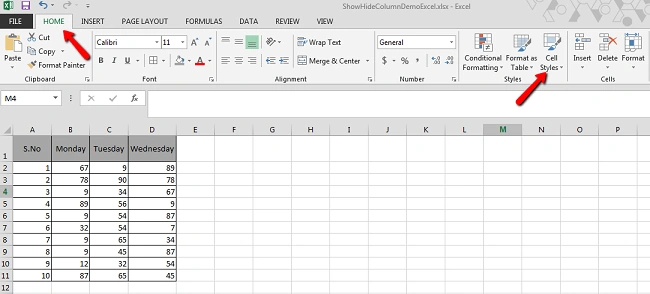
To do so, we will create a dummy Excel file like the following:

Now it is time for action.
Click on the home tab and go to the Format menu.
Now click on the format menu and then click Hide & Unhide under the visibility menu. Now click on hide column.

Now if you see your Excel file, you can see the selected column has been hide.

To make it visible, you just need to follow the same procedure that we just followed. You can see an Unhide option in the same Hide & Unhide menu.

Conclusion
That is all. I hope you liked this article. Please share with me your feedback.
Sibeesh VenuPosted Jul 15, 2015, 2:28 AM
Nitesh Luharuka Thank you
Sibeesh VenuPosted Jul 15, 2015, 2:28 AM
Santhakumar Munuswamy Thank you
Sibeesh VenuPosted Jul 15, 2015, 2:28 AM
Neeraj Kumar Thank you
Nitesh KejriwalPosted Jul 15, 2015, 2:16 AM
Nice tip
Santhakumar MunuswamyPosted Jul 13, 2015, 3:05 PM
Nice article! Thanks for sharing
Neeraj KumarPosted Jul 13, 2015, 11:34 AM
Nice Article sir
Sibeesh VenuPosted Jul 13, 2015, 10:15 AM
Dominique Ceja Thanks
Sibeesh VenuPosted Jul 13, 2015, 10:15 AM
Kalyankumar Ravichandran Thank you
Dominique CejaPosted Jul 13, 2015, 9:49 AM
Thanks
Kalyankumar RavichandranPosted Jul 13, 2015, 8:57 AM
Informative!
Sibeesh VenuPosted Jul 13, 2015, 7:32 AM
Rakesh Kalluri Thank you
Sibeesh VenuPosted Jul 13, 2015, 7:32 AM
Nilesh Jadav Thank you
Rakesh KalluriPosted Jul 13, 2015, 7:17 AM
Good One.
Nilesh JadavPosted Jul 13, 2015, 7:01 AM
Nice one sir
Sibeesh VenuPosted Jul 13, 2015, 6:05 AM
Pankaj Kumar Choudhary Thank you
Pankaj Kumar ChoudharyPosted Jul 13, 2015, 4:55 AM
Great Information Sir........