

TreeView
A Treeview control is a way to display information in a hierarchical order. Each item has a number of sub items. The treeview is a parent and child way to represent and very easily understand something. Treeview is used to easily explain our process in the client. For Example:
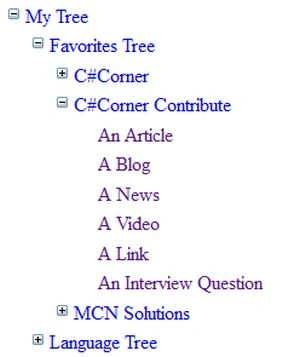
"My Tree" is the root node of the tree, under the root node are two sub node ("Favorites Tree" and "Language Tree"). This sub-node has sub nodes ("C#Corner" and "MCN Solutions") and this sub-node has a leaf node.
Kendo UI TreeView
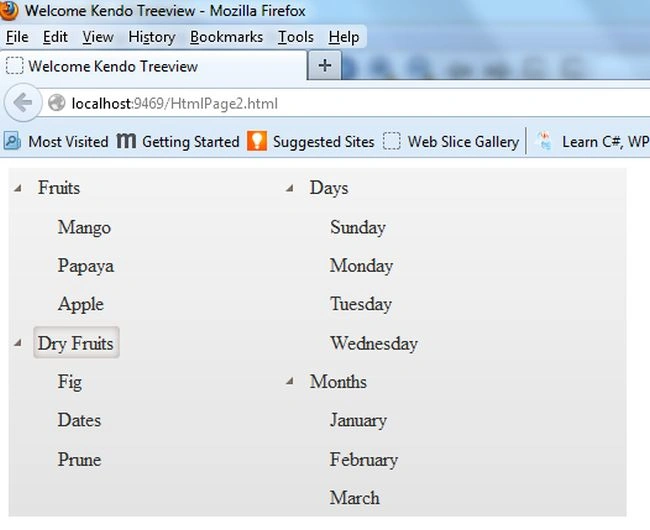
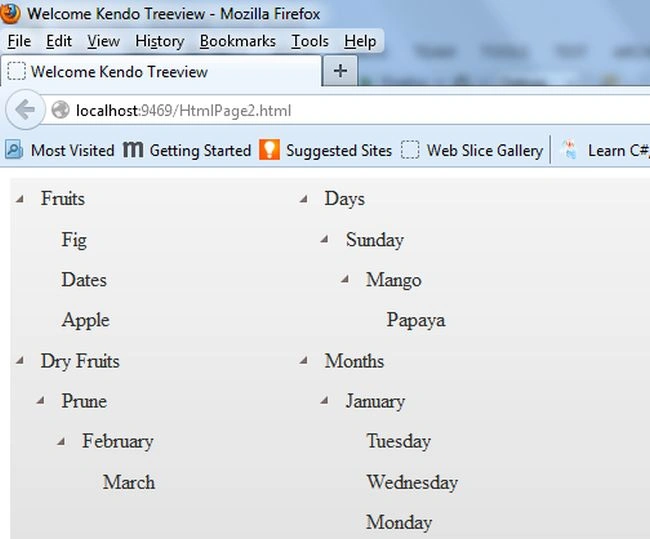
Kendo UI treeview displays hierarchical data in a traditional tree structure. This is used for user interaction in mouse re-ordering operations via drag and drop. There are two ways to create a treeview in the Kendo UI.
- Hierarchical list with static HTML.
- Use dynamic data binding to data source.
Hierarchical list with static HTML
The static HTML is small hierarchies and is for data that does not change frequently.
- <ul id="treeView">
- <li>Item 1
- <ul>
- <li>Item 1.1</li>
- <li>Item 1.2</li>
- </ul>
- </li>
- <li>Item 2</li>
- </ul>
Use dynamic data binding to data source
Data binding is used for larger data sets and for data that changes frequently.
- $(document).ready(function () {
- $("#treeView").kendoTreeView({
- dataSource: [
- {
- text: "Item 1",
- items: [
- { text: "Item 1.1" },
- { text: "Item 1.2" }
- ]
- },
- { text: "Item 2" }
- ]
- })
- });
- <!DOCTYPE html>
- <html xmlns="http://www.w3.org/1999/xhtml">
- <head>
- <title>Welcome Kendo Treeview</title>
- <link href="Content/kendo/2014.1.318/kendo.default.min.css" rel="stylesheet" />
- <link href="Content/kendo/2014.1.318/kendo.common.min.css" rel="stylesheet" />
- <script src="Scripts/kendo/2014.1.318/jquery.min.js"></script>
- <script src="Scripts/kendo/2014.1.318/kendo.web.min.js"></script>
- <script src="Scripts/JavaScript2.js"></script>
- </head>
- <body>
- <div id="example">
- <div class="demo-section k-header">
- <div id="treeview-left"></div>
- <div id="treeview-right"></div>
- </div>
- <script>
- $("#treeview-left").kendoTreeView({
- dragAndDrop: true,
- dataSource: [
- {
- text: "Fruits", expanded: true, items: [
- { text: "Mango" },
- { text: "Papaya" },
- { text: "Apple" }
- ]
- },
- {
- text: "Dry Fruits", items: [
- { text: "Fig" },
- { text: "Dates" },
- { text: "Prune" }
- ]
- }
- ]
- });
- $("#treeview-right").kendoTreeView({
- dragAndDrop: true,
- dataSource: [
- {
- text: "Days", expanded: true, items: [
- { text: "Sunday" },
- { text: "Monday" },
- { text: "Tuesday" },
- { text: "Wednesday" }
- ]
- },
- {
- text: "Months", items: [
- { text: "January" },
- { text: "February" },
- { text: "March" }
- ]
- }
- ]
- });
- </script>
- <style scoped>
- #treeview-left,
- #treeview-right {
- float: left;
- width: 220px;
- overflow: visible;
- }
- .demo-section {
- width: 500px;
- }
- .demo-section:after {
- content: ".";
- display: block;
- height: 0;
- clear: both;
- visibility: hidden;
- }
- </style>
- </div>
- </body>
- </html>
ASP.NET TreeView
The ASP.NET treeview is a powerful server control for rendering a treeview. This is a very important control for ASP.NET. It is used to display the data in a parent/child relationship or hierarchical order. This ASP.NET treeview supports more programming models from statically defined trees to dynamically constructed trees to data bound trees.
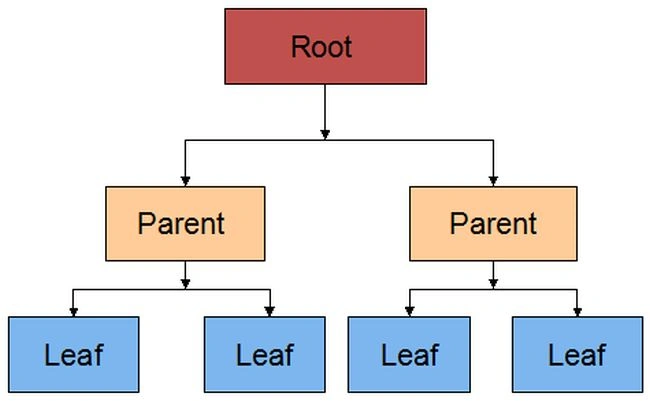
There are the following three types of nodes available in a treeview.
-
Root: This root node has no parent node, only one or more child nodes.
-
Parent: This node has a parent node and one or more child nodes also available.
-
Leaf: The Leaf node has no child nodes, only a parent node.
- <%@ Page Language="C#" AutoEventWireup="true" CodeBehind="WebForm1.aspx.cs" Inherits="WebApplication6.WebForm1" %>
- <!DOCTYPE html>
- <html xmlns="http://www.w3.org/1999/xhtml">
- <head runat="server">
- <title>Welcome ASP.NET Treeview</title>
- </head>
- <body>
- <form id="form1" runat="server" action="WebForm1.aspx">
- <div>
- <h2>Using TreeView Control</h2>
- <asp:TreeView ID="TreeView1" runat="server">
- <Nodes>
- <asp:TreeNode Text="My Tree">
- <asp:TreeNode Text="Favorites Tree">
- <asp:TreeNode Text="C#Corner">
- <asp:TreeNode Text="Home" NavigateUrl="http://www.c-sharpcorner.com" />
- <asp:TreeNode Text="Answers" NavigateUrl="http://www.c-sharpcorner.com/Forums" />
- <asp:TreeNode Text="Blogs" NavigateUrl="http://www.c-sharpcorner.com/Blogs" />
- <asp:TreeNode Text="Videos" NavigateUrl="http://www.c-sharpcorner.com/Videos" />
- <asp:TreeNode Text="Interviews" NavigateUrl="http://www.c-sharpcorner.com/interviews" />
- <asp:TreeNode Text="Books" NavigateUrl="http://www.c-sharpcorner.com/ebooks" />
- <asp:TreeNode Text="Links" NavigateUrl="http://www.c-sharpcorner.com/resources" />
- <asp:TreeNode Text="News" NavigateUrl="http://www.c-sharpcorner.com/news" />
- <asp:TreeNode Text="Chapters" NavigateUrl="http://www.c-sharpcorner.com/Chapters" />
- <asp:TreeNode Text="CareerAdvice" NavigateUrl="http://www.c-sharpcorner.com/CareerAdvice" />
- <asp:TreeNode Text="Jobs" NavigateUrl="http://www.c-sharpcorner.com/jobs" />
- </asp:TreeNode>
- <asp:TreeNode Text="C#Corner Contribute">
- <asp:TreeNode Text="An Article" NavigateUrl="http://www.c-sharpcorner.com/publish/articlesubmissionguideline.aspx" />
- <asp:TreeNode Text="A Blog" NavigateUrl="http://www.c-sharpcorner.com/blogs/CreateBlog.aspx" />
- <asp:TreeNode Text="A News" NavigateUrl="http://www.c-sharpcorner.com/news/CreateNews.aspx" />
- <asp:TreeNode Text="A Video" NavigateUrl="http://www.c-sharpcorner.com/Publish/CreateArticle.aspx" />
- <asp:TreeNode Text="A Link" NavigateUrl="http://www.c-sharpcorner.com/Resources/CreateResource.aspx" />
- <asp:TreeNode Text="An Interview Question" NavigateUrl="http://www.c-sharpcorner.com/interviews/Question/PostQuestion.aspx" />
- </asp:TreeNode>
- <asp:TreeNode Text="MCN Solutions">
- <asp:TreeNode Text="Home page" NavigateUrl="http://www.mcnsolutions.net" />
- <asp:TreeNode Text="Services" NavigateUrl="http://www.mcnsolutions.net/Services" />
- <asp:TreeNode Text="Technology" NavigateUrl="http://www.mcnsolutions.net/Technology.aspx" />
- <asp:TreeNode Text="Outsourcing" NavigateUrl="http://www.mcnsolutions.net/Outsourcing" />
- <asp:TreeNode Text="Industries" NavigateUrl="http://www.mcnsolutions.net/Industries.aspx" />
- <asp:TreeNode Text="Company" NavigateUrl="http://www.mcnsolutions.net/Company" />
- <asp:TreeNode Text="Contact" NavigateUrl="http://www.mcnsolutions.net/Contact-Us" />
- </asp:TreeNode>
- </asp:TreeNode>
- <asp:TreeNode Text="Language Tree">
- <asp:TreeNode Text="C" NavigateUrl="http://www.tutorialspoint.com/csharp" />
- <asp:TreeNode Text="Java" NavigateUrl="http://www.tutorialspoint.com/java/index.htm" />
- <asp:TreeNode Text="Objective-C" NavigateUrl="http://www.tutorialspoint.com/objective_c" />
- <asp:TreeNode Text="C++" NavigateUrl="http://www.learncpp.com" />
- <asp:TreeNode Text="C#" NavigateUrl="http://www.completecsharptutorial.com" />
- <asp:TreeNode Text="PHP" NavigateUrl="http://www.w3schools.com/PHP" />
- <asp:TreeNode Text="JavaScript" NavigateUrl="http://www.w3schools.com/js/DEFAULT.asp" />
- <asp:TreeNode Text="VB.NET" NavigateUrl="http://www.tutorialspoint.com/vb.net" />
- <asp:TreeNode Text="PL/SQL" NavigateUrl="http://plsql-tutorial.com" />
- <asp:TreeNode Text="COBOL" NavigateUrl="http://www.b-u.ac.in/sde_book/bca_cobol.pdf" />
- <asp:TreeNode Text="Python" NavigateUrl="http://www.tutorialspoint.com/python" />
- <asp:TreeNode Text="ASP.NET" NavigateUrl="http://www.w3schools.com/ASPNET/default.asp" />
- </asp:TreeNode>
- <asp:TreeNode Text="Others Tree">
- <asp:TreeNode Text="Sport Games">
- <asp:TreeNode Text="Cricket" NavigateUrl="http://www.cricketgames.me" />
- <asp:TreeNode Text="Foot Ball" NavigateUrl="http://www.myfootballgames.co.uk/" />
- <asp:TreeNode Text="Tennis" NavigateUrl="http://www.freetennis.org" />
- </asp:TreeNode>
- <asp:TreeNode Text="New Paper">
- <asp:TreeNode Text="English">
- <asp:TreeNode Text="The Hindu" NavigateUrl="http://www.thehindu.com" />
- <asp:TreeNode Text="Business Line" NavigateUrl="http://www.thehindubusinessline.com" />
- <asp:TreeNode Text="The Times of India" NavigateUrl="http://timesofindia.indiatimes.com" />
- </asp:TreeNode>
- <asp:TreeNode Text="Hindi">
- <asp:TreeNode Text="Dainik Jagran" NavigateUrl="http://www.indiapress.org/gen/news.php/Dainik_Jagran/" />
- <asp:TreeNode Text="Janwarta" NavigateUrl="http://www.janwarta.com/" />
- <asp:TreeNode Text="Hari Bhoomi" NavigateUrl="http://www.haribhoomi.com/" />
- </asp:TreeNode>
- <asp:TreeNode Text="Tamil">
- <asp:TreeNode Text="Dinakaran" NavigateUrl="http://www.dinakaran.com" />
- <asp:TreeNode Text="Tamil Murasu" NavigateUrl="http://tamilmurasu.org" />
- <asp:TreeNode Text="Dinamalar" NavigateUrl="http://www.dinamalar.com" />
- </asp:TreeNode>
- </asp:TreeNode>
- <asp:TreeNode Text="Social Media">
- <asp:TreeNode Text="FaceBook" NavigateUrl="http://www.facebook.com" />
- <asp:TreeNode Text="Twitter" NavigateUrl="http://twitter.com/signup" />
- <asp:TreeNode Text="Google+" NavigateUrl="https://plus.google.com" />
- <asp:TreeNode Text="LinkedIn" NavigateUrl="https://in.linkedin.com" />
- <asp:TreeNode Text="YouTube" NavigateUrl="https://www.youtube.com" />
- </asp:TreeNode>
- </asp:TreeNode>
- </asp:TreeNode>
- </Nodes>
- </asp:TreeView>
- </div>
- </form>
- </body>
- </html>
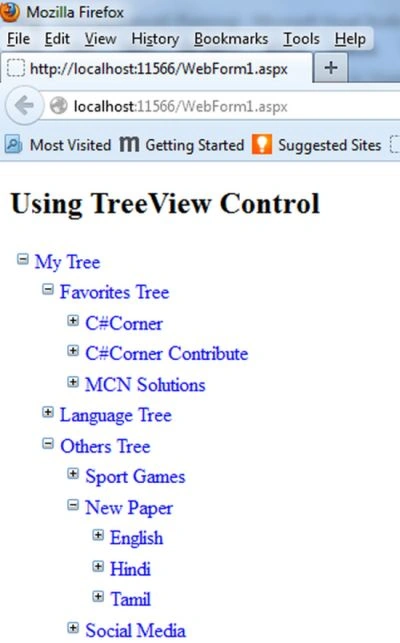
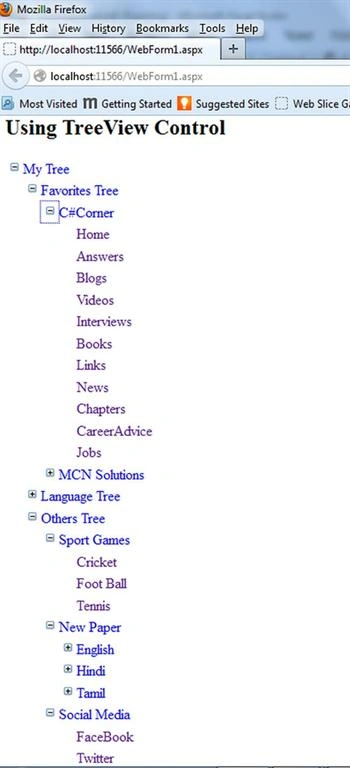
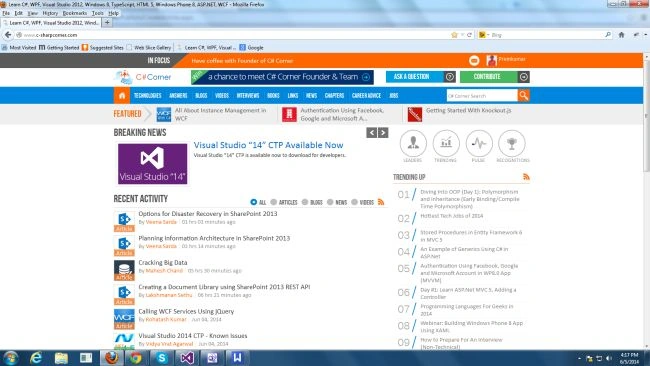
When you run the application you will get the output window above, then you want to go to the C# Corner home page, in other words click the home option of the C# Corner and the home page will automatically open. Otherwise if you want to go to the MCN solution page then click under the MCN solution option. For example see the following window.

This article described how to use the Kendo UI drag and drop treeview and ASP.NET treeview controls in a web application. Thanks for reading.
sreenivasa kPosted Feb 27, 2015, 4:55 PM
nice article and thx for sharing
Premkumar EswaramurthiPosted Jun 16, 2014, 11:13 PM
Thank you Prerana.
Prerana TiwariPosted Jun 6, 2014, 5:05 AM
Nice article