

Introduction
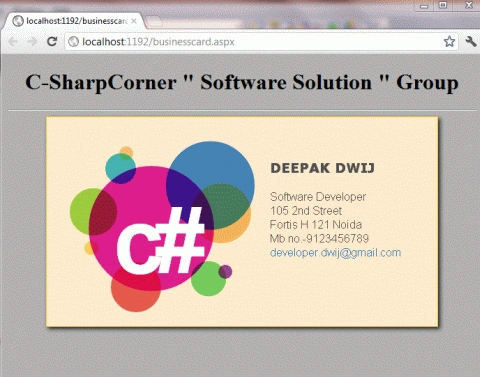
This article is about something very important and interesting; that is creating a business card using HTML5. In this section, we will use the canvas tag. When we run our script we will show electronic business cards in the browser.
Here we will use some JavaScript and some styles along with HTML code. Just go through the steps to see how to create this application.
Let's see how the Bussinesscard application can be created. To do so use the following steps.
Step 1 : Open a HTML editor or Visual Studio.
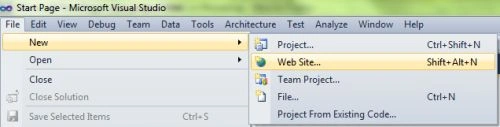
Open File menu ->select new ->Choose Website then.
This is where we will create an HTML5 application.
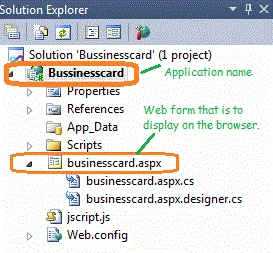
- Go to Solution Explorer
- Right-click on the Application name
- Select Add-->add new item
- Now in the window that opens, select an HTML page or a new Webform
- Rename it to businesscard.aspx
CSS Script
- <style>
- .card-container
- {
- text-align: center;
- margin-bottom: 2.5em;
- margin-top:2 em;
- }
- #canvas
- {
- border: 1px solid #FFC125;
- background-color: #FFEBCD;
- -moz-box-shadow: 3px 3px 8px #222;
- -webkit-box-shadow: 3px 3px 8px #222;
- box-shadow: 3px 3px 8px #222;
- }
- .title
- {
- text-align: center;
- font-family: Segoe UI Light, Arial, Helvetica;
- font-size: 2.2em;
- margin: 1em;
- }
- .info
- {
- text-align: center;
- font-family: Segoe UI Light, Arial, Helvetica;
- font-size: 1.2em;
- margin: 0.25em;
- }
- a, a:visited, a:active, a:hover
- {
- color: #fff;
- text-decoration: none;
- }
- a:hover
- {
- text-decoration: underline;
- }
- </style>
Step 3: In this part, we need to work on some JavaScript. To fully understanding how the JavaScript works, download the attached .rar file and run the Bussinesscard application.
JavaScript for the Canvas alignment and setting the Hexa colors.
- window.addEventListener('load', onloadHandler, false);
- function onloadHandler() {
- // get the canvas DOM element
- var canvas = document.getElementById('canvas'),
- ctx = canvas.getContext("2d"),
- width = canvas.width,
- height = canvas.height;
- // data structures - generate initial blobs
- var blobList = new BlobList();
- blobList.blobs = [
- new Blob(150, 160, 0, 90, "rgba(220,5,134,.9)"),
- new Blob(67, 136, 0, 34, "rgba(145,200,46,.9)"),
- new Blob(106, 74, 0, 22, "rgba(45,172,173,.9)"),
- new Blob(114, 52, 0, 10, "rgba(238,172,78,.75)"),
- new Blob(220, 82, 0, 56, "rgba(47,118,178,.9)"),
- new Blob(250, 138, 0, 43, "rgba(248,172,78,.9)"),
- new Blob(232, 232, 0, 25, "rgba(99,198,78,.9)"),
- new Blob(256, 222, 0, 10, "rgba(140,45,136,.9)"),
- new Blob(128, 244, 0, 36, "rgba(226,74,63,.9)"),
- new Blob(64, 188, 0, 10, "rgba(255,203,78,.9)")
- ];
Former memberPosted Aug 27, 2012, 5:50 AM
Oh come on. It's not html5 - it's XHTML1.0 transitional. It's also stolen from http://www.kevs3d.co.uk/dev/eglogo/ - have some decency, man!
Mahesh ChandPosted Feb 29, 2012, 11:01 PM
Interesting.
Akash GaurPosted Feb 29, 2012, 10:56 PM
hello deepak you have created a good article about business card.