

Introduction
Before reading this article, I highly recommend reading the previous parts:
- Getting Started With ASP.Net Web API 2: Day 1
- Getting Started With ASP.Net Web API 2: Day 2
- Getting Started With ASP.Net Web API 2: Day 3
- Getting Started With ASP.Net Web API 2: Day 4
- Getting Started With ASP.Net Web API 2: Day 5
- Getting Started With ASP.Net Web API 2: Day 6
- Getting Started With ASP.Net Web API 2: Day 7
- Getting Started With ASP.Net Web API 2: Day 8
- Globally for the entire API
- Locally, for specific routes only
To make the session global, we need to create the session behavior as SessionStateBehaviorin the Global.asax file.
- protected void Application_PostAuthorizeRequest()
- {
- HttpContext.Current.SetSessionStateBehavior(SessionStateBehavior.Required);
- }
The ASP.NET Web API 2 declares the routes in a static WebApiConfig class, against an instance of HttpConfiguration. And defines the Web API 2 routes against the System.Web.RouteCollection too. The method allows us to overload the MapHttpRoute. If the method is void, then it will return an instance of the newly declared route. If we declared the route directly using the System.Web.RouteCollection, the return would be a System.Web.Route object, where we can assign an IRouteHandler.
HttpControllerRouteHandler, in the GetHttpHandler method, returns an instance of HttpControllerHandler, that is the entry point to the Web API pipeline. We use session on an IHttpHandler by making it implement an IRequiresSessionState interface. It will enable the session state for each route handler implementing that interface.
Prerequisites
There are the following things we need to use when developing a Web API 2 application for session state.
- Visual Studio 2013
- ASP.NET Web API 2 Template
Getting Started
In this section we will follow some important procedures and these are:
- Create ASP.NET Web API
- Add Web API 2 Controller
- Add a class inside the model
- Add a SessionHttpControllerRouteHandler class
- Add SessionControllerHandler class
We need to use a basic procedure to enable session locally.
Step 1
Open the Visual Studio 2013 and click New Project.
Step 2
Select the ASP.NET Web Application and provide a nice name for the project.
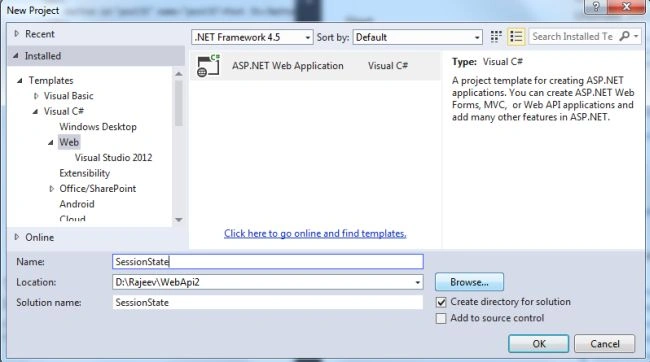
Step 3
Select the Web API template and click the OK button, by default it will choose MVC along with the Web API.
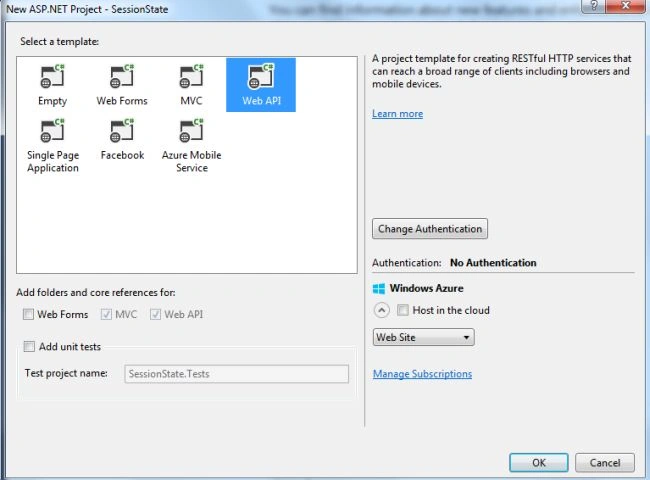
Step 4
Right-click on the Model folder and add a Student class to the model where the name fields are defined.
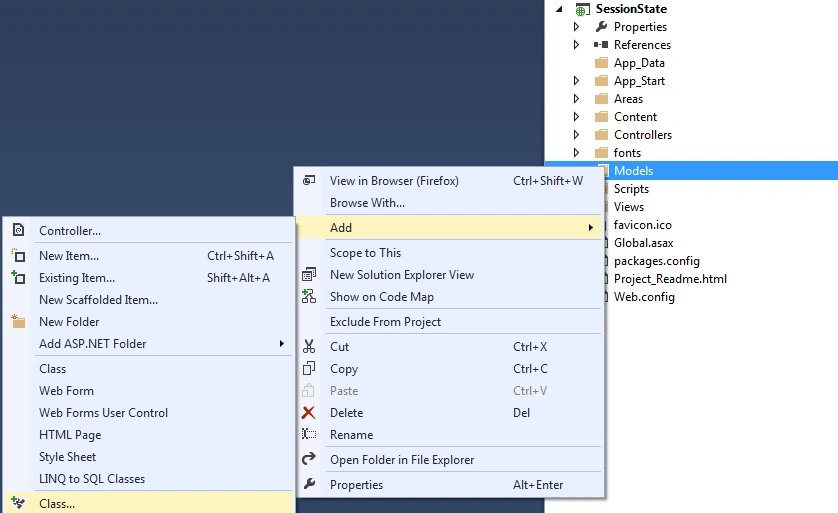
- namespace SessionState.Models
- {
- public class NumberResult
- {
- public int NewValue { get; set; }
- public int LastValue { get; set; }
- }
- }
Right-click on the Controller folder and select the Web API 2 empty Web API controller and provide a nice name. For this project I took NumberController.
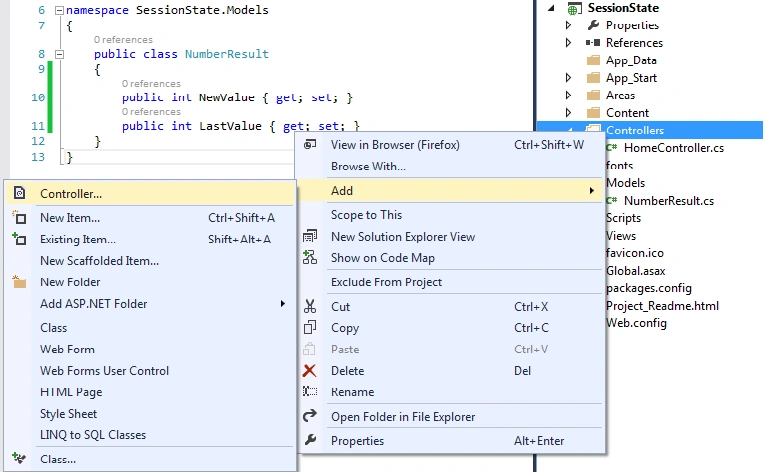
Step 6
Create a SessionHttpControllerRoteHandler class.
- namespace SessionState
- {
- public class SessionHttpControllerRouteHandler : HttpControllerRouteHandler
- {
- protected override IHttpHandler GetHttpHandler(RequestContext requestContext)
- {
- return new SessionControllerHandler(requestContext.RouteData);
- }
- }
- }
This SessionHttpControllerRouteHandler class implements the HttpControllerRouteHandler. SessionHttpControllerRouteHandler is set as the RouteHandler on the created route.
Step 7
Create a SessionControllerHandler class.
- namespace SessionState
- {
- public class SessionControllerHandler : HttpControllerHandler, IRequiresSessionState
- {
- public SessionControllerHandler(RouteData routeData)
- : base(routeData)
- { }
- }
- }
Step 8
Register Web API routes against System.Web.RouteCollection.
- namespace SessionState
- {
- public class RouteConfig
- {
- public static void RegisterRoutes(RouteCollection routes)
- {
- routes.IgnoreRoute("{resource}.axd/{*pathInfo}");
- routes.MapHttpRoute(
- name: "DefaultApi",
- routeTemplate: "api/{controller}/{id}",
- defaults: new { id = RouteParameter.Optional }
- ).RouteHandler = new SessionHttpControllerRouteHandler();
- routes.MapRoute(
- name: "Default",
- url: "{controller}/{action}/{id}",
- defaults: new { controller = "Home", action = "Index", id = UrlParameter.Optional }
- );
- }
- }
- }
Enable the Session on All ASP.NET Web API Routes using a Reflection trick.
- namespace SessionState
- {
- public static class WebApiConfig
- {
- public static void Register(HttpConfiguration config)
- {
- var httpControllerRouteHandler = typeof(HttpControllerRouteHandler).GetField("_instance",
- BindingFlags.Static |
- BindingFlags.NonPublic);
- if (httpControllerRouteHandler != null)
- {
- httpControllerRouteHandler.SetValue(null,
- new Lazy<HttpControllerRouteHandler>(() => new SessionHttpControllerRouteHandler(), true));
- }
- config.MapHttpAttributeRoutes();
- //config.Routes.MapHttpRoute(
- // name: "DefaultApi",
- // routeTemplate: "api/{controller}/{id}",
- // defaults: new { id = RouteParameter.Optional }
- //);
- }
- }
- }
A sample code ApiController that holds the session sate.
- namespace SessionState.Controllers
- {
- public class NumberController : ApiController
- {
- public NumberResult get()
- {
- var newValue= new Random().Next(1,7);
- object context;
- if (Request.Properties.TryGetValue("MS_HttpContext", out context))
- {
- var httpContext = context as HttpContextBase;
- if (httpContext != null && httpContext.Session != null)
- {
- var lastValue = httpContext.Session["LastValue"] as int?;
- httpContext.Session["LastValue"] = newValue;
- return new NumberResult
- {
- NewValue= newValue,
- LastValue=lastValue??0
- };
- }
- }
- return new NumberResult { NewValue = newValue };
- }
- }
- }

This will generate a random number every time.
Further Reading
Getting Started with ASP.NET Web API 2 : Day 10
Ryan KaraPosted Jan 13, 2017, 2:25 PM
The first method (via PostAuthorizeRequest) permits you to use Attribute Routing on individual Controller actions, but the RouteHandlers seem to break attribute routing. Are you aware of this, and are you aware of a work around for this?
Ravi KPosted Apr 29, 2016, 9:25 AM
Hi Saurav, This does not work on production server when web and web api are hosted seperately.. can u help me ?
Arweb AroshanzamirPosted Feb 9, 2015, 3:46 PM
nice one.. thanks sir
Atul GuptaPosted Oct 30, 2014, 11:27 PM
Nice Article, Keep it up Rajeev !!