

Introduction
A List is one of the generic collection classes in the "System.Collection.Generic" namespace. There are several generic collection classes in the System.Collection.Generic namespace that includes the following:
- Dictionary
- List
- Stack
- Queue
A List class can be used to create a collection of any type. For example, we can create a list of Integers, strings and even any complex types.
Why use a List
- Unlike arrays, a List can grow in size automatically. In other words, a list can be re-sized dynamically but arrays cannot.
- List is a generic type.
- The List class also provides methods to search, sort and manipulate lists.
Example 1 - Using Array
I am taking an example to store data in an array and see what the problem is in storing the data in the array.
using System;
using System.Collections.Generic;

namespace List_Methods_Properties
{
    class Program
    {
        static void Main(string[] args)
        {
            customer customer1 = new customer()
            {
                EmpID = 1,
                EmpName = "Sourabh",
                EmpSalary = 50000
            };
            customer customer2 = new customer()
            {
                EmpID = 2,
                EmpName = "Shaili",
                EmpSalary = 60000
            };
            customer customer3 = new customer()
            {
                EmpID = 3,
                EmpName = "Saloni",
                EmpSalary = 55000
            };
            //Customer array
            customer[] customers = new customer[2];
            customers[0] = customer1;
            customers[1] = customer2;

            //here I am adding one more cutomer to customers array and building the programs
            customers[2] = customer3;
        }
    }
    class customer
    {
        public int EmpID { get; set; }
        public string EmpName { get; set; }
        public int EmpSalary { get; set; }

    }
}
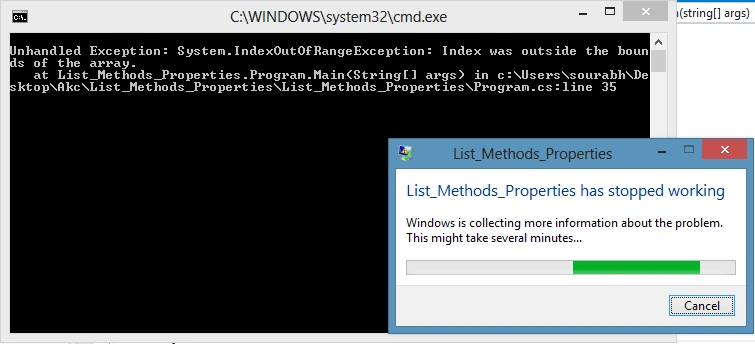
In the example above, I have created one class named "customer" and In the main method I have created an array named customers with a size of two. When I build this program (using CTRL+SHIFT+B) then I will get output like built successfully but when I run this program then I get the error:
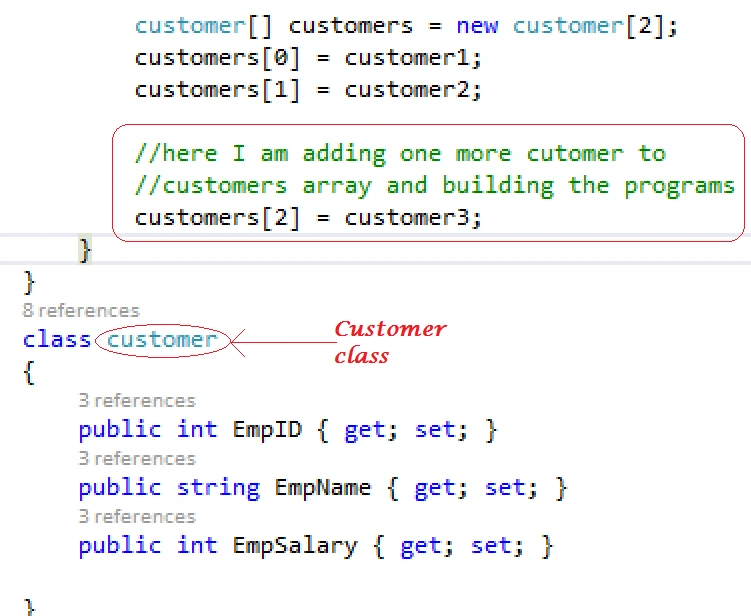
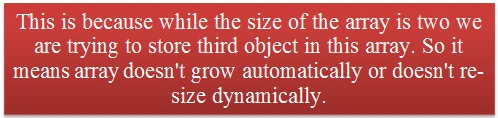
When I run this program then at run time I will get the exception index was out of the bound of the array.
So now we use List
A list is a generic data type that can hold any type of data that may be integer, float, string or may be complex type. To create a list we have 3 types of constructors.
List<Type> Customers = new List<Type>();//default constructor
List<Type> Customers = new List<Type>(int capacity);//with spacific capacity
List<Type> Customers = new List(IEnumerable<Type> collection);//with spacific collection
Example 2 - Using List
using System;
using System.Collections.Generic;

namespace List_Methods_Properties
{
    class Program
    {
        static void Main(string[] args)
        {
            customer customer1 = new customer()
            {
                EmpID = 1,
                EmpName = "Sourabh",
                EmpSalary = 50000
            };
            customer customer2 = new customer()
            {
                EmpID = 2,
                EmpName = "Shaili",
                EmpSalary = 60000
            };
            customer customer3 = new customer()
            {
                EmpID = 3,
                EmpName = "Saloni",
                EmpSalary = 55000
            };

            //using list
            // Creating List with initial capacity 2
            List<customer> Customers = new List<customer>(2);
            Customers.Add(customer1);  // Here Add Method is used to add the item to the list
            Customers.Add(customer2);

            //adding one more customer wheather capacity is 2 only
            Customers.Add(customer3);
        }
    }
    class customer
    {
        public int EmpID { get; set; }
        public string EmpName { get; set; }
        public int EmpSalary { get; set; }

    }
}
Output
In the preceding example we are adding 3 items to the list wereas the capacity is only two so it proves that a List can be automatically re-sized.
Add Method
Add method is used to add the items to the list.
How to access items from the C# List
To add the item to the list we use an index number to access it.
// <List Item>[index number]
Code
using System;
using System.Collections.Generic;

namespace List_Methods_Properties
{
    class Program
    {
        static void Main(string[] args)
        {
            customer customer1 = new customer()
            {
                EmpID = 1,
                EmpName = "Sourabh",
                EmpSalary = 50000
            };
            customer customer2 = new customer()
            {
                EmpID = 2,
                EmpName = "Shaili",
                EmpSalary = 60000
            };
            customer customer3 = new customer()
            {
                EmpID = 3,
                EmpName = "Saloni",
                EmpSalary = 55000
            };

            //using list
            // Creating List with initial capacity 2
            List<customer> Customers = new List<customer>(2);
            Customers.Add(customer1);
            Customers.Add(customer2);
            Customers.Add(customer3);

            //Accessing Item from the List

            customer c1 = Customers[0];
            Console.WriteLine("ID={0}, Name={1}, Salary={2}",c1.EmpID,c1.EmpName,c1.EmpSalary);

            customer c2 = Customers[1];
            Console.WriteLine("ID={0}, Name={1}, Salary={2}", c2.EmpID, c2.EmpName, c2.EmpSalary);

            customer c3 = Customers[2];
            Console.WriteLine("ID={0}, Name={1}, Salary={2}", c3.EmpID, c3.EmpName, c3.EmpSalary);
        }
    }
    class customer
    {
        public int EmpID { get; set; }
        public string EmpName { get; set; }
        public int EmpSalary { get; set; }

    }
}
How to access all the items of the list using foreach loop,
using System;
using System.Collections.Generic;

namespace List_Methods_Properties
{
    class Program
    {
        static void Main(string[] args)
        {
            customer customer1 = new customer()
            {
                EmpID = 1,
                EmpName = "Sourabh",
                EmpSalary = 50000
            };
            customer customer2 = new customer()
            {
                EmpID = 2,
                EmpName = "Shaili",
                EmpSalary = 60000
            };
            customer customer3 = new customer()
            {
                EmpID = 3,
                EmpName = "Saloni",
                EmpSalary = 55000
            };

            //using list
            // Creating List with initial capacity 2
            List<customer> Customers = new List<customer>(2);
            Customers.Add(customer1);
            Customers.Add(customer2);
            Customers.Add(customer3);

            //Accessing Item from the List using for loop

            foreach (customer c in Customers)
            {
                Console.WriteLine("ID={0}, Name={1}, Salary={2}", c.EmpID, c.EmpName, c.EmpSalary);
            }
        }
    }
    class customer
    {
        public int EmpID { get; set; }
        public string EmpName { get; set; }
        public int EmpSalary { get; set; }
    }
}
Output
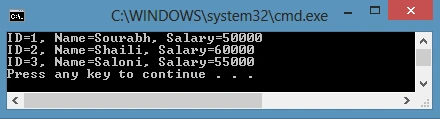
Note
You can also use for or while loop to access all the items.
Different Properties of a C# List
- Count: This property is the number of items of the List.
- Capacity: This property is the capacity of the List. By default the capacity is 0, then starts with 4, 8, 16, 32.....
using System;
using System.Collections.Generic;

namespace List_Methods_Properties
{
    class Program
    {
        static void Main(string[] args)
        {
            List<string> Names = new List<string>();
            Names.Add("Sourabh");
            Names.Add("Shaili");
            Names.Add("Saloni");
            Console.WriteLine("Number of Items in the List is:" + Names.Count);
            Console.WriteLine("Capacity of the List is:" + Names.Capacity);
        }
    }
}
Output
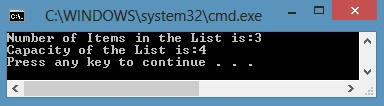
Different Methods of a C# List
- Contains: This method determines whether or not an element is in the List, if the element is present in the List then this method returns "True" else "False".
- Insert: This method is used to insert an element at a specific index.
- Remove: This method removes the first occurrence of the specific object from the list.
- RemoveAll: This method removes all the elements that matches the condition.
- RemoveAt: This method remove the element from the specified index.
- Clear: Removes all the element from the list.
- Sort: This method is used sort the List
- Reverse: This method reverses the order of the elements in the entire List.
- TrimExcess: This method sets the capacity to the actual number of elements in the list.
Example
using System;
using System.Collections.Generic;

namespace List_Methods_Properties
{
    class Program
    {
        static void Main(string[] args)
        {
            List<string> Names = new List<string>();
            Names.Add("Sourabh");
            Names.Add("Shaili");
            Names.Add("Saloni");
            Names.Add("Ankit");
            Names.Add("Bill");
            Names.Add("Dinesh");
            Names.Add("Mahesh Chand");
            Names.Add("DJ");
            Names.Add("Rajesh");
            Names.Add("Rajesh");
            Names.Add("Rajesh");
            //Contains: This method determines that weather the element is in List or not,
            //If element is present in List then this method returns "True" else return "False".
            Console.WriteLine(Names.Contains("Sourabh\n"));

            //accessing all the element from the list
            foreach (string Name in Names)
            {
                Console.WriteLine(Name);
            }

            //Insert: This method is used to insert an element in particular index.
            Names.Insert(5, "Rajesh");

            Console.WriteLine("\n\nAfter Inserting Rajesh at 5th index");
            foreach (string Name in Names)
            {
                Console.WriteLine(Name);
            }

            //Sort: Sorts the List
            Names.Sort();
            Console.WriteLine("\n\nSorting in List");
            foreach (string Name in Names)
            {
                Console.WriteLine(Name);
            }

            //Reverse: Reverse the order of the element of List
            Names.Reverse();
            Console.WriteLine("\n\nReverse Elements of List");
            foreach (string Name in Names)
            {
                Console.WriteLine(Name);
            }

            //Remove: Removes the elements from the list
            Names.Remove("Rajesh");
            Console.WriteLine("\n\nRemove Element from the List using Remove Method");
            foreach (string Name in Names)
            {
                Console.WriteLine(Name);
            }

            //RemoveAt:Remove the elements from the list at the specific index
            Names.RemoveAt(7);
            Console.WriteLine("\n\nRemove Element from the List using RemoveAt Method");
            foreach (string Name in Names)
            {
                Console.WriteLine(Name);
            }

            //nTrimExcess:Sets the capacity to the actual number of elements in the List
            Names.TrimExcess();
            Console.WriteLine("\n\nTrimExcess Method");
            Console.WriteLine("Capacity: {0}", Names.Capacity);
            Console.WriteLine("Count: {0}", Names.Count);

            //Clear:Removes all elements from the List
            Names.Clear();
            Console.WriteLine("\n\nClear Method");
            Console.WriteLine("Capacity: {0}", Names.Capacity);
            Console.WriteLine("Count: {0}", Names.Count);
            Console.ReadKey();
        }
    }
}
Output

In this article, we saw some use cases of List<T>.
Further readings
Kumaresan MurugesanPosted Feb 8, 2021, 8:23 AM
Nice article
Kunjal ChaudhariPosted Mar 28, 2020, 3:32 AM
Hello, You declare a different class 'Customer', if i want to use the same class then how it is possible?
Deep DasPosted Feb 22, 2020, 12:15 PM
How would you check that in a list there is customer with ID 2. I would like to add the customer with Id 2 only if its not already in the list.
Rahul KadamPosted Nov 5, 2018, 7:38 AM
Good one,,,,,
KeyurPosted Nov 4, 2018, 4:53 AM
Very nice article. Just to make it complete, adding usage of TrimExcess(). It will remove extra capacity which is going to be allocated by default.
Hiten PandyaPosted Nov 2, 2018, 12:29 AM
Very Straight forward and simple explanation. Good one.
Hitanshi MehtaPosted Sep 28, 2018, 3:18 PM
Good one!!!!
sourav mahajanPosted Apr 23, 2018, 1:06 AM
Great..explanation
Surender BhyanPosted Nov 17, 2014, 3:44 AM
very clean and clear explanation. Thanks :)