

This article provides a sample TIC TAC TOE 2 player game in C#.
Introduction
Tic Tac Toe is a simple game that, if played optimally by both the players, will always result in a tie. However, many players (especially the younger children) still enjoy it, and Tic Tac Toe can be made significantly more complex by increasing the size of the board.
It is a two player game. The goal of Tic Tac Toe is to be the first player to get three in a row on a 3x3 grid, or you can increase the number of boards.
Diagram
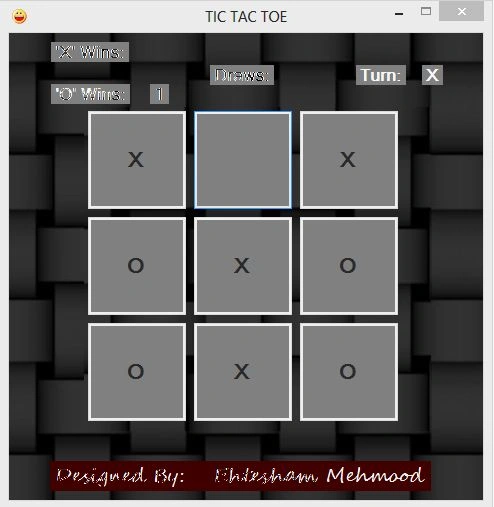
Global variables
// here we define variables
int xWins = 0;
int yWins = 0;
int d = 0;
Button[] b = new Button[9];
Form load event
//Here form will be loaded like a program load in to memory
private void Form1_Load(object sender, EventArgs e)
{
// here is the loop of 9 iterations because we want 3x3 board and then
//putting in theflowLayoutPanel
for (int i = 0; i < 9; i++)
{
b[i] = new Button();
b[i].Width = 100;
b[i].Height = 100;
b[i].Click += new EventHandler(Form1_Click);
flowLayoutPanel1.Controls.Add(b[i]);
}
}
Reset Function
/// Reset is function who clear the board.
/// </summary>
void reset()
{
for (int i = 0; i < 9; i++)
{
b[i].Enabled = true;
b[i].Text = "";
draw = 0;
}
}
Form click event
void Form1_Click(object sender, EventArgs e)
{
Button bt = (Button)sender;
if (flag == 0)
{
bt.Text = "X";
label10.Text = "O";
flag = 1;
}
else
{
bt.Text = "O";
label10.Text = "X";
flag = 0;
}
bt.Enabled = false;
draw++;
//call check funtion for conditions
check();
if (draw == 9)
{
MessageBox.Show("Game Draw");
d++;
label6.Text = d.ToString();
reset();
}
}
Check Function
void check() // Here is the check() function in which conditions will full fill.
{
//FOr Rows
if (b[0].Text == b[1].Text && b[1].Text == b[2].Text && b[0].Text!="")
{
MessageBox.Show(b[0].Text + " Wins");
if (b[0].Text == "X")
{
xWins++;
label3.Text = xWins.ToString();
}
else
{
yWins++;
label4.Text = yWins.ToString();
}
reset();
}
if (b[3].Text == b[4].Text && b[4].Text == b[5].Text && b[3].Text != "")
{
MessageBox.Show(b[3].Text + " Wins");
if (b[3].Text == "X")
{
xWins++;
label3.Text = xWins.ToString();
}
else
{
yWins++;
label4.Text = yWins.ToString();
}
reset();
}
if (b[6].Text == b[7].Text && b[7].Text == b[8].Text && b[6].Text != "")
{
MessageBox.Show(b[6].Text + " Wins");
if (b[6].Text == "X")
{
xWins++;
label3.Text = xWins.ToString();
}
else
{
yWins++;
label4.Text = yWins.ToString();
}
reset();
}
//For Coloums
if (b[0].Text == b[3].Text && b[3].Text == b[6].Text && b[0].Text != "")
{
MessageBox.Show(b[0].Text + " Wins");
if (b[0].Text == "X")
{
xWins++;
label3.Text = xWins.ToString();
}
else
{
yWins++;
label4.Text = yWins.ToString();
}
reset();
}
if (b[1].Text == b[4].Text && b[4].Text == b[7].Text && b[1].Text != "")
{
MessageBox.Show(b[1].Text + " Wins");
if (b[1].Text == "X")
{
xWins++;
label3.Text = xWins.ToString();
}
else
{
yWins++;
label4.Text = yWins.ToString();
}
reset();
}
if (b[2].Text == b[5].Text && b[5].Text == b[8].Text && b[2].Text != "")
{
MessageBox.Show(b[2].Text + " Wins");
if (b[2].Text == "X")
{
xWins++;
label3.Text = xWins.ToString();
}
else
{
yWins++;
label4.Text = yWins.ToString();
}
reset();
}
//For Diagnols
if (b[0].Text == b[4].Text && b[4].Text == b[8].Text && b[0].Text != "")
{
MessageBox.Show(b[0].Text + " Wins");
if (b[0].Text == "X")
{
xWins++;
label3.Text = xWins.ToString();
}
else
{
yWins++;
label4.Text = yWins.ToString();
}
reset();
}
if (b[2].Text == b[4].Text && b[4].Text == b[6].Text && b[2].Text != "")
{
MessageBox.Show(b[2].Text + " Wins");
if (b[2].Text == "X")
{
xWins++;
label3.Text = xWins.ToString();
}
else
{
yWins++;
label4.Text = yWins.ToString();
}
reset();
}
}
I have also attached the source code so you can download it and run it on your PC.
MarkRLVPosted Sep 15, 2022, 7:46 PM
Can you change this program so # of players = 0 and the computer can learn "the only way to win is not to play" -- a reference to the 1983 movie War Games?
csharp godPosted Feb 23, 2022, 1:19 AM
Console.WriteLine("Player {0} has won", (player % 2) + 1); can you please tell me what does the {0} stand for and how does it change if its 1 or 0?
Anjith AkPosted Dec 23, 2021, 6:07 PM
Hi, once a player has won it would be nice if console clears itself and restarts game, how can we do this?
akshay BarapatrePosted Jan 31, 2021, 5:45 PM
Chage it bcoz 7 8 9 is not working
akshay BarapatrePosted Jan 31, 2021, 5:44 PM
//Winning Condition For Third Row else if (arr[7] == arr[8] && arr[8] == arr[9]) { return 1; }
Giri GowdaPosted Nov 17, 2019, 8:49 AM
How to run this code
Sadhana GaudPosted May 12, 2014, 11:17 PM
thnks... It helped to improve my logic in program
Shweta LodhaPosted Apr 19, 2014, 5:22 AM
Nice one
Shaili DashoraPosted Apr 8, 2014, 1:36 AM
nice artical sourabh