

Introduction
C# supports both synchronous and asynchronous methods. Let's learn the difference between synchronous and asynchronous and how to code in C#.
Interestingly enough, any method we normally create in C# is synchronous by default. For example, the following method fetches data from a database and binds it to a TextBox synchronously.
private void LoadData() {
    // Create connection
    SqlConnection conn = new SqlConnection(@ "network address= .; integrated
    security = true; database = EmployeeDb ");
    // Create command
    string sql = @ "select EmpId,Name
    from dbo.EmployeeDetails where EmpID <= 500 ";
    // Data binding code goes here
    try {
        // Open connection
        conn.Open();
        // Execute query via ExecuteReader
        SqlDataReader rdr = cmd.ExecuteReader();
        while (rdr.Read()) {
            txtReader.AppendText("\nEmpID: ");
            txtReader.AppendText(rdr.GetValue(1) + "\t\t" + rdr.GetValue(0));
            txtReader.AppendText("\n");
        }
    } catch (SqlException ex) {
        MessageBox.Show(ex.Message + ex.StackTrace, "Exception Details");
    } finally {
        conn.Close();
    }
}
What is Synchronous in C#
-
Synchronous represents a set of activities that starts happening together at the same time.
-
A synchronous call waits for the method to complete before continuing with program flow.
How bad is it?
-
It badly impacts the UI that has just one thread to run its entire user interface code.
-
Synchronous behavior leaves end users with a bad user experience and a blocked UI whenever the user attempts to perform some lengthy (time-consuming) operation.
Business Scenario and Problem Statement
Consider a real-world business case in which a UI binds data to the data grid by fetching it from the database. While data is being fetched and bound to the grid the rest of the UI is blocked. Any attempt of interaction with other UI controls will not be evident until the data loading is over. This UI blockage gets over when data fetch-and-binding is completely done. Refer to "Figure 1-1 Synchronous Behavior" below
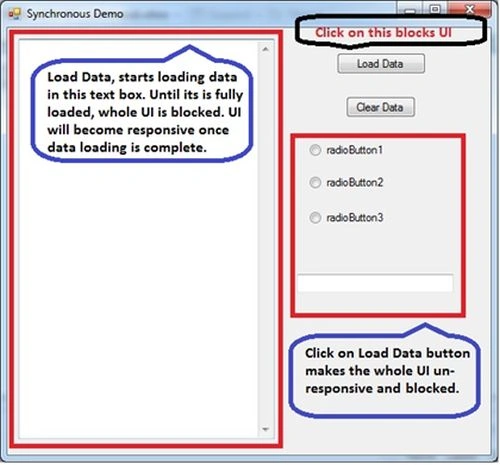
Figure 1-1 Synchronous Behavior
Solution to the Synchronous Problem
A synchronous method call can create a delay in program execution that causes a bad user experience. Hence, an asynchronous approach (threads) will be better. An asynchronous method call (cretion of a thread) will return immediately so that the program can perform other operations while the called method completes its work in certain situations.
The asynchronous method's behavior is different than synchronous ones because an asynchronous method is a separate thread. You create the thread; the thread starts executing, but control is immediately returned back to the thread that called them time; while the other thread continues to execute.
In general, asynchronous programming makes sense in two cases as,
-
If you are creating a UI intensive application in which the user experience is the prime concern. In this case, an asynchronous call allows the user interface to remain responsive. Unlike as shown in Figure 1-1.
-
If you have other complex or expensive computational work to do, you can continue; interacting with the application UI while wait for the response back from the long-running task.
Asynchronous Patterns in C#
There are various ways to use threads in applications. These recipes are known as Patterns.
Asynchronous Programming Model Pattern
-
Relies on two corresponding methods to represent an asynchronous operation: BeginMethodName and EndMethodName
-
Most often you must have seen this while using delegates or method invocation from a Web Service.
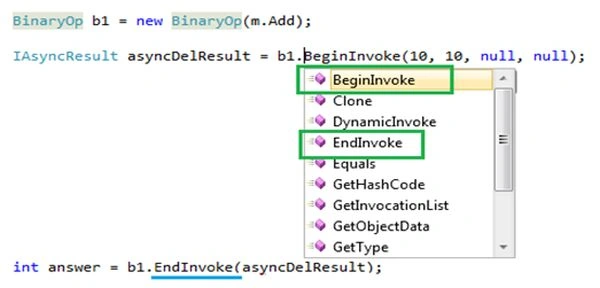
Figure 1-2 APM Pattern
Event Based Asynchronous Pattern
-
The Event-based Asynchronous Pattern has a single MethodNameAsync method and a corresponding MethodNameCompleted event
-
Basically, this pattern enforces a pair of methods and an event to collaborate and help the application execute a thread asynchronously
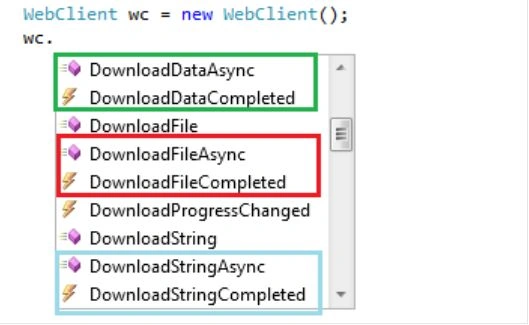
Figure 1-3 Event Based Pattern
Task based Asynchronous Pattern
-
The Microsoft .NET Framework 4.0 introduces a new Task Parallel Library (TPL) for parallel computing and asynchronous programming. The namespace is "System.Threading.Tasks".
-
A Task can represent an asynchronous operation and a Task provides an abstraction over creating and pooling threads.
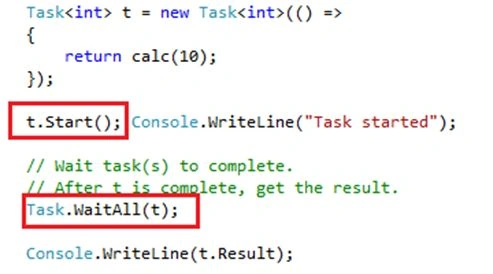
Figure 1-4 Task Based Pattern
C# 5.0 async and await based Asynchronous Pattern
-
Two new keywords, async and await, were introduced in C# 5.0 and .NET 4.5. These are implemented at the compiler level and built on top of the "System.Threading.Tasks.Task" feature of .NET 4.0.
-
To work with async and await, you must have Visual Studio 2012
async void LoadEmployee_Click(object sender, RoutedEventArgs e) {
    // ...
    await viewer.LoadEmplployeeAsync();
    // ...
}
Problem with older Asynchrnous Patterns
With earlier patterns, the programmer needed to do all the plumbing and collaboration between a pair of methods (BeginMethod and EndMethod) or a method and an event (MethodAsync and MethodCompleted) to make them functional; see Figure 1-2 APM Pattern. This approach was a tedious job not only in terms of syntax but also from sequence of statements inside the method body.
C# 5.0 async/await offers a completely different and easy way to do asynchronous programming. With this feature it's no longer the responsibility of the programmer to do the syntax related tedious work, rather this is now done by the keywords (C# 5.0 async / await) provided by the programming language.
As a result, asynchronous code is easy to implement and retain its logical structure. Hence now it is as easy as writing your normal method without concern of any extra plumbing and so on. As shown in other asynchronous patterns in which you need to deal with a pair of methods or a combination of methods and events and so on.
Business Scenario
Consider a real-world business case, a WPF UI binding data to the data grid by fetching a large number of rows from a database. While data is being fetched and bound to a grid, the rest of the UI should continue to be responsive. Any attempt at interaction with other UI controls must not be blocked and data loading and binding must continue in parallel.. Refer to "Figure 1-1 Synchronous Behavior" below.
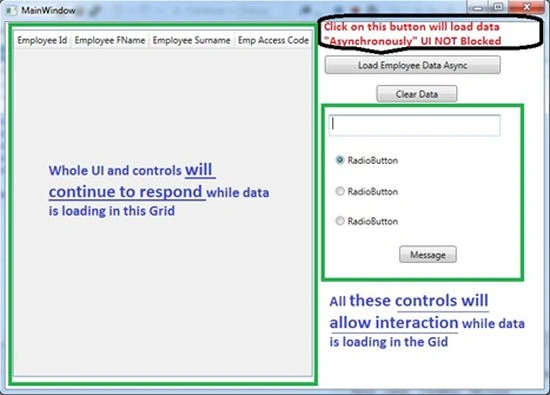
Figure 1-5 Asynchronous Behavior
Let's Code
If you look at the code below, it looks like normal code as shown at the very beginning of this article. The differences worth noting are highlighted in yellow in the code block below.
Private async void LoadCustomersAsync() {
    using(EmployeeDbEntities ent = new EmployeeDbEntities()) {
        IdbConnection conn = (ent.Connection as EntityConnection).StoreConnection;
        conn.Open();
        using(DbCommand cmd = (DbCommand) conn.CreateCommand()) {
            var query = from p in ent.EmployeeDetails
            where p.Name.Contains("FN") && p.SurName.Contains("SN") && (p.Name + p.SurName).Length > 3
            select p;
            //Convert linq query to SQL statement for CommandText
            string str = ((ObjectQuery) query).ToTraceString();
            cmd.CommandText = str;
            // Invoke Async flavor of ExecuteReader
            var task = await cmd.ExecuteReaderAsync();
            //translate retieved data to entity customer
            var cust1 = await Task.Run(
                () => ent.Translate < EmployeeDetails > (task).ToList < EmployeeDetails > ());
            employeesDataGrid.ItemsSource = cust1;
        }
    }
}
As you noticed, the flow looks very natural and no extra plumbing appears in the code. Except async/await, task and of course the asynchronous flavor of the main function that is retrieving data from the database; in our case, ExecuteReaderAsync() is the method.
This code will allow you to perform UI interaction; when data is being fetched and grid binding is taking place, refer to the Figure 1-6 async/await in action.
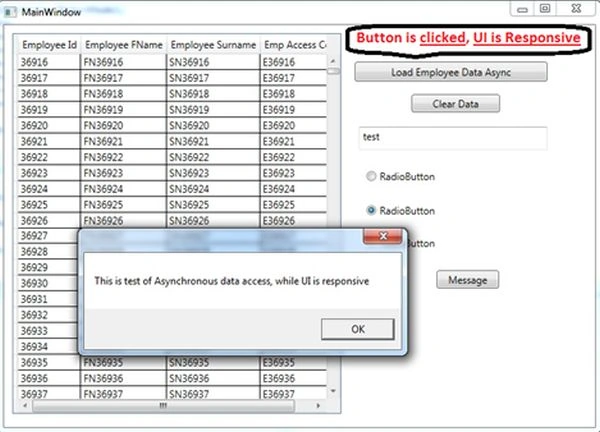
Figure 1-6 async/await in action (as you can see in image 36K + rows pulled)
Legacy Operations
Microsoft suggests that with the release of .NET 4.5, the following commonly used methods should be considered as legacy operations. When possible and if you are usng .NET 4.5 then you must use async and await to do asynchronous programming in your application.
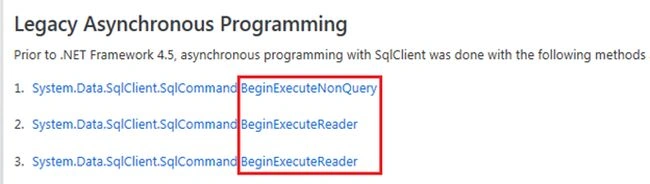
Figure 1-7 Legacy Operations
What if you don't have Visual Studio 2012
Since Visual Studio 2012 is still not adopted by many development teams in various organizations and many developers still use Visual Studio 2010. So, can they use async and await syntax there?
Microsoft released an async CTP that is supposed to work well with Visual Studio 2010 (without SP1) and allow the developers to use the same syntax.
Search for "async CTP" in Bing or Google.
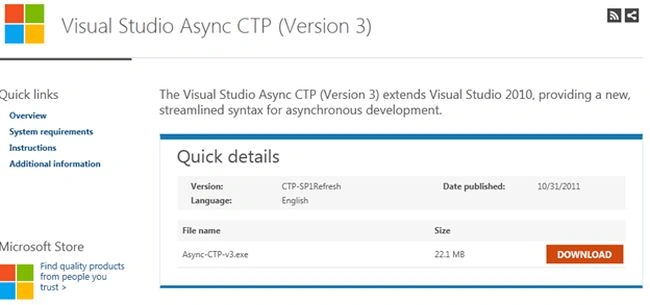
Figure 1-8 Async CTP download page
Side-by-Side Comparison of various ways techniques
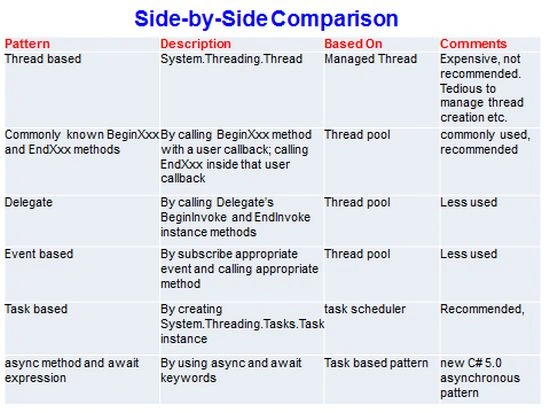
Figure 1-9 Side-by-Side comparison on various techniques
Jignesh KumarPosted Mar 7, 2020, 2:50 AM
Very informative article thank for sharing ..
Dipa MehtaPosted Mar 6, 2020, 7:45 AM
Very detailed article...
Md. KhanPosted Oct 29, 2018, 1:21 AM
Great explaining...
John SamuelPosted Sep 21, 2017, 7:02 AM
All your articles are very easy to understand. Great work. Thank You!!! :)
Ramesh beruguPosted Dec 2, 2014, 11:19 PM
in LoadCustomersAsync(), when control is reached cmd.ExecuteReaderAsync() method, the control will wait until it is completed, this is same like synchronous programming, here i could see the only one benefit that the UI will not blocked, can you please explain me if i am wrong
Vidya Vrat AgarwalPosted Sep 22, 2014, 4:25 PM
Code snippets are shown on the article.
Ramesh beruguPosted Sep 21, 2014, 11:44 AM
Sir, do you have sample code of this example
Vidya Vrat AgarwalPosted Aug 12, 2013, 8:29 AM
Glad that you guys find it helpful.
Ravi ShekharPosted Aug 12, 2013, 8:16 AM
Nice article sir. thank you for this article
Anurag SarkarPosted Aug 12, 2013, 5:44 AM
Thanks Sir.