

Introduction
Using WebView we can create an Android application but not a native Android application.
Assuming we want to customize that application, we must capture the request executed when the web page is loaded.
When the request is captured then we can only redirect the control to an activity then we can develop the activity using an overridden method in WebViewClient.
- public void onLoadResource(WebView view, String url){}
For instance,
- WebView mWebView;
- mWebView.setWebViewClient(new MyWebViewClient()
- {
- @Override
- public void onLoadResource(WebView view, String url){
- System.out.println("Current URL : "+ url + " " + Html.fromHtml("<br>") + " is http url ? "+ URLUtil.isHttpUrl(url));
- if( url.equals("http://www.c-sharpcorner.com/1/247/android-programming.aspx"))
- {
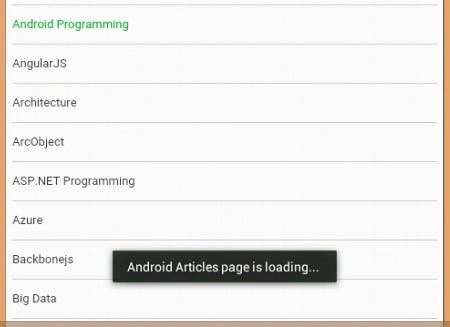
- Toast.makeText(getApplicationContext(), "Android Articles page is loading... ", Toast.LENGTH_LONG).show();
- }
- }
- }
Assume we want to get cookies to get session details and other information, then depending on the URL we can get the cookies.
We can also get the session of the web page loaded in the WebView.
CookieSyncManager
The CookieSyncManager synchronizes the browser cookie store between main memory and permanent storage.
- CookieSyncManager.getInstance().sync();
For instance,
- public void onPageFinished(WebView view, String url){
- CookieSyncManager.getInstance().sync();
- URL url1 = null;
- try {
- url1 = new URL(url);
- }
- catch (MalformedURLException e) {
- // TODO Auto-generated catch block
- e.printStackTrace();
- }
- System.out.println("C sharp corner user Ref " + url1.getRef());
- System.out.println(" C sharp corner user host " + url1.getHost());
- System.out.println("C sharp corner user authority " + url1.getAuthority());
- String cookies = CookieManager.getInstance().getCookie(url);
- System.out.println("All COOKIES " + cookies);
- Toast.makeText(getApplicationContext(),"All Cookies " + cookies , Toast.LENGTH_LONG).show();
- }
Source Code-
MainActivity.java
- package com.example.webviewdemo;
- import java.net.MalformedURLException;
- import java.net.URL;
- import android.annotation.SuppressLint;
- import android.app.Activity;
- import android.content.Context;
- import android.os.Bundle;
- import android.text.Html;
- import android.webkit.CookieManager;
- import android.webkit.CookieSyncManager;
- import android.webkit.URLUtil;
- import android.webkit.WebView;
- import android.webkit.WebViewClient;
- import android.widget.Toast;
- public class MainActivity extends Activity {
- public Context context;
- public class MyWebViewClient extends WebViewClient {}
- WebView mWebView;
- String url = "http://www.c-sharpcorner.com/";@SuppressLint("SetJavaScriptEnabled")@Override
- public void onCreate(Bundle savedInstanceState) {
- super.onCreate(savedInstanceState);
- setContentView(R.layout.activity_main);
- mWebView = (WebView) findViewById(R.id.webView1);
- mWebView.getSettings().setJavaScriptCanOpenWindowsAutomatically(true);
- mWebView.getSettings().setBuiltInZoomControls(true);
- mWebView.setWebViewClient(new MyWebViewClient() {@Override
- public void onLoadResource(WebView view, String url) {
- System.out.println("Current URL : " + url + " " + Html.fromHtml("<br>") + " is http url ? " + URLUtil.isHttpUrl(url));
- if (url.equals("http://www.c-sharpcorner.com/1/247/android-programming.aspx")) {
- Toast.makeText(getApplicationContext(), "Android Articles page is loading... ", Toast.LENGTH_LONG).show();
- }
- }@Override
- public void onPageFinished(WebView view, String url) {
- CookieSyncManager.getInstance().sync();
- URL url1 = null;
- try {
- url1 = new URL(url);
- } catch (MalformedURLException e) {
- // TODO Auto-generated catch block
- e.printStackTrace();
- }
- System.out.println("C sharp corner user Ref " + url1.getRef());
- System.out.println(" C sharp corner user host " + url1.getHost());
- System.out.println("C sharp corner user authority " + url1.getAuthority());
- String cookies = CookieManager.getInstance().getCookie(url);
- System.out.println("All COOKIES " + cookies);
- Toast.makeText(getApplicationContext(), "All Cookies " + cookies, Toast.LENGTH_LONG).show();
- }
- });
- mWebView.getSettings().setJavaScriptEnabled(true);
- mWebView.loadUrl(url);
- }@Override
- public void onBackPressed() {
- if (mWebView.canGoBack()) {
- mWebView.goBack();
- } else {
- super.onBackPressed();
- }
- }
- }
activity_main.xml
- <?xml version="1.0" encoding="utf-8"?>
- <LinearLayout xmlns:android="http://schemas.android.com/apk/res/android"
- android:layout_width="match_parent"
- android:layout_height="match_parent"
- android:orientation="vertical" >
- <WebView
- android:id="@+id/webView1"
- android:layout_width="match_parent"
- android:layout_height="match_parent" />
- </LinearLayout>
Note
Add Permission of the internet in the manifest file.
- <uses-permission android:name="android.permission.INTERNET" />
Output
After capturing the request URL before a web page,
Android Program
After getting a cookies session in a WebView,
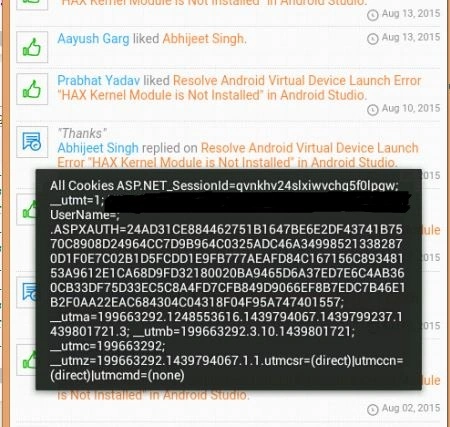
Figure 2- WebView
Santhakumar MunuswamyPosted Aug 22, 2015, 7:07 AM
Good Article. Thanks for sharing
RakeshPosted Aug 20, 2015, 10:22 AM
Good one sir
Sibeesh VenuPosted Aug 20, 2015, 6:25 AM
Nice Share
Rajeesh MenothPosted Aug 20, 2015, 4:13 AM
Nice Share
Mohammed IbrahimPosted Aug 20, 2015, 2:59 AM
nice....
Gopi ChandPosted Aug 20, 2015, 2:53 AM
Nice work Abhijeet :)
Vaikesh K PPosted Aug 20, 2015, 2:44 AM
Nice :)
Karthikeyan KPosted Aug 20, 2015, 2:34 AM
Nice one sir..Thanks for share