

Introduction
This article introduces the HyperText Markup Language (HTML) language and how to start coding in HTML. In my next article of this series, I will show you all the major tags of the HTML language in just one article so until then go through this and be ready for the next part.
What is HTML?
HTML is a language for web pages.
What is HTML?
- HTML is a specific instance of a markup language based on a standard known as Standard Generalized Markup Language (SGML).
- HTML defines the structure and layout of a Web document using a variety of tags and attributes.
- HTML is a markup language.
- A markup language is a set of markup tags.
- The tags describe document content.
- HTML documents contain HTML tags and plain text.
The flow of the Data
- HTML allows you to specify the document specification separate from the formatting rules.
- HTML is used for the document specification, that is, it is used to specify the logical structure of the document.
For example, we can mark up some text as being a section header without any specification of what the header looks like.
Format information is provided separately.
For example, we can provide a format specification for a section header, specifying that it should appear as a 14 pt. font in boldface, left-justified.
The basic idea is that a presentation program (Netscape is an example of such a program) takes the HTML and a format specification and creates the actual document.
Diagram
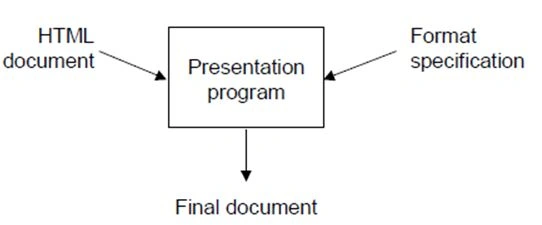
Basic Idea
- <!DOCTYPE html>
- <html>
- <body>
- <h1> Good morning Ehtesham Mehmood </h1>
- <p> Good evening Ehetsham Mehmood</p>
- </body >
- </html >
- HTML tags are keywords (tag names) surrounded by angle brackets like <html>
- HTML tags normally come in pairs like <b> and </b>
- The first tag in a pair is the start tag, the second tag is the end tag
- The end tag is written like the start tag, with a forward slash before the tag name
- Start and end tags are also called opening tags and closing tags
- The DOCTYPE declaration defines the document type.
- The text between <html> and </html> describes the web page.
- The text between <body> and </body> is the visible page content.
- The text between <h1> and </h1> is displayed as a heading.
- The text between <p> and </p> is displayed as a paragraph.
In which editor can we code HTML?
- Notepad
- Adobe Dreamweaver
- Notepad++
I will use Notepad here. Use the following procedure to create your first web page with Notepad.
Step 1
Start Notepad
To start Notepad click on the Start button then select "All Programs" >> "Accessories" >> "Notepad".
Step 2
Edit Your HTML with Notepad
Type your HTML code into Notepad.
Step 3
Save Your HTML
Select "Save as.." in Notepad's file menu. When you save an HTML file, you can use either the .htm or the .html file extension.
Step 4
Run the HTML in your browser
Start your web browser and open your HTML file from the "File" -> "Open" menu, or just browse to the folder and double-click your HTML file.
In my next part of this article, I will show all the major tags of the HTML language in just one article so until then go through this and be ready for the next part.
Ehtesham MehmoodPosted Jan 31, 2015, 2:30 PM
Good start. Welcome to the C# Corner (y)