

Introduction
Today in this article I will show you the basic Swing components of the Java language, including how to handle these components and how to work with these components. In this article, we will cover the following components.
-
Frame
-
Buttons
-
Combo Box
-
CheckBox
-
Radio Button
-
Menu Bar
-
Open File Dialog Box
-
Save File Dialog Box
-
Password Field
-
Text Field
-
Text Area
-
Progress Bar
Start
-
First, select "File" >> "New project" then select Java application and then "OK".
-
Then right-click on your package and click "Add new item" then add a new Frame from there.
-
Drag the Menu bar from the pallet and right-click on the file then click "Add" from the pallet then click menu item.
-
Drag a combo box from the pallet on the frame and go to the properties of the component and edit its models property and write like I C#, Java, PHP and so on.
-
Drag two buttons from the pallet as in the diagram below.
-
Drag a text field and text area from the pallet.
-
Drag checkboxes and radio buttons from the pallet on the Frame.
-
Drag a File Chooser from the pallet on Frame.
-
Double-click on the component then its action performed event will be generated.
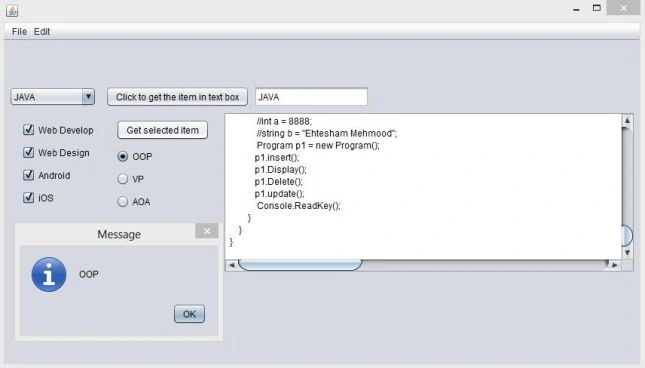
Menu Bar Item events
1. Open File Dialog
- jMenuItem1 event
- private void jMenuItem1ActionPerformed(java.awt.event.ActionEvent evt)
- {
- int returnVal = jFileChooser1.showOpenDialog(this);
- if (returnVal == JFileChooser.APPROVE_OPTION)
- {
- File file = jFileChooser1.getSelectedFile();
- String file_name = file.toString();
- try
- {
- FileReader FR = new FileReader(file_name);
- jTextArea1.read(FR, evt);
- } catch (Exception e) {}
- }
- }
2. Save File Dialog Box
- jMenuItem2 event
- private void jMenuItem2ActionPerformed(java.awt.event.ActionEvent evt)
- {
- int returnVal = jFileChooser1.showSaveDialog(this);
- if (returnVal == JFileChooser.APPROVE_OPTION)
- {
- File file = jFileChooser1.getSelectedFile();
- String file_name = file.toString();
- try
- {
- FileWriter FW = new FileWriter(file_name, false);
- String AllText = jTextArea1.getText();
- FW.write(jTextArea1.getText());
- FW.write(AllText);
- FW.flush();
- FW.close();
- }
- catch (Exception e) {}
- }
- }
3. Combo Box
- jButton1 event.
- private void jButton1ActionPerformed(java.awt.event.ActionEvent evt)
- {
- String s = (String) jComboBox1.getSelectedItem();
- jTextField1.setText(s);
- }
4. CheckBox and Radio Buttons
- private void jButton2ActionPerformed(java.awt.event.ActionEvent evt)
- {
- String s1 = "";
- String s2 = "";
- if (jCheckBox1.isSelected())
- {
- s1 = s1 + "" + jCheckBox1.getText() + "\n";
- }
- if (jCheckBox2.isSelected())
- {
- s1 = s1 + "" + jCheckBox2.getText() + "\n";
- }
- if (jCheckBox3.isSelected())
- {
- s1 = s1 + "" + jCheckBox3.getText() + "\n";
- }
- if (jCheckBox4.isSelected())
- {
- s1 = s1 + "" + jCheckBox4.getText() + "\n";
- }
- }
jTextArea1.setText(s1);//here assign the all check box which are selected to the text area.
//here we check same for the Radio buttons.
Gowtham RajamanickamPosted May 19, 2015, 12:49 AM
good one