

Introduction
This article will mainly focus on how to change the icon of a shortcut in Windows 10. In computer terminology, an icon is a graphical representation or a simple picture that denotes a program or data file or command in a Graphical User Interface (GUI) format. In other words, it provides a way to represent a program or data file or command by a picture rather than textual information.
Icons make our display more attractive in comparison with textual information. Users can easily understand by seeing the icon what it will be done. The most used file format for the icon is ".ico". This ".ico" file holds only one icon file in its store, but some file types keep icons for you to use. These are as follows:
- .exe: exe icons can be set into the executable files of an application and these executable files can contain one or more icons.
- .dll: DLL icons can also be inserted into DLL files. One or more icons can also be in a DLL.
How to change the icon of a shortcut folder or program in Windows 10?
At first, make sure that you have downloaded the icon that you want to change. The icon with a size of 256 x 256 is always advised by Microsoft because this is the standard size comparison for selecting a large icon view.
The following is the procedure to change the icons of a shortcut.
Step 1
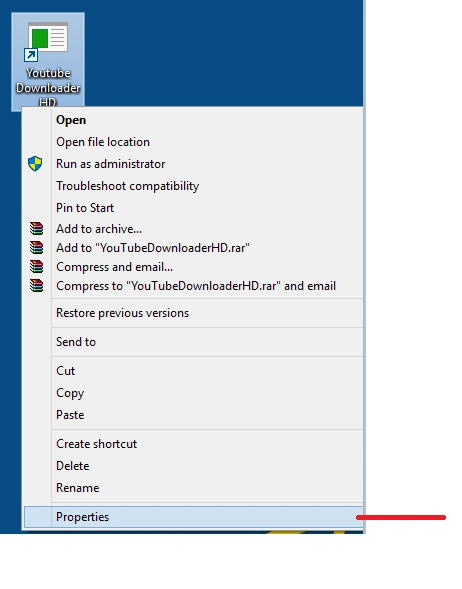
Select the folder or application whose icon you want to change, right-click on it and select Properties.
Step 2
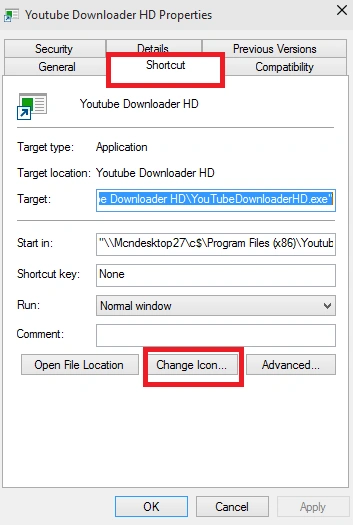
Go to the Shortcut tab and click on it, then choose the Change Icon button.
Step 3
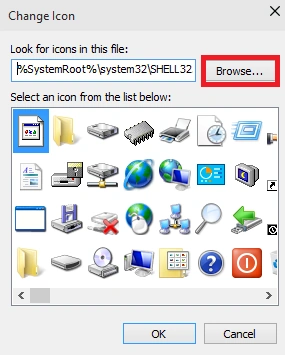
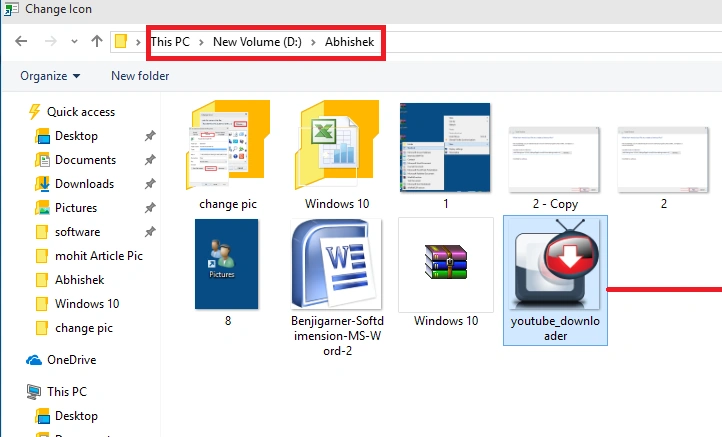
Now a dialog box will appear for Change Icon. In this, you can find many icons associated with your folder or your application. You can choose any one of them or if you want to set the icon that you have downloaded, then click Browse.
Neeraj KumarPosted Jul 24, 2015, 1:12 PM
Folder Shortcut Icon can be change in windows 8/8.1
Sibeesh VenuPosted Jul 24, 2015, 4:13 AM
Nice Share. Thank you
SharadPosted Jul 24, 2015, 3:16 AM
nice....
Gopi ChandPosted Jul 24, 2015, 1:36 AM
Good one
Nilesh JadavPosted Jul 24, 2015, 12:35 AM
Nice work sir