

Introduction
In this article, we will learn how to create an image in Canvas. We know that many elements can be created such as rectangles, circles, triangles, and diamond shapes by drawing paths, and with various shades using rgba. In this segment we see will how to draw images in the Canvas. To draw the images in The canvas using HTML5 we use the drawimage() function that allows us to create an image object within the canvas area. We specify the image object and destination point where we want to draw the image in HTML5 Canvas.
Here are the steps:
Step 1:
- Open the Visual Studio 2010.
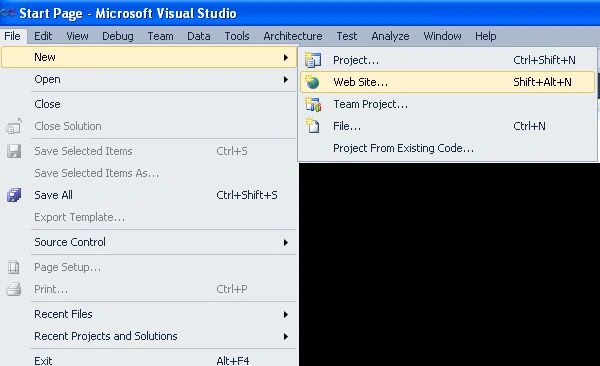
- File->>New->>Website
- choose an Empty Website

- Right-click on the Solution Explorer
- Add->>add new item->>HTML form
- Give the name.

Step 3:
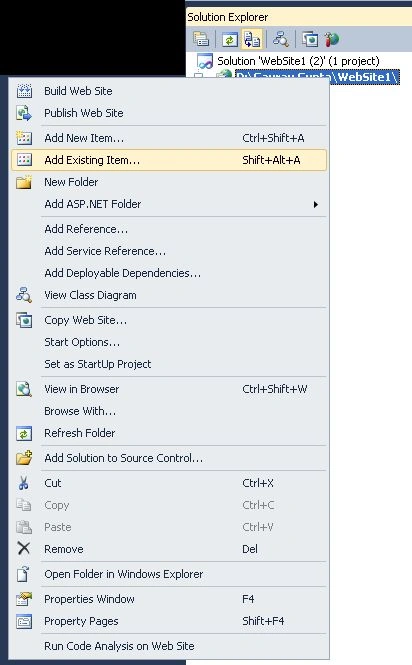
- Right-click on the Solution Explorer
- Add Existing Item
- Add the Images in the Solution Explorer.
Step 4:
Write the code below in the .htm Page:
- <html>
- <head>
- <style>
- body {
- margin: 0px;
- padding: 0px;
- }
- Canvas {
- border: 10px solid #9Cff98;
- }
- </style>
- <script>
- window.onload = function () {
- var canvas = document.getElementById("myCanvas");
- var context = canvas.getContext("2d");
- var canvas2 = document.getElementById("my2anvas");
- var context2 = my2anvas.getContext("2d");
- var imageObj = new Image();
- var neximg = new Image();
- imageObj.onload = function () {
- context.drawImage(imageObj, 100 , 80);
- };
- neximg.onload = function () {
- context2.drawImage(neximg, 100, 80);
- };
- imageObj.src = "images.jpg";
- neximg.src = "images (1).jpg";
- };
- </script>
- </head>
- <body>
- <canvas id="myCanvas" width="450" height="350"></canvas>
- </br>
- <canvas id="my2anvas" width="450" height="350"></canvas>
- </body>
- </html>
Step 5: Press F5 and see the Output:
Output

Join the conversation! Your thoughts help the community grow.