

In this article we will learn how to make CAPTCHA codes in JSP with a simple example.
What a CAPTCHA is
The acronym CAPTCHA stands for "Completely Automated Public Turing test to tell Computers and Humans Apart". Since the dawn of the internet, people have tried to abuse or hack websites for both sport and profit. As the abuse became profitable, the scale of abuse grew using automated software (sometimes referred to as robots or bots). To prevent bots from overrunning sites with spam, fraudulent registrations, fake entries and other notorious things, publishers responded by testing users to see if they were human or not.
In other words it is a type of challenge-response test used in computing to determine whether or not the user is human.
A CAPTCHA looks like:
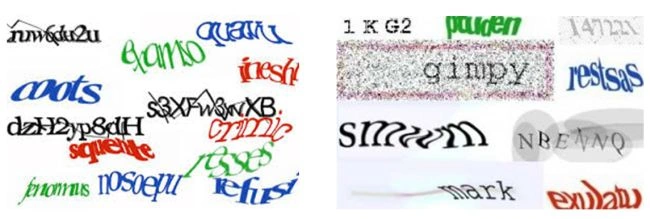
Now let's learn how to make it.
Create a new project in any IDE you have, here we are making it in NetBeans and we are creating only one JSP file in our project named CAPTCHA.
An overview of project creation.
Captcha.jsp
- <%@page contentType="text/html" pageEncoding="UTF-8"%>
- <!DOCTYPE HTML PUBLIC "-//W3C//DTD HTML 4.01 Transitional//EN"
- "http://www.w3.org/TR/html4/loose.dtd">
- <html>
- <head>
- <meta http-equiv="Content-Type" content="text/html; charset=UTF-8">
- <title>JSP Page</title>
- </head>
- <body>
- <%
- StringBuffer sb=new StringBuffer();
- for(int i=1;i<=5;i++)
- {
- sb.append((char)(int)(Math.random()*79+23+7));
- }
- String cap=new String(sb);
- %>
- <div style="background-color: skyblue">
- <center>
- <h1>Captcha Demo</h1>
- <script type ="text/javascript">
- function validation(){
- var c = document.forms ["f1"]["cap1"].value;
- if(c==null||c=="")
- {
- alert ("Please Enter Captcha");
- return false;
- }
- }
- </script>
- <form action="log" name="f1" onsubmit="return validation()">
- <table border="0">
- <tbody>
- <tr>
- <td>
- <div style="background-color: aqua"><h2><s><i><font face="casteller"><%=cap%></font></i></s></h2></div>
- </td>
- <td><input type="text" name="cap1" value="" /></td>
- <td><input type="hidden" name="cap2" value='<%=cap%>' readonly="readonly" </td>
- </tr>
- </tbody>
- </table>
- <input type="submit" value="OK" />
- <input type="reset" value="Reset" />
- </form>
- </center>
- </div>
- </body>
- </html>
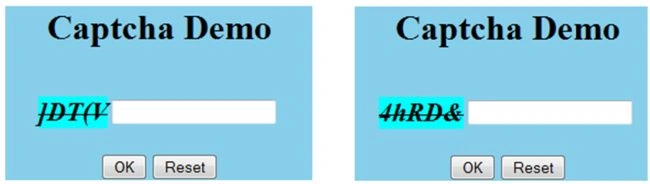
Output
samarth shahPosted Dec 3, 2019, 12:43 AM
How to print only charachters between a to z in captcha using math random
ram peesaPosted Jul 17, 2019, 4:25 AM
I need the captcha validation code,kindly share with me
Hitanshi MehtaPosted Apr 13, 2019, 3:33 PM
It is too good!! Thanks for sharing!!!
Abhishek JaiswalPosted Feb 25, 2015, 4:35 AM
Expecting some good article soon. :)
Gopi ChandPosted Feb 24, 2015, 10:18 AM
Thanks buddy..:)
Abhishek JaiswalPosted Feb 24, 2015, 4:52 AM
Gopi Chand, good to see u here again. :)
Gopi ChandPosted Feb 23, 2015, 9:45 AM
Yes Sneha i'll provide u that.
Sneha DavePosted Feb 23, 2015, 12:15 AM
please provide validation with a sample database too
Laxman KompelliPosted Dec 18, 2014, 12:48 PM
Awesome bro all other fucking websites giving pages of code for this its so grateBut in validation you are checking only captcha text is null or not you are not checking weather the the entered captcha is right or wrong. Insert that code too bro
Abhishek JaiswalPosted Jul 14, 2014, 11:38 PM
SHORT N CRUNCHY.. GOOD WORK!