

Hey guys, sorry for not writing this part within the same period I've written the previous 3 parts, but that is because I wanted to be sure that the code is written without bugs, so in the previous 3 weeks we have tested the control extensively and solved many issues we have found in it and now its stable, so finally we have decided to post the code to continue our 4 part series of articles.
We will now explain the most important part of our Multiple upload attachment control implementation, which is the class that implements all the logic of our control.
Remember: The control we are going to make is a control that adds multiple attachments to each of 3 lists regarding the type of the file you are going to upload. The three types of files we have are Images, Videos and other files or PDF.
So after uploading any file there is a GUID id generated as an id for the file that is saved with the same list as a name for the file uploaded and as a title for the file, the title column will contain the file name and the GUIDs of all the items that contains this file.
I know that this article may be somehow unclear but I think some photos will make everything more obvious.
In the next image is the back-end of our control, this is how to create a new column of the type of our Uploader.
Here you will specify the 3 lists to be uploaded of your files, these lists are preferred to be on the root of your application and then you will specify the number of files you want to upload per each type, if you want to disable uploading images for example then just make the number of image files = 0 and by that you can put Images list name = any string as null.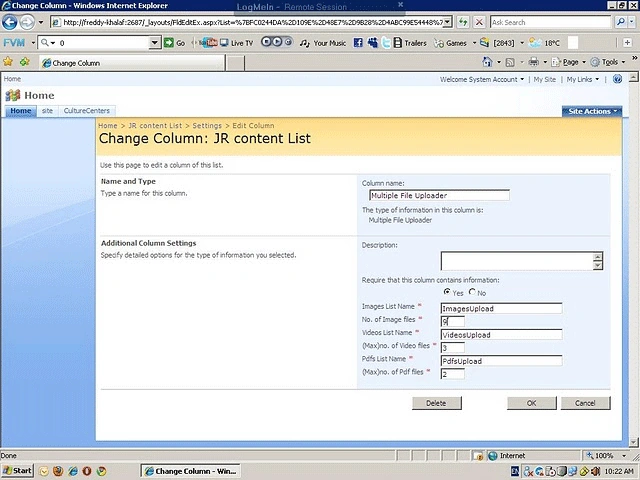
And this image is the layout of our control.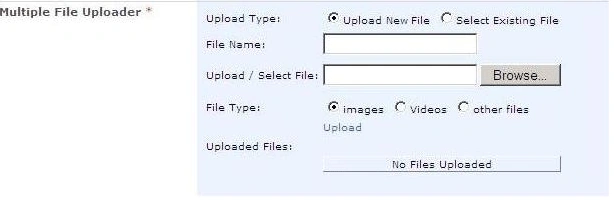
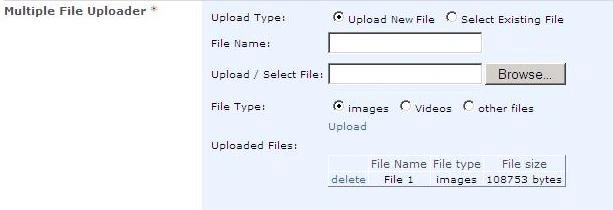
And that is how to select a file from the previous files you've uploaded and the existing files are loaded from the list related to the type you are choosing.
Uploading files.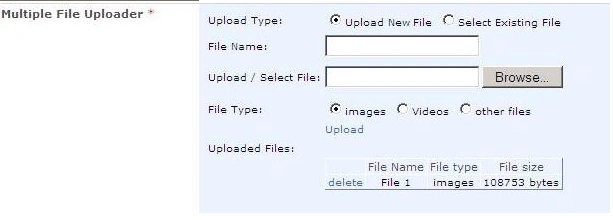
The following picture shows the item added in the images list and as shown it's name is a GUID representing this file id and its title is: Testing File.Jpg * (the GUID id of the main item that contains this file).
And after creating the main item in my list that will contain many attached files it will be shown as follows: 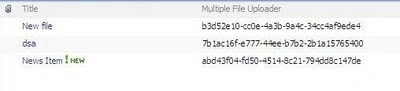
In the previous image you can see the item with title = News Item and the value stored in the Multiple File Uploader is the GUID id representing this item and this id is used to connect the item with its related uploaded files as shown in the picture of the images list (the id of the news item is the same as found in the title column of the image created in the images list) .
I think by now everything is more clear so I can post the code that implements this control.
using System;
using System.Collections.Generic;
using System.Linq;
using System.Web;
using Microsoft.SharePoint;
using Microsoft.SharePoint.WebControls;
using System.Web.UI.WebControls;
using System.Threading;
using System.Web.UI;
using System.Data;
using System.Web.UI.HtmlControls;
namespace SpCustomFields
{
public class FileUploader : SPFieldText
{
public static string internalFieldName = string.Empty;
public static bool isRequired = false;
public FileUploader(SPFieldCollection spFieldCollection, string spName)
: base(spFieldCollection, spName)
{ }
public FileUploader(SPFieldCollection spFieldCollection, string spName, string dispName)
: base(spFieldCollection, spName, dispName)
{ }
public override BaseFieldControl FieldRenderingControl
{
get
{
isRequired = this.Required;
internalFieldName = this.InternalName;
FileUploaderImplementation fileControl = new FileUploaderImplementation();
fileControl.FieldName = this.InternalName;
return fileControl;
}
}
public override object GetFieldValue(string value)
{
return base.GetFieldValue(value);
}
}
public class FileUploaderImplementation : BaseFieldContro
{
#region Form Controls and Variable initialization
FileUpload fileUploader;
LinkButton btnUpload;
TextBox FileNameTextBox;
RadioButton RdImages, RdPdfs, RdVideos, RdUpload, RdSelect;
GridView UploadingGrid;
DropDownList SelectDropDown;
CustomValidator customUploadValidator;
RequiredFieldValidator UploadRequiredValidator, FileNameRequiredValidator, GridValidator;
Label lblFileName;
TextBox HiddenFieldGridValidator;
string ImagesUploadList, VideosUploadList, PdfsUploadList;
int ImagesMaximumLength, VideosMaximumLength, PdfsMaximumLength;
bool extFound = false;
public static string newsItemId = string.Empty;
#endregion
#region Main Functions to be overrided for the custom control
protected override string DefaultTemplateName
{
get
{
return "FileUploaderTemplate";
}
}
public override void Focus()
{
EnsureChildControls();
fileUploader.Focus();
}
protected override void CreateChildControls()
{
base.CreateChildControls();
//Reading lists names.
try
{
ImagesUploadList = this.Field.GetCustomProperty("ImagesList").ToString();
VideosUploadList = this.Field.GetCustomProperty("VideosList").ToString();
PdfsUploadList = this.Field.GetCustomProperty("PdfsList").ToString();
ImagesMaximumLength = int.Parse(this.Field.GetCustomProperty("ImagesMaximumLength").ToString());
VideosMaximumLength = int.Parse(this.Field.GetCustomProperty("VideosMaximumLength").ToString());
PdfsMaximumLength = int.Parse(this.Field.GetCustomProperty("PdfsMaximumLength").ToString());
}
catch
{
//To do: Log Exception.
}
if (ControlMode == SPControlMode.New || ControlMode == SPControlMode.Edit)
{
#region rendering all controls
try
{
lblFileName = (Label)TemplateContainer.FindControl("lblFileName");
FileNameTextBox = (TextBox)TemplateContainer.FindControl("FileNameTextBox");
RdImages = (RadioButton)TemplateContainer.FindControl("RdImages");
RdPdfs = (RadioButton)TemplateContainer.FindControl("RdPdfs");
RdVideos = (RadioButton)TemplateContainer.FindControl("RdVideos");
RdUpload = (RadioButton)TemplateContainer.FindControl("RdUpload");
RdSelect = (RadioButton)TemplateContainer.FindControl("RdSelect");
customUploadValidator =
(CustomValidator)TemplateContainer.FindControl("UploadControlCustomValidator");
UploadRequiredValidator = (RequiredFieldValidator)TemplateContainer.FindControl("UploadControlRequiredValidator");
FileNameRequiredValidator = (RequiredFieldValidator)TemplateContainer.FindContr("FileNameRequiredValidator");
GridValidator = (RequiredFieldValidator)TemplateContainer.FindControl("GridValidator");
fileUploader = (FileUpload)TemplateContainer.FindControl("FilesUploader");
SelectDropDown = (DropDownList)TemplateContainer.FindControl("SelectDropDown");
btnUpload = (LinkButton)TemplateContainer.FindControl("UploadButton");
UploadingGrid = (GridView)TemplateContainer.FindControl("UploadingGrid");
HiddenFieldGridValidator = (TextBox)TemplateContainer.FindControl("HiddenFieldGridValidator");
}
catch
{
//To do: Log the Exception
}
#endregion
#region defining controls properties and assigning events to them
try
{
btnUpload.Click += new EventHandler(BtnUploadClick);
RdUpload.CheckedChanged += new EventHandler(UploadOrSelect);
RdSelect.CheckedChanged += new EventHandler(UploadOrSelect);
RdPdfs.CheckedChanged += new EventHandler(FillInSelectDropDown);
RdVideos.CheckedChanged += new EventHandler(FillInSelectDropDown);
RdImages.CheckedChanged += new EventHandler(FillInSelectDropDown);
customUploadValidator.ServerValidate += new ServerValidateEventHandler(customUploadValidator_ServerValidate);
UploadingGrid.RowDeleting += new GridViewDeleteEventHandler(UploadingGridRowDelete);
DataTable dt = new DataTable();
if (ViewState["UploadingGrid"] != null)
{
dt = (DataTable)ViewState["UploadingGrid"];
}
UploadingGrid.DataSource = dt;
UploadingGrid.DataBind();
}
catch
{
// To do: Log the Exception
}
#endregion
CheckDataGrid();
newsItemId = UpdateNewsItemID();
CheckUploadStatus();
}
if (ControlMode == SPControlMode.Edit)
{
HiddenFieldGridValidator.Text = "Edit mode";
FileNameRequiredValidator.Visible = false;
UploadRequiredValidator.Visible = false;
FillInGridWithUploads();
newsItemId = UpdateNewsItemID();
CheckUploadStatus();
}
}
public override object Value
{
get
{
EnsureChildControls();
return newsItemId;
}
set
{
EnsureChildControls();
base.Value = newsItemId;
}
}
#endregion
#region Form Events
void BtnUploadClick(object sender, EventArgs e)
{
FileNameRequiredValidator.Visible = true;
UploadRequiredValidator.Visible = true;
FileNameRequiredValidator.Validate();
UploadRequiredValidator.Validate();
if (string.IsNullOrEmpty(newsItemId) && ControlMode == SPControlMode.New)
{
newsItemId = Guid.NewGuid().ToString();
}
else if (ControlMode == SPControlMode.Edit && this.Value != null && string.IsNullOrEmpty(this.Value.ToString()))
{
newsItemId = UpdateNewsItemID();
}
else
{
newsItemId = UpdateNewsItemID();
}
if (SelectDropDown.Visible == true || extFound)
{
if (fileUploader.Visible == true && fileUploader.HasFile && fileUploader.FileBytes != null && FileNameRequiredValidator.IsValid && UploadRequiredValidator.IsValid)
{
AddUploadsToUploadingGrid();
AddUploadsToDocLib();
CheckUploadStatus();
FileNameTextBox.Text = string.Empty;
}
else if (SelectDropDown.Visible == true)
{
AddUploadsToUploadingGrid();
AddSelectedToNewsItem();
CheckUploadStatus();
}
}
}
private void FillInSelectDropDown(object sender, EventArgs e)
{
if (RdSelect.Checked && sender != null)
{
string lstName = string.Empty;
if (((RadioButton)sender).ID == "RdImages")
{
lstName = ImagesUploadList;
}
if (((RadioButton)sender).ID == "RdPdfs")
{
lstName = PdfsUploadList;
}
if (((RadioButton)sender).ID == "RdVideos")
{
lstName = VideosUploadList;
}
SPListItemCollection spListItemColl = SPContext.Current.Site.RootWeb.Lists[lstName].Items;
DeleteItemsInDrpDown();
if (spListItemColl.Count <= 0)
{
SelectDropDown.Items.Add("No Files Uploaded under this Type");
btnUpload.Enabled = false;
SelectDropDown.SelectedIndex = 0;
SelectDropDown.Enabled = false;
}
else
{
btnUpload.Enabled = true;
SelectDropDown.Enabled = true;
foreach (SPListItem itm in spListItemColl)
{
ListItem lstItem = new ListItem();
if (itm["Title"] != null && itm["Name"] != null)
{
lstItem.Text = (!itm["Title"].ToString().Contains('*')) ? itm["Title"].ToString() : itm["Title"].ToString().Split('*')[0];
lstItem.Value = itm["Name"].ToString();
SelectDropDown.Items.Add(lstItem);
}
}
}
}
}
private void customUploadValidator_ServerValidate(object sender, ServerValidateEventArgs e)
{
List<string> allowedFileExtensions = new List<string>();
string errorMessage = "Invalid File Extension, Valid extensions (";
if (RdImages.Checked)
{
allowedFileExtensions.Add(".jpg");
allowedFileExtensions.Add(".gif");
allowedFileExtensions.Add(".bmp");
}
else if (RdVideos.Checked)
{
allowedFileExtensions.Add(".wmv");
allowedFileExtensions.Add(".mpeg");
allowedFileExtensions.Add(".mpg");
}
else if (RdPdfs.Checked)
{
allowedFileExtensions.Add(".pdf");
allowedFileExtensions.Add(".doc");
allowedFileExtensions.Add(".docx");
allowedFileExtensions.Add(".xls");
allowedFileExtensions.Add(".xlsx");
allowedFileExtensions.Add(".ppt");
allowedFileExtensions.Add(".pptx");
}
foreach (string str in allowedFileExtensions)
{
if (e.Value.ToLower().EndsWith(str))
{
extFound = true;
break;
}
else
{
extFound = false;
errorMessage += str + ' ';
continue;
}
}
if (extFound)
{
e.IsValid = true;
}
else
{
customUploadValidator.ErrorMessage = errorMessage + " )";
e.IsValid = false;
}
}
private void UploadOrSelect(object sender, EventArgs e)
{
if (((RadioButton)sender).ID == "RdUpload")
{
btnUpload.Enabled = true;
fileUploader.Visible = true;
SelectDropDown.Visible = false;
UploadRequiredValidator.Visible = true;
FileNameTextBox.Visible = true;
FileNameRequiredValidator.Visible = true;
lblFileName.Visible = true;
}
else
{
object eventSender = null;
Naveen VermaPosted Jan 17, 2014, 3:10 AM
Thanks for posting this.. Will it be possible for you to provide the complete test soluation as how it use it in app...
Naveen VermaPosted Jan 17, 2014, 3:09 AM
Great..
Isan ARAZPosted Oct 12, 2010, 1:16 AM
Hello First thanks for great post! Second, i spend 6 hours on your codes, but unfortunately couldn't get expected result. Would you please send it as a solution or inform about some setting that i wanted for this project? Please check your email.
Isan ARAZPosted Oct 11, 2010, 3:40 AM
Thanks alot! You are angle!
Sebastian Alduncin PisantPosted May 31, 2010, 11:08 AM
Hi, i´m kinda new in this of using controls... How do you implement this in a PlaceHolder¿? Plz. I´m using a method to do custom applications where I use 2 pages, one for Design (without main masterpage) and other for the implementation in a sharepoint site (with the main masterpage attached). Thank you in advance.