

Introduction
This article describes how to send an email with a runtime generated file as an attachment in C#. For sending the email, you need to configure the email services on the server.
Note 1: For more info about configuration read the article about how to configure the mail server (http://technet.microsoft.com/en-us/library/cc780996%28v=ws.10%29.aspx)
Note 2: I will use the "iTextSharp.dll" as a PDF generator library.
You can download it from the following.
- Links
http://sourceforge.net/projects/itextsharp
https://www.nuget.org/packages/iTextSharp/
Or you can download the attached file of this article.
To explain this article, I will use the following procedure after configuring the server:
- Create a new website.
- Add a reference of the downloaded "iTextSharp.dll" to the Website
- Add a page into the website and add 3 textboxes into the page for the receiver Email-ID, subject of Email and message of Email and a button for sending the mail.
- Write some code in the ".cs" file to send the mail with some Text and runtime generated file on the button click event.
The following are the details of the preceding procedure.
Step 1
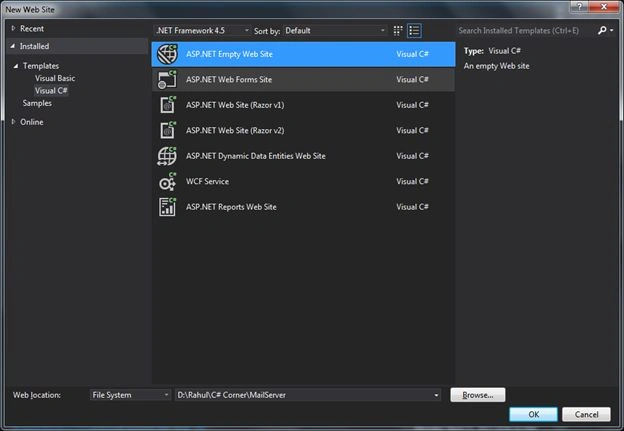
- Create a new empty Website named "MailServer".
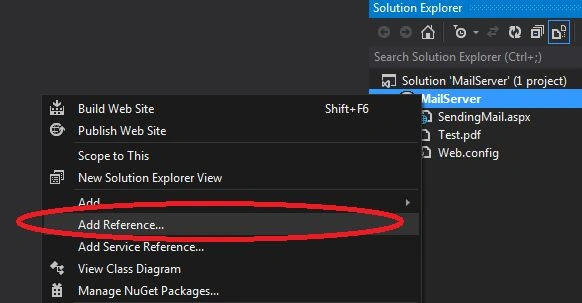
- Right-click on the website and click on "Add Reference…".
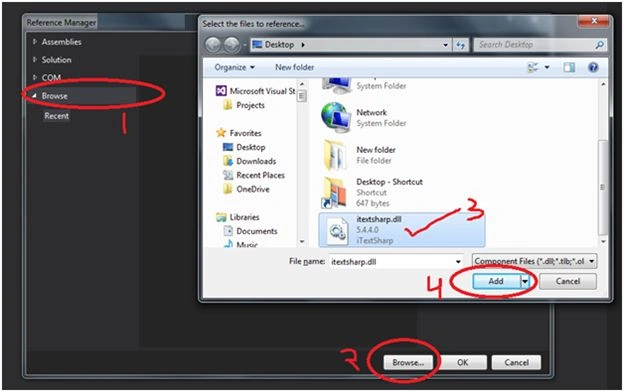
- Click on the Browse tab on the left side
- Click on the Browse button at the bottom
- Select the "iTextSharp.dll" from the system
- Click on the Add button
Finally it will look like:
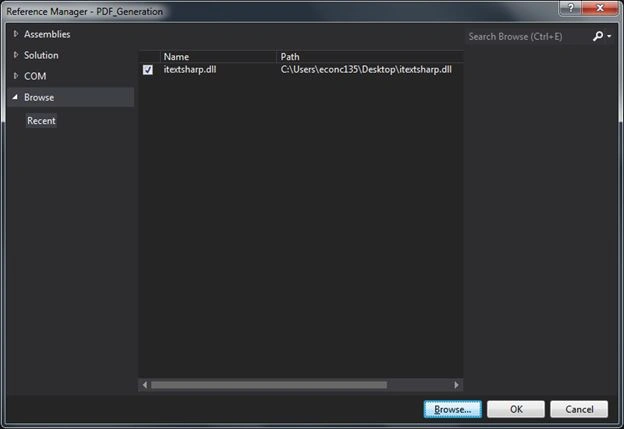
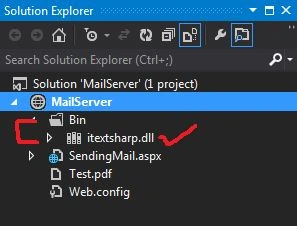
Now click on the "OK" button and see the "Solution Explorer" where the "iTextSharp.dll" reference has been added to the "Bin" folder.
Step 2
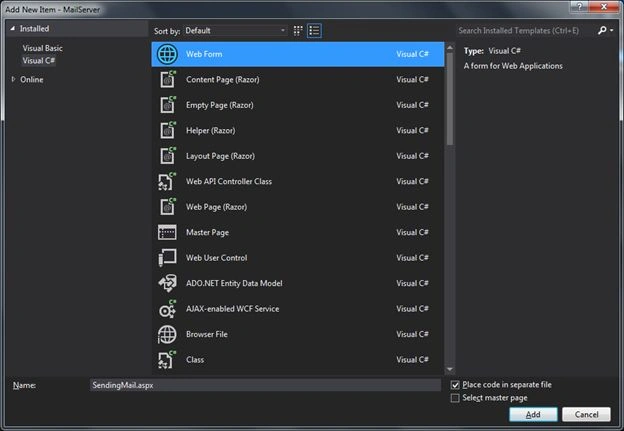
- Add a new Page named "SendingMail.aspx".
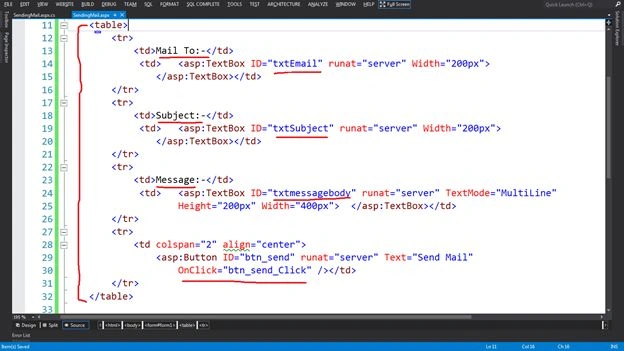
- Add a Button with Onclick event (for sending the Email) to the page.
- <table>
- <tr>
- <td>Mail To:-</td>
- <td>
- <asp:TextBox ID="txtEmail" runat="server" Width="200px">
- </asp:TextBox></td>
- </tr>
- <tr>
- <td>Subject:-</td>
- <td>
- <asp:TextBox ID="txtSubject" runat="server" Width="200px">
- </asp:TextBox></td>
- </tr>
- <tr>
- <td>Message:-</td>
- <td>
- <asp:TextBox ID="txtmessagebody" runat="server" TextMode="MultiLine" Height="200px" Width="400px">
- </asp:TextBox></td>
- </tr>
- <tr>
- <td colspan="2" align="center">
- <asp:Button ID="btn_send" runat="server" Text="Send Mail"
- OnClick="btn_send_Click" /></td>
- </tr>
- </table>
- Add the following 6 namespaces to the top of the ".cs" file.
- using System.Net.Mail;
- using System.IO;
- using System.Text;
- using System.Net.Mime;
- using iTextSharp.text;
- using iTextSharp.text.pdf;
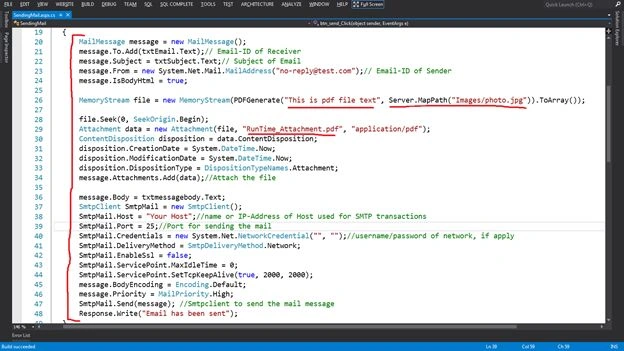
- Write the code to send the Email on the click event of the button.
- protected void btn_send_Click(object sender, EventArgs e)
- {
- try
- {
- MailMessage message = new MailMessage();
- message.To.Add(txtEmail.Text);// Email-ID of Receiver
- message.Subject = txtSubject.Text;// Subject of Email
- message.From = new System.Net.Mail.MailAddress("[email protected]");// Email-ID of Sender
- message.IsBodyHtml = true;
- MemoryStream file = new MemoryStream(PDFGenerate("This is pdf file text", Server.MapPath("Images/photo.jpg")).ToArray());
- file.Seek(0, SeekOrigin.Begin);
- Attachment data = new Attachment(file, "RunTime_Attachment.pdf", "application/pdf");
- ContentDisposition disposition = data.ContentDisposition;
- disposition.CreationDate = System.DateTime.Now;
- disposition.ModificationDate = System.DateTime.Now;
- disposition.DispositionType = DispositionTypeNames.Attachment;
- message.Attachments.Add(data);//Attach the file
- message.Body = txtmessagebody.Text;
- SmtpClient SmtpMail = new SmtpClient();
- SmtpMail.Host = "Your Host";//name or IP-Address of Host used for SMTP transactions
- SmtpMail.Port = 25;//Port for sending the mail
- SmtpMail.Credentials = new System.Net.NetworkCredential("", "");//username/password of network, if apply
- SmtpMail.DeliveryMethod = SmtpDeliveryMethod.Network;
- SmtpMail.EnableSsl = false;
- SmtpMail.ServicePoint.MaxIdleTime = 0;
- SmtpMail.ServicePoint.SetTcpKeepAlive(true, 2000, 2000);
- message.BodyEncoding = Encoding.Default;
- message.Priority = MailPriority.High;
- SmtpMail.Send(message); //Smtpclient to send the mail message
- Response.Write("Email has been sent");
- }
- catch (Exception ex)
- { Response.Write("Failed"); }
- }
Note: The "SmtpMail.Host" value will be your hosting name or IP Address and "SmtpMail.Port" will also vary.
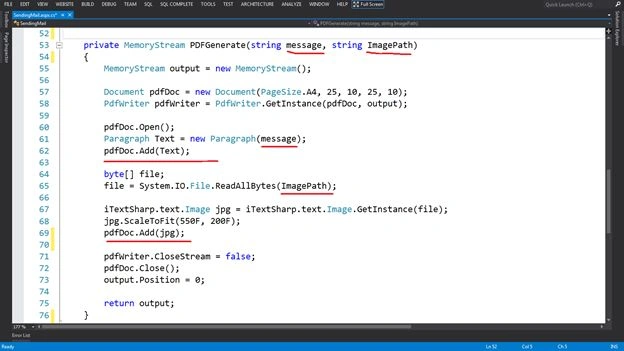
- private MemoryStream PDFGenerate(string message, string ImagePath)
- {
- MemoryStream output = new MemoryStream();
- Document pdfDoc = new Document(PageSize.A4, 25, 10, 25, 10);
- PdfWriter pdfWriter = PdfWriter.GetInstance(pdfDoc, output);
- pdfDoc.Open();
- Paragraph Text = new Paragraph(message);
- pdfDoc.Add(Text);
- byte[] file;
- file = System.IO.File.ReadAllBytes(ImagePath);
- iTextSharp.text.Image jpg = iTextSharp.text.Image.GetInstance(file);
- jpg.ScaleToFit(550F, 200F);
- pdfDoc.Add(jpg);
- pdfWriter.CloseStream = false;
- pdfDoc.Close();
- output.Position = 0;
- return output;
- }
Step 4
- Run the Page on the server that will be like:
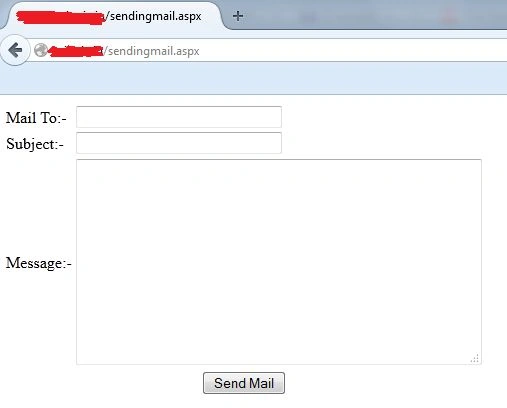
- After filling in the valid Email ID, Subject of Email and message of the Email, click on the "Send mail" button for sending the email.
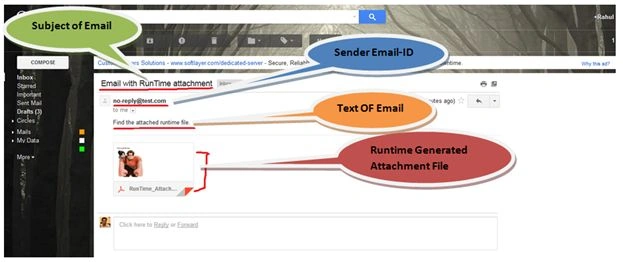
Result: Now you can see that, I (the receiver) got the email.
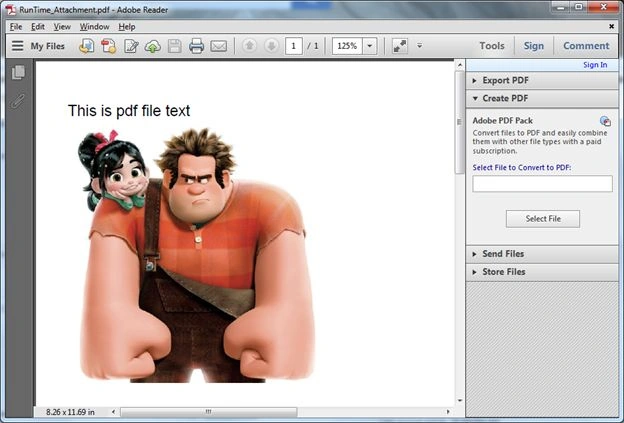
After downloading the file see the text and image in the .pdf file.
sudhanshu GuptaPosted Sep 28, 2019, 12:07 PM
Helo sir, i saw your code but i need a code by which we can send link in mail to user and when user clicks on the the link respective excel sheet gets download. please share a technique by which we cant do it or code.