

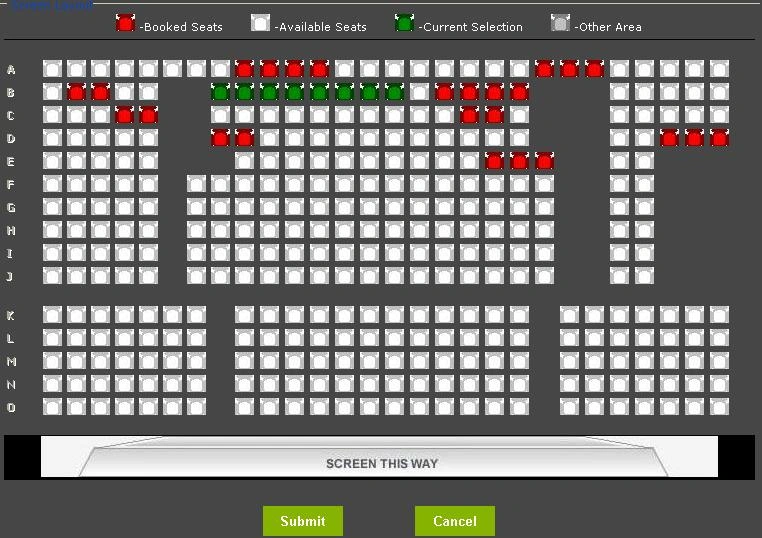
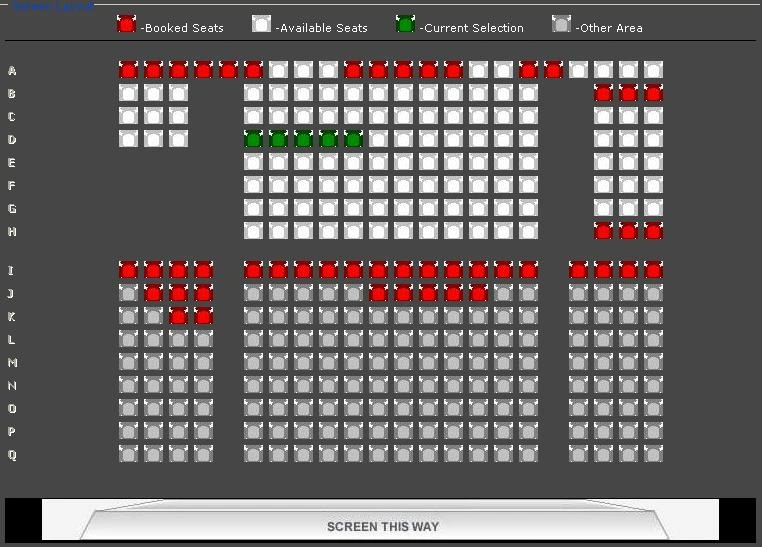
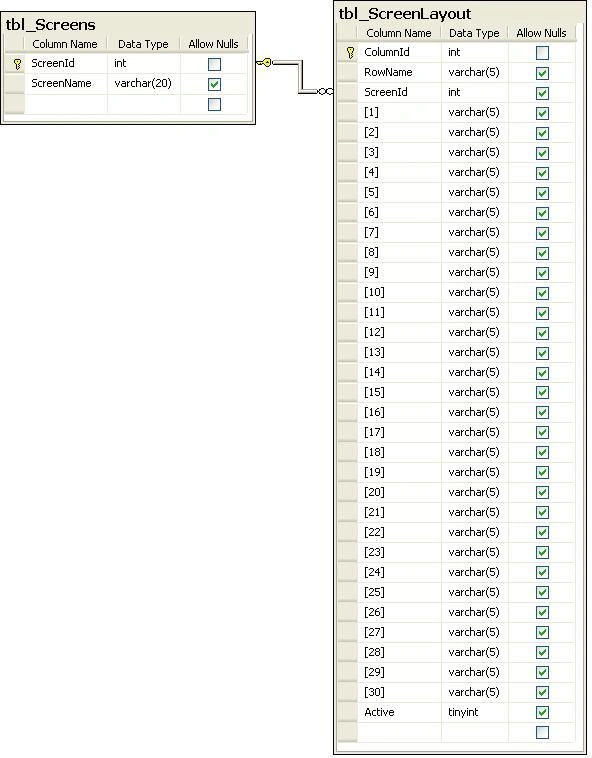
- First of all create the
database in SQL Server and name it as a "GridView_As_A_MOVIE_ScreenLayout" and in that
database create the two tables like below.
- Create the stored procedures for adding screen, getting all screens, adding screen layout and getting
screen layout.
/*(1st StoredProcedure)*/
/*This stored procedure is for adding screen which takes one parameter */
Create Proc sp_AddScreen
(
@ScreenName varchar(20)
)
as
Begin
if not exists (select ScreenId from tbl_Screens where ScreenName = @ScreenName)
begin
insert into tbl_Screens(ScreenName) values (@ScreenName)
end
End
/*(2nd StoredProcedure)*/
/*This stored procedure is for getting all screens from tbl_Screens */
Create procedure sp_GetScreens as
select * from tbl_Screens
/*(3rd StoredProcedure)*/
/*This stored procedure is for adding screen layout*/
CREATE Procedure sp_AddScreenLayout
(
@RowName varchar(5),@ScreenId int,@1 varchar(5),@2 varchar(5),@3 varchar(5),@4 varchar(5),@5 varchar(5),@6 varchar(5),@7 varchar(5),@8 varchar(5),
@9 varchar(5),@10 varchar(5),@11 varchar(5),@12 varchar(5),@13 varchar(5),@14 varchar(5),@15 varchar(5),@16 varchar(5),@17 varchar(5),@18 varchar(5),
@19 varchar(5),@20 varchar(5),@21 varchar(5),@22 varchar(5),@23 varchar(5),@24 varchar(5),@25 varchar(5),@26 varchar(5),@27 varchar(5),@28 varchar(5),
@29 varchar(5),@30 varchar(5),@Message varchar(150) out
)
As
Begin
if @RowName = 'Line'
begin
insert into tbl_ScreenLayout (RowName,ScreenId,[1],[2],[3],[4],[5],[6],[7],[8],[9],[10],[11],[12],[13],[14],[15],[16],[17],[18],[19],
[20],[21],[22],[23],[24],[25],[26],[27],[28],[29],[30])
values
@RowName,@ScreenId,@1,@2,@3,@4,@5,@6,@7,@8,@9,@10,@11,@12,@13,@14,@15,@16,@17,@18,@19,
@20,@21,@22,@23,@24,@25,@26,@27,@28,@29,@30)
set @Message = 'Added Successfully.'
end
else
begin
if (select ColumnId from tbl_ScreenLayout where RowName=@RowName and ScreenId=@ScreenId) is null
begin
insert into tbl_ScreenLayout (RowName,ScreenId,[1],[2],[3],[4],[5],[6],[7],[8],[9],[10],[11],[12],[13],[14],[15],[16],[17],[18],[19],
[20],[21],[22],[23],[24],[25],[26],[27],[28],[29],[30])
values
@RowName,@ScreenId,@1,@2,@3,@4,@5,@6,@7,@8,@9,@10,@11,@12,@13,@14,@15,@16,@17,@18,@19,
@20,@21,@22,@23,@24,@25,@26,@27,@28,@29,@30)
set @Message = 'Added Successfully.'
end
end
End
/*(4th StoredProcedure)*/
/*This stored procedure is to get screen layout */
CREATE procedure sp_GetScreenLayout(@ScreenId int) as
select * from tbl_Screens s
inner join
tbl_ScreenLayout sl
on
sl.ScreenId=s.ScreenId and sl.ScreenId=@ScreenId
- In Web.config file write a connection string in <connectionStrings/> tag.
<connectionStrings>
<add name="constr" connectionString="User Id = sa; Password = 123; Database =
GridView_As_A_MOVIE_ScreenLayout; Data Source= KatareRaju"/>
</connectionStrings>
- Add New Class by right
clicking on solution explorer and name it as a DAL (DAL = Data Access Layer) and
define three methods like follows.
static SqlConnection con;
static SqlCommand cmd;
static DataSet ds;
static SqlDataAdapter da;
/*(1st method in DAL.cs)*/
/*GetConnectionString method reads the connection string from web.config
file and returns connection string*/
public static string GetConnectionString()
{
return
ConfigurationManager.ConnectionStrings["constr"].ConnectionString;
}
/*(2nd method in DAL.cs)*/
/*This method is for performing operations like Insert, Update and Delete*/
public static int ExecuteNonQuery(string connectionString, CommandType commandType, string commandText, SqlParameter[] parameters)
{
try
{
con = new SqlConnection(connectionString);
cmd = new SqlCommand(commandText, con);
cmd.CommandType = commandType;
foreach (SqlParameter p in parameters)
{
if (p.Value == null)
{
}
cmd.Parameters.Add(p);
}
con.Open();
return cmd.ExecuteNonQuery();
}
catch (SqlException ex)
{
throw new ArgumentException(ex.Message);
}
finally { con.Close(); }
}
/*(3rd method in DAL.cs)*/
/*This method is for retrieving data from database*/
public static DataSet ExecuteDataSet(string connectionString, CommandType
commandType, string commandText, SqlParameter[] parameters)
{
try
{
con = new SqlConnection(connectionString);
cmd = new SqlCommand();
cmd.Connection = con;
cmd.CommandText = commandText;
cmd.CommandType = commandType;
if (parameters == null)
{
da = new SqlDataAdapter(cmd);
ds = new DataSet();
da.Fill(ds);
return ds;
}
else
{
foreach (SqlParameter p in parameters)
{
if ((p.Direction == ParameterDirection.InputOutput) && (p.Value == null))
{
}
//if (p.Value != null)
//{
cmd.Parameters.Add(p);
//}
}
da = new SqlDataAdapter(cmd);
ds = new DataSet();
da.Fill(ds);
return ds;
}
}
catch (SqlException ex)
{
throw new ArgumentException(ex.Message);
}
}
- Add another New Class by
right clicking on solution explorer and name it as a BOL (BOL =
Business Object Layer) and define following methods.
/*(1st method in BOL.cs)*/
/*AddScreen method adds screen name to tbl_Screens table in the database using stored procedure sp_AddScreen*/
public int AddScreen(string screenName)
{
try
{
SqlParameter[] p = new SqlParameter[1];
p[0] = new SqlParameter("@ScreenName", screenName);
return DAL.ExecuteNonQuery(DAL.GetConnectionString(),CommandType.StoredProcedure, "sp_AddScreen", p);
}
catch (ArgumentException ex)
{
throw new ArgumentException(ex.Message);
}
}
/*(2nd method in BOL.cs)*/
/*GetScreens method gets all screens which are present in tbl_Screens table from the database using stored procedure sp_GetScreens*/
public DataSet GetScreens()
{
try
{
SqlParameter[] p = new SqlParameter[0];
return DAL.ExecuteDataSet(DAL.GetConnectionString(),CommandType.StoredProcedure, "sp_GetScreens", p);
}
catch (Exception)
{
throw;
}
}
/*(3rd method in BOL.cs)*/
/*AddScreenLayout method inserts the screen layout to the tbl_ScreenLayout table using stored procedure sp_AddScreenLayout*/
public string AddScreenLayout(string rowName, int screenId, string one, string two, string three, string four, string five, string six, string seven, string eight, string nine, string ten, string eleven, string twelve, string thirteen, string fourteen, string fifteen, string sixteen, string seventeen, string eighteen, string nineteen, string twenty, string twentyone, string twentytwo, string twentythree, string twentyfour, string twentyfive, string twentysix, string twentyseven, string twentyeight, string twentynine, string thirty)
{
try
{
SqlParameter[] p = new SqlParameter[33];
p[0] = new SqlParameter("@RowName", rowName);
p[1] = new SqlParameter("@ScreenId", screenId);
p[3] = new SqlParameter("@1", one);
p[4] = new SqlParameter("@2", two);
p[5] = new SqlParameter("@3", three);
p[6] = new SqlParameter("@4", four);
p[7] = new SqlParameter("@5", five);
p[8] = new SqlParameter("@6", six);
p[9] = new SqlParameter("@7", seven);
p[10] = new SqlParameter("@8", eight);
p[11] = new SqlParameter("@9", nine);
p[12] = new SqlParameter("@10", ten);
p[13] = new SqlParameter("@11", eleven);
p[14] = new SqlParameter("@12", twelve);
p[15] = new SqlParameter("@13", thirteen);
p[16] = new SqlParameter("@14", fourteen);
p[17] = new SqlParameter("@15", fifteen);
p[18] = new SqlParameter("@16", sixteen);
p[19] = new SqlParameter("@17", seventeen);
p[20] = new SqlParameter("@18", eighteen);
p[21] = new SqlParameter("@19", nineteen);
p[22] = new SqlParameter("@20", twenty);
p[23] = new SqlParameter("@21", twentyone);
p[24] = new SqlParameter("@22", twentytwo);
p[25] = new SqlParameter("@23", twentythree);
p[26] = new SqlParameter("@24", twentyfour);
p[27] = new SqlParameter("@25", twentyfive);
p[28] = new SqlParameter("@26", twentysix);
p[29] = new SqlParameter("@27", twentyseven);
p[30] = new SqlParameter("@28", twentyeight);
p[31] = new SqlParameter("@29", twentynine);
p[32] = new SqlParameter("@30", thirty);
p[2] = new SqlParameter("@Message", SqlDbType.VarChar, 150);
p[2].Direction = ParameterDirection.Output;
DAL.ExecuteDataSet(DAL.GetConnectionString(),CommandType.StoredProcedure, "sp_AddScreenLayout", p);
return Convert.ToString(p[2].Value);
}
catch (ArgumentException ex)
{
throw new ArgumentException(ex.Message);
}
}
/*(4)*/
/*This method gets the screen layout from tbl_ScreenLayout table using stored procedure sp_GetScreenLayout*/
public DataSet GetScreenLayout(int screenId)
{
try
{
SqlParameter[] p = new SqlParameter[1];
p[0] = new SqlParameter("@ScreenId", screenId);
return DAL.ExecuteDataSet(DAL.GetConnectionString(),CommandType.StoredProcedure, "sp_GetScreenLayout", p);
}
catch (ArgumentException ex)
{
throw new ArgumentException(ex.Message);
}
}
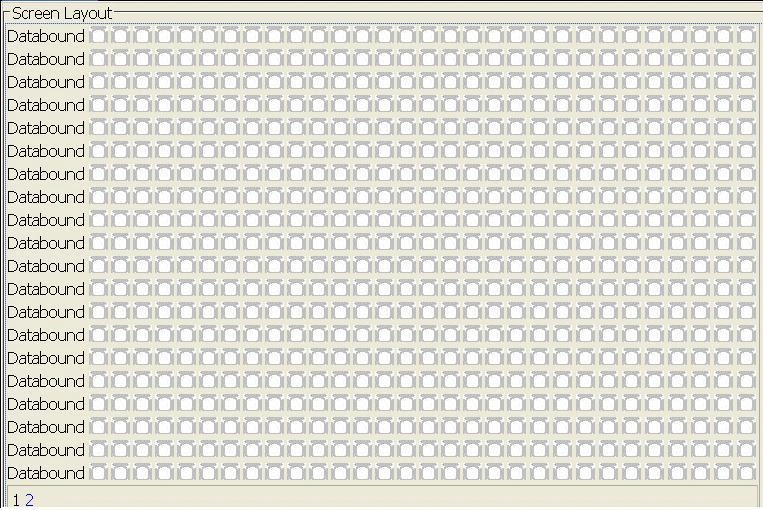
- Add New WebForm and drag
& drop three(3) panels on it and design Panel1, Panel2, and Panel3 as follows and design those panels like below.

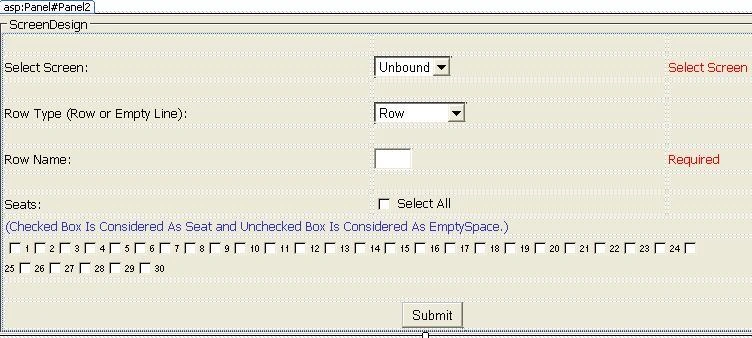
- And CodeBehind file(i.e., .cs file) of webform declare
variables for using thorugh out the file and in default constructor create
instance for Business Object Layer class.
int val;
BOL obj; //Business Object Layer class
//Default Constructor
public GridView_As_A_MOVIE_ScreenLayout()
{
obj = new BOL();
}
- Write a method bind the screen names to the DropDownList of Panel2 i.e., ddlScreens and call this method when the page is loading for at the first time.
///
<summary>
/// BindScreens method binds the all screens to the ddlScreens DropDownList of
Panel2(GroupingText="ScreenDesign";)
/// </summary>
void
BindScreens()
{
try
{
ddlScreens.Items.Clear();
ddlScreens.DataSource =
obj.GetScreens();
ddlScreens.DataTextField = "ScreenName";
ddlScreens.DataValueField = "ScreenId";
ddlScreens.DataBind();
ddlScreens.Items.Insert(0, "Select");
}
catch (Exception)
{
throw;
}
}
//Page Load
protected void Page_Load(object
sender, EventArgs e)
{
if
(!IsPostBack) { BindScreens(); }
}
- Call
the AddScreen method of BOL class for
adding the screen to the tbl_Screens table in the Button (ID="btnSubmit")Click
event.
/// <summary>
/// This is for adding screen
/// </summary>
protected void btnSubmit_Click(object sender, EventArgs e)
{
try
{
int val = obj.AddScreen(Convert.ToString(txtScreenName.Text));
if (val >= 0)
{
Response.Write("Screen addeed successfully.");
BindScreens();
}
else
Response.Write("Screen you added is already existed.");
}
catch (Exception)
{
throw;
}
}
- In
DesignScreen panel, write code for SelectedIndexChanged event of CheckBoxList (ID="chkbSeats") like below.
protected void chkbSeats_SelectedIndexChanged(object sender, EventArgs e)
{
foreach (ListItem lt in chkbSeats.Items)
{
if (lt.Selected)
{
val += 1;
lt.Text = Convert.ToString(val);
}
else { lt.Text = ""; }
}
}
- Call
the AddScreenLayout method of BOL class for adding the screen layout to the
tbl_ScreenLayout table in the Button (ID="btnSubmitScreenLayout")
Click event.
/// <summary>
/// This is for adding screen layout
/// </summary>
protected void btnSubmitScreenLayout_Click(object sender, EventArgs e)
{
try
{
string one = chkbSeats.Items.FindByValue("1").Text.ToString();
string two = chkbSeats.Items.FindByValue("2").Text.ToString();
string three = chkbSeats.Items.FindByValue("3").Text.ToString();
string four = chkbSeats.Items.FindByValue("4").Text.ToString();
string five = chkbSeats.Items.FindByValue("5").Text.ToString();
string six = chkbSeats.Items.FindByValue("6").Text.ToString();
string seven = chkbSeats.Items.FindByValue("7").Text.ToString();
string eight = chkbSeats.Items.FindByValue("8").Text.ToString();
string nine = chkbSeats.Items.FindByValue("9").Text.ToString();
string ten = chkbSeats.Items.FindByValue("10").Text.ToString();
string eleven = chkbSeats.Items.FindByValue("11").Text.ToString();
string twelve = chkbSeats.Items.FindByValue("12").Text.ToString();
string thirteen = chkbSeats.Items.FindByValue("13").Text.ToString();
string fourteen = chkbSeats.Items.FindByValue("14").Text.ToString();
string fifteen = chkbSeats.Items.FindByValue("15").Text.ToString();
string sixteen = chkbSeats.Items.FindByValue("16").Text.ToString();
string seventeen = chkbSeats.Items.FindByValue("17").Text.ToString();
string eighteen = chkbSeats.Items.FindByValue("18").Text.ToString();
string nineteen = chkbSeats.Items.FindByValue("19").Text.ToString();
string twenty = chkbSeats.Items.FindByValue("20").Text.ToString();
string twentyone = chkbSeats.Items.FindByValue("21").Text.ToString();
string twentytwo = chkbSeats.Items.FindByValue("22").Text.ToString();
string twentythree = chkbSeats.Items.FindByValue("23").Text.ToString();
string twentyfour = chkbSeats.Items.FindByValue("24").Text.ToString();
string twentyfive = chkbSeats.Items.FindByValue("25").Text.ToString();
string twentysix = chkbSeats.Items.FindByValue("26").Text.ToString();
string twentyseven = chkbSeats.Items.FindByValue("27").Text.ToString();
string twentyeight = chkbSeats.Items.FindByValue("28").Text.ToString();
string twentynine = chkbSeats.Items.FindByValue("29").Text.ToString();
string thirty = chkbSeats.Items.FindByValue("30").Text.ToString();
lblMsg.Text = obj.AddScreenLayout(Convert.ToString(txtRowName.Text), Convert.ToInt32(ddlScreens.SelectedValue), one, two, three, four, five, six, seven, eight, nine, ten, eleven, twelve, thirteen, fourteen, fifteen, sixteen, seventeen, eighteen, nineteen, twenty, twentyone, twentytwo, twentythree, twentyfour, twentyfive, twentysix, twentyseven, twentyeight, twentynine, thirty);
if (lblMsg.Text == "Added Successfully.")
{
GetScreenLayout(Convert.ToInt32(ddlScreens.SelectedValue));
}
}
catch (Exception)
{ throw; }
}
- In
ScreenLayout panel, Set the AutoGenerateColumns property of
GridView(ID="gvScreenLayout") to False.
And take 30 TemplateField's and design each templatefield as follows.
<asp:TemplateField>
<ItemTemplate>
<asp:ImageButton ID="ImageButton1" CommandArgument='<%# Eval("1") %>'
CommandName="ib1" Visible='<%# MyVisible(Eval("1").ToString()) %>'
runat="server" ImageUrl="~/images/wchair.jpg" />
</ItemTemplate>
<ItemStyle BorderStyle="None" />
</asp:TemplateField>
- And
lastly , call the GetScreenLayout method of BOL and bind it to GridView to looks
like a movie screen layout.
/// <summary>
/// Binds the Screen Layout to gvScreenLayout GridView which is present in Panel3(GroupingText="Screen Layout";)
/// </summary>
/// <param name="screenId"></param>
void GetScreenLayout(int screenId)
{
try
{
gvScreenLayout.DataSource = obj.GetScreenLayout(screenId);
gvScreenLayout.DataBind();
}
catch (ArgumentException ex)
{
Response.Write(ex.Message);
}
}
prashant jasoliyaPosted Sep 11, 2019, 11:28 PM
This code is not working proper please correct the connection error
Rǿmẳņtįĉ ÇrıMıŋal KûldêépPosted Mar 29, 2017, 6:06 AM
Hii can i have your contact number
krishna philkhanaPosted Sep 20, 2015, 5:03 AM
Hi Raju Garu, I am a fresher, I am learning from your articles Can I Get the extension of the project, like how to book a seat on a particular name. my mail ID is [email protected]
Neha RanaPosted May 6, 2015, 8:18 AM
Lovely... Thanks a lot... Raju
예진 이Posted Oct 12, 2014, 11:34 AM
wow thank u !! please send me your total program ...i need to study .. [email protected]
Zeeshan ShafqatPosted Sep 16, 2014, 4:12 PM
Hi, I would like to know that i want to make this seating grid in android. Since i am new to android, can you please tell me how i can make it? Your help would be really appreciated.
Sai KumarPosted Jul 2, 2014, 7:52 AM
please send me the total code to mail sir. [email protected]
SAI KRISHNA VELLANKIPosted Nov 7, 2013, 5:33 AM
thanks
Rajesh lakshmanPosted Sep 9, 2013, 2:41 AM
Good one!! All the best
arun kumarPosted Nov 4, 2012, 3:23 AM
thankyou
maxensoansPosted Aug 24, 2012, 2:11 AM
good 1
Suthish NairPosted Jul 28, 2012, 7:07 AM
Thank you very much, arif elahi. I am happy, the post helped you...
arif elahiPosted Jul 24, 2012, 11:32 PM
thanks.
Sharath DanielPosted Apr 2, 2012, 12:09 PM
Its not complete,i'm only able to create the seat layout. Not able to get the click count and not able to change color. Can anybody upload the full project.
santosh santoshPosted Sep 1, 2011, 7:30 AM
good very good sir....... it is a out of imagination........ actually one problem sir.....i am now complited my .net course.but i am 2010 pass out.so we must putting a experence resume.....so i need a realtime project with all forms &soft copy....kindly can u send me to my mail other wise u will tell me that when u submitted to in ur profile..at that time i will download from ur site.so u have only rpl to me that its ready so that i can download..([email protected])
nagendra reddyPosted Jul 15, 2011, 12:39 AM
Thanks for the nice example , I need some more clarification on this article, 1. How to select the particular seat value ex: person is selecting seat no: '7' in Row 'D' 2. The colour of the selected seat should change to a different colour to specifi as the seat is booked ?
Suthish NairPosted Mar 15, 2011, 12:21 PM
Updated your article with another logic... check and test it..
Suthish NairPosted Mar 12, 2011, 4:09 PM
You are using 30 columns for 30 seats? What if in future the seats get increased or decreased? You need to do a lots of coding logic changes. Instead of creating columns why dont update/insert it as rows with reference to another table?