

Introduction
- <!DOCTYPE html>
- <html xmlns="http://www.w3.org/1999/xhtml">
- <head runat="server">
- </head>
- <body>
- <form id="form1" runat="server">
- <script>
- var student = {
- name: "Rama Sagar",
- branch: "computers",
- hometown: "Hyderabad",
- interestIn: "C#"
- }
- document.write("Name:-" + student.name + "<br>");
- document.write("branch:- " + student.branch + "<br>");
- document.write("hometown:-" + student.hometown + "<br>");
- document.write("Interest In:- " + student.interestIn + "<br>");
- </script>
- </form>
- </body>
- </html>
Output
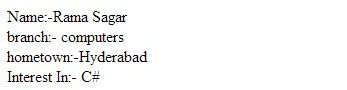
- <!DOCTYPE html>
- <html xmlns="http://www.w3.org/1999/xhtml">
- <head runat="server">
- </head>
- <body>
- <form id="form1" runat="server">
- <script>
- var student = '{"name":"Rama Sagar" , "branch": "computers", "hometown":"Hyderabad", "interestIn": "C#"}';
- //JSON.parse method to parse json data
- var value = JSON.parse(student);
- document.write("Name:-" + value.name + "<br>");
- document.write("branch:- " + value.branch + "<br>");
- document.write("hometown:-" + value.hometown + "<br>");
- document.write("Interest In:- " + value.interestIn + "<br>");
- </script>
- </form>
- </body>
- </html>
Output
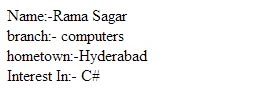
Raja MsrPosted Aug 23, 2023, 5:36 AM
Your article on JSON in JavaScript was informative, engaging and easy to understand.