

Cursor
- Oracle creates an area of memory called a Context Area to process SQL statements.
- The context area includes:
- Number of rows processed by the statement.
- A Cursor is a pointer to a Context Area.
- A SQL query result is called an Active set of records.
- This temporary work area is used to store the data retrieved from the database and manipulate this data.
- Once the complete result set is fetched, the context area is flushed out to release back the memory.
- A Cursor allows fetching and processing rows returned by a select statement and process one row at a time.
There are the following two types of Cursors:
- Implicit Cursors
- Explicit Cursors
Implicit Cursors
- An Implicit Cursor that is automatically declared by an Oracle Server statement is executed
- User/Programmer cannot control the information in this cursor
| Attributes | Working |
| % IS OPEN | Returns BOOLEAN value Evaluate to TRUE IF the cursor is open else evaluates to FALSE |
| %FOUND | Returns BOOLEAN value Evaluates to TRUE IF the most resent fetch returns a row else evaluates to FALSE |
| %NOTFOUND | Returns BOOLEAN value Evaluates to TRUE IF the most resent fetch does not return a row else evaluates to FALSE |
| %ROWCOUNT | Returns a number Evaluates the total number of row returned so far by the cursor. |
Create Table
- CREATE TABLE Employee_Detail
- (
- EMP_ID NUMBER, EMP_NAME VARCHAR(50), Designation VARCHAR(50), SALARY NUMBER
- )
- insert into Employee_Detail values(100, 'Rupesh Kahane', 'CEO', 30000)
- insert into Employee_Detail values(101, 'Vaibhav Taware', 'Developer', 14000)
- insert into Employee_Detail values(102, 'Ajit Katte', 'Sales', 18000)
- insert into Employee_Detail values(103, 'Vaibhav Taware', 'B Developer', 17000)
- insert into Employee_Detail values(104, 'Mitesh M', 'Tester', 9000)
- insert into Employee_Detail values(105, 'Abhijit', 'Team Lead', 20000)
- insert into Employee_Detail values(106, 'Nikhil G', 'Developer', 20000)
- v_Designation Employee_detail.Designation%Type := 'P LEAD';
- BEGIN
- Update Employee_detail Set Designation ='Developer'
- where Designation =v_Designation;
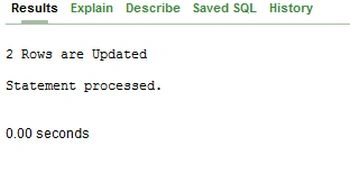
- DBMS_Output.PUT_LINE(SQL%ROWCOUNT || ' Rows are Updated');
- IF SQL%NOTFOUND THEN
- DBMS_Output.PUT_LINE('Data not found...Process Terminated');
- END IF;
- END;
Explicit Cursor
- An Explicit Cursor is defined within the program for a query that returns more than one row of data.
- This cursor allows sequential processing of each row of the returned data from the database.
- An Explicit Cursor is declared using Name with an association of a SELECT statement in the DECLARE section of the PL/SQL block.
Advantages
- Provides programmatic control for programmers.
- Easy to trap errors.
- Designed to work with SELECT statements that return more than one record at a time.
- Require additional steps to operate than an Implicit Cursor.
There are a few steps that you need to follow:
- Cursor Declaration
A Cursor is declared in the declaration block and provided with a Name and a SELECT statement.
- Cursor Opening
To process any cursor for the business logic, it is mandatory that it should be opened. This enables creation of a Context Area.
- Cursor Fetching
Fetching retrieves records from the Context Area into a variable such that the variable can be used for the business logic.
A Fetch command operates on the current record only and processes through the result set one record at a time.
- Cursor Closing
The cursor should be closed else it may lead to a memory leak. Until the cursor is closed, the memory is not released.
Syntax
DECLARE
Cursor Declaration
BEGIN
Opening of Cursor
Fetching of Cursor
Close Cursor
End;
Cursor with “Simple loop”
- DECLARE
v_EMP_ID Employee_detail.EMP_ID%TYPE; - CURSOR employee_cursor
- IS
- SELECT EMP_ID
- FROM Employee_detail;
- BEGIN
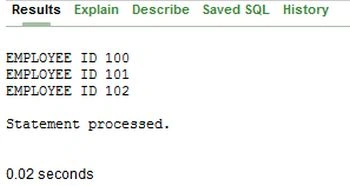
OPEN employee_cursor; - FETCH employee_cursor INTO v_EMP_ID;
- DBMS_Output.PUT_LINE('EMPLOYEE ID ' || v_EMP_ID);
- FETCH employee_cursor INTO v_EMP_ID;
- DBMS_Output.PUT_LINE('EMPLOYEE ID ' || v_EMP_ID);
- FETCH employee_cursor INTO v_EMP_ID;
- DBMS_Output.PUT_LINE('EMPLOYEE ID ' || v_EMP_ID);
- CLOSE employee_cursor;
- END;
Cursor with “loop”
- DECLARE
- CURSOR employee_cursor
- IS
- SELECT * FROM Employee_detail;
- v_Emp_Data employee_cursor%ROWTYPE;
- BEGIN
- OPEN employee_cursor;
- LOOP
- FETCH employee_cursor INTO v_Emp_Data;
- EXIT WHEN employee_cursor%NOTFOUND;
- DBMS_Output.PUT_LINE(' Emp Id: ' || v_Emp_Data.Emp_ID);
- DBMS_Output.PUT_LINE(' Name: ' ||v_Emp_Data.Emp_Name);
- DBMS_Output.PUT_LINE('');
- END LOOP;
- CLOSE employee_cursor;
- END;
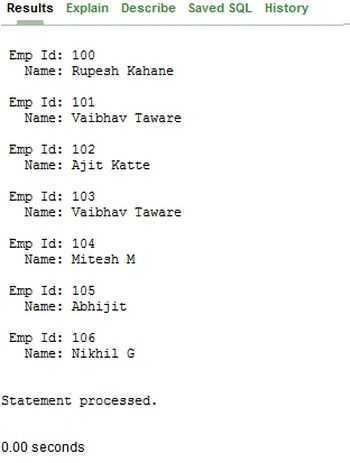
In the above example within the loop each record in the Active Set is retrieved and used.
- An EXIT WHEN statement is mandatory to be the part of the loop.
- A loop is terminated with a proper cursor attribute operating on %NOTFOUND status.
- A loop is terminated when the condition is TRUE.
- DECLARE
- CURSOR employee_cursor
- IS
- SELECT * FROM Employee_detail;
- v_Emp_Data employee_cursor%ROWTYPE;
- BEGIN
- OPEN employee_cursor;
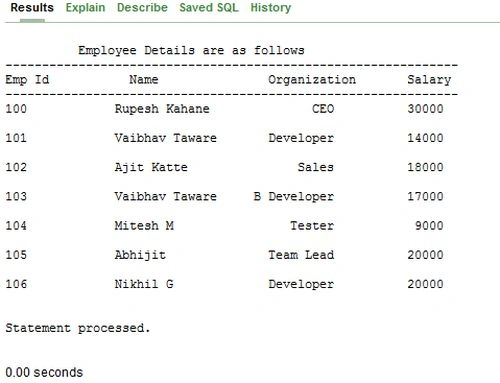
- DBMS_Output.PUT_LINE(' Employee Details are as follows');
- DBMS_Output.PUT_LINE('--------------------------------------------------------------');
- DBMS_Output.PUT_LINE('Emp Id '||' Name '||' Organization '||'Salary ');
- DBMS_Output.PUT_LINE('--------------------------------------------------------------');
- LOOP
- FETCH employee_cursor INTO v_Emp_Data;
- EXIT WHEN employee_cursor%NOTFOUND;
- DBMS_Output.PUT_LINE(RPAD(v_Emp_Data.Emp_ID,15)|| RPAD(v_Emp_Data.Emp_Name,15)|| LPAD(v_Emp_Data.Designation,15)|| LPAD(v_Emp_Data.Salary,15));
- DBMS_Output.PUT_LINE('');
- END LOOP;
- CLOSE employee_cursor;
- END;
Cursor with “While Loop”
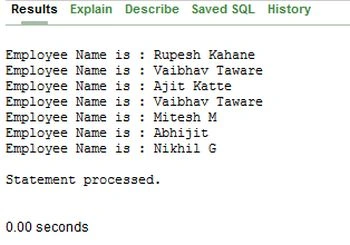
- DECLARE
- CURSOR employee_cursor
- IS
- SELECT *
- FROM Employee_detail;
- v_EMP_DATA employee_cursor%ROWTYPE;
- BEGIN
- OPEN employee_cursor;
- FETCH employee_cursor INTO v_EMP_DATA;
- WHILE employee_cursor%FOUND
- LOOP
- DBMS_Output.PUT_LINE('Employee Name is : ' || v_EMP_DATA.EMP_NAME);
- FETCH employee_cursor INTO v_EMP_DATA;
- END LOOP;
- CLOSE employee_cursor;
- END;
Cursor with “FOR Loop”
- The loop works on a range oriented operational logic.
- The loop is very useful for traveling through all the data in a database table.
- This is more dynamic in operation than a simple loop.
- The cursor does not require an explicit OPEN, FETCH and CLOSE.
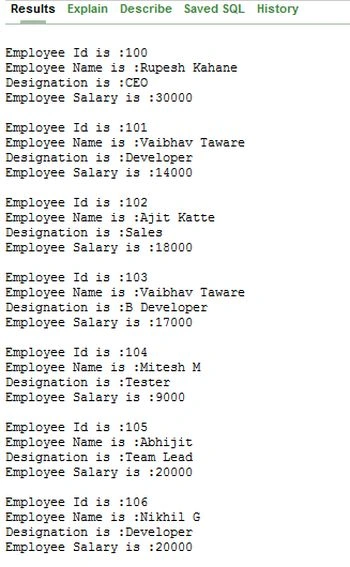
- DECLARE
- CURSOR employee_cursor
- IS
- SELECT *
- FROM Employee_detail;
- v_EMP_DATA employee_cursor%ROWTYPE;
- BEGIN
- FOR v_EMP_DATA IN employee_cursor
- LOOP
- DBMS_Output.PUT_LINE('Employee Id is :' || v_EMP_DATA.EMP_Id);
- DBMS_Output.PUT_LINE('Employee Name is :' || v_EMP_DATA.EMP_NAME );
- DBMS_Output.PUT_LINE('Designation is :' || v_EMP_DATA.Designation );
- DBMS_Output.PUT_LINE('Employee Salary is :' || v_EMP_DATA.Salary);
- DBMS_Output.PUT_LINE('' );
- END LOOP;
- END;
Conclusion
I hope that this article will be very useful for beginners to understand cursors. I welcome all your suggestions and comments.
Join the conversation! Your thoughts help the community grow.