

This article explains partial classes in C# and .NET. We will also learn why we need partial classes followed by how to create a partial class and put it to work in a real application.
Introduction
Partial classes were introduced in C# 2.0 and later extended in C# 3.0.
It is very common for class library developers or architects to define and implement a lot of functionality in a single class. For example, a Car class can hold the definition and all of its functions. What if the functionality is too much? Obviously, the file becomes large and it becomes cumbersome to use and to be updated by developers. What if multiple developers in a team want to modify the same class? What if the Car class has functionality separated by its external interface, internal design, and the engine and three separate developers work on three different aspects of this class?
The solution to this problem is partial classes. We can break down the Car class into three partial classes. Each partial class can be a different source file (physically). In the case of the Car class, there can be three physical files with even different names, CarExternal.cs, CarInternal.cs and CarEngine.cs, all of them defined in a Car class. When all these three partial classes are compiled, they are compiled as one Car class. But the advantage here is that three separate developers can work on three different files without affecting one another.
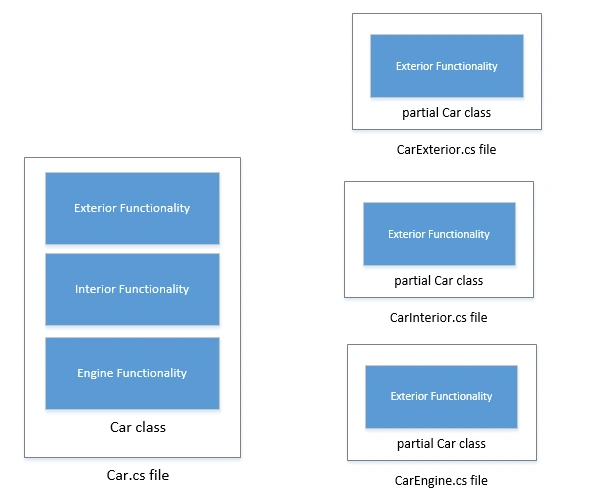
The preceding diagram shows two images. The first image shows an example of a typical single class Car that resides in a single Car.cs file. The second image is an example of three partial Car classes that reside in three different .cs files.
In some project types, Visual Studio separates the same class into two partial classes to separate the user interface with code behind so the designers and programmers can work on the same class simultaneously.
Not only the definition of a class, but struct, interface, and a method can be implemented as partial and split over multiple source files.
Creating Partial Classes
Let's take a quick look at the Car class in Listing 1.
{
// Car Exterior Functionality
public void BuildTrim() { }
public void BuildWheels() { }
// Car Interior Functionality
public void BuildSeats(){}
public void BuildDashboard() { }
// Car Engine
public void BuildEngine() { }
} |
Listing 1
The code in Listing 1 defines the Car class that has its functionality broken down into three parts, Exterior, Interior, and Engine.
The partial keyword is used to create a partial class. All the parts must use the partial keyword. All the parts must be available at compile time to form the final type. All the parts must have the same accessibility, such as public, private, and so on.
Now, we are going to break the Car class down into three partial classes to make it simpler.
{
// Car Exterior Functionality
public void BuildTrim() { }
public void BuildWheels() { }
}
public partial class Car
{
// Car Interior Functionality
public void BuildSeats() { }
public void BuildDashboard() { }
}
public partial class Car
{
/// Car Engine
public void BuildEngine() { }
} |
Listing 2
All partial classes in Listing 2 reside in multiple .cs files.
Partial Methods
A partial class or struct may contain a partial method. Similar to a partial class, a partial method can be used as a definition in one part while another part can be the implementation. If there is no implementation of a partial method then the method and its calls are removed at compile time.
A partial method declaration consists of two parts: the definition and the implementation.
The code listing in Listing 3 defines a partial method called InitializeCar in a different .cs file and the implementation of the same method is in a different .cs file.
{
// A partial method definiton
partial void InitializeCar();
// Car Exterior Functionality
public void BuildTrim() { }
public void BuildWheels() { }
}
public partial class Car
{
/// Car Engine
public void BuildEngine() { }
// A partial method implementaion
partial void InitializeCar()
{
string str = "Car";
// Put all car initialization here
}
} |
Listing 3
More
The following are some more articles on partial classes:
- 4 Real Time Use of Partial Classes and Partial MethodJan 12, 2012. In this article we will explain use of partial classes and partial methods for 4 real time.
- Partial Classes in C#Jun 20, 2011. In this quick article you will have a look at Partial Classes in C#.
- Partial Classes in C#Jun 03, 2009. In this article, I will explain what partial classes are, their benefits, and how to implement partial classes using C#.
- New Features in C# version 2.0 - Partial TypesOct 12, 2004. Partial types are new addition to C# language version 2.0, which is available with the .NET Framework 2.0 or Visual Studio 2005. This article discusses the partial classes and how to create and use them in your applications.
- Learning Visual Studio 2005 IDE - The DesignerJun 07, 2004. In this article of Learning Visual Studio 2005 IDE series, I will explore some of the designer features and the breakdown of the classes of a Windows Forms project.
- New Features in C# 2.0 : Part 2Mar 10, 2004. In this article I will talk about iterators, anonymous methods, and partial classes.
Ehtesham MehmoodPosted Feb 22, 2014, 7:56 PM
Mahesh sir please write article about C# programming language ? what c# can do for you ? please explain in your words i am lover of your website and also lover of C# language so want to know more and more about C# power ?
Murali ReddyPosted Oct 10, 2013, 6:42 AM
The Best Example we can give for this partial class is.When we open a WPF Application it divides the apllication into .xaml file for design part and .cs file for Source Code.