

Introduction
In this article we are going to see what Launchers are and what are the uses of
Launcher in developing a Windows Phone 7 Application.
Launcher in Windows Phone 7 is an API used to launch some of the built in
applications using which the user can select some task. Once the user selects
the application, we can handle the task as per the convenient option to do some
manipulations as per the task raised. Some of the example of using the launchers
is triggering a contact application to select some contact information.
Launchers have some general steps to launch a particular application and steps
are as follows
- Creating an instance of the task
- Setting the parameters to organize the task
- Calling the show method to invoke the task
Let us see the list of Launchers available and
the usage of each and every launcher tasks to get some clear idea on when to use
each task to get a better performance.
Launchers Tasks
- SMS Compose Task -This task is used to send a message from the application. We can launch the SMS Composer of the Messaging application and we can optionally specify the recipients, body etc to make it easy. The message composer screen will be opened along with the default items and the message will not be sent unless and until the Send button is clicked.
- Email Compose Task -This task is used to send Email message from the application which we develop. This task will launch the Email Composing screen with the options to load the data which we can be specified as static or dynamic using our code. The Email will not be sent unless and until the user presses the Send button from the task.
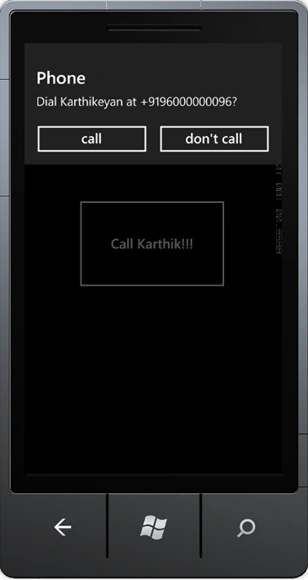
- Phone Call Task -This task is used to make phone calls for the users within the application, we can specify properties like calling number, name etc but unless and until the call button is pressed manually the call will not be processed.
- Web Browser Task -Used to launch the web browser to open a specified URL mentioned using the properties at run time.
- Media Player Launcher Task-This task is used to launch the Media Player and play some media files of our choice by selecting the media file or by playing them randomly. Also we have options to make use of some of the properties like rewind, pause, forward etc to make it much easier to perform.
- Connection Settings Task -This task is used to adjust the network settings connection by providing options for the users to handle it based on necessary settings.
- Bing Maps Directions Task -This task is used to launch the BING maps to get the direction of a specified location by providing the location details as a parameter.
- Bing Maps Task -This task is used to launch the BING maps application and search the location within the map. We can use the inbuilt options within the task to ZOOM in and ZOOM out to get the clear location.
- Search Task -This task is used to perform some online search of the content which can be used to search for the application which we develop. This task performs a general search for the content which we specify, normally like the BING.
- Share Link Task -This task is used to share some links to the social networking sites, we can use this task to launch from our application and share some links to the network.
- Share Status Task -This task is used to share our status message to the social networking sites, we can use this task to launch from our application and send status messages to different social networking sites.
- Marketplace Detail Task -This task is used to launch the Market place client application and displays the detailed information of a specific application which we want to look at, if no application parameter is passed, it opens by default, the current application from which it was called.
- Market place Hub Task -This task is used to launch the Market place hub within the Marketplace client application to display the type of content which we are looking for.
- Marketplace Review Task -This task is used to launch the Marketplace application and show the reviews page for the application from which the task will be invoked.
- Marketplace Search Task -This task is used to search the market place with some particular content of application. Using this task launches the market place application with the specified search filter options to select from the list of applications.
Let us take an example on how to use one of the task and we will see in depth in our upcoming articles one by one. Now let us create a Phone Call task and see how to launch the Phone application to make a call.
Steps
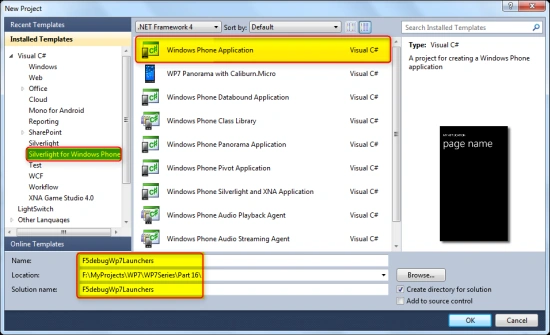
Open Visual Studio 2010 and create a new Silverlight for Windows Phone 7
Application with a valid project name as shown in the screen below.
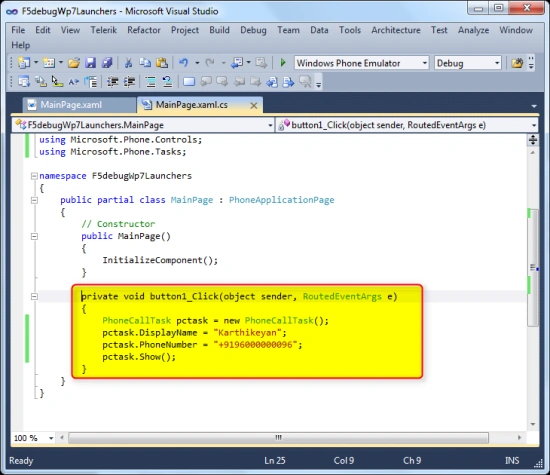
Now let us add a button to invoke the PhoneCall Task and call a particular number, write the below code on the click event of the button as shown in the screen below. Also note that we need to add the below Using Directive in order to use the PhoneCall task (using Microsoft.Phone.Tasks; )
XAML Code
<Grid
x:Name="LayoutRoot"
Background="Transparent">
<Grid.RowDefinitions>
<RowDefinition
Height="Auto"/>
<RowDefinition
Height="*"/>
</Grid.RowDefinitions>
<!--<span class="hiddenSpellError" pre="">TitlePanel</span>
contains the name of the application and page title-->
<StackPanel
x:Name="TitlePanel"
Grid.Row="0"
Margin="12,17,0,28">
<TextBlock
x:Name="ApplicationTitle"
Text="F5DEBUG
WP7 TUTORIALS"
Style="{StaticResource
PhoneTextNormalStyle}"/>
<TextBlock
x:Name="PageTitle"
Text="Launchers"
Margin="9,-7,0,0"
Style="{StaticResource
PhoneTextTitle1Style}"/>
</StackPanel>
<!--<span class="hiddenSpellError" pre="">ContentPanel</span> -
place additional content here-->
<Grid
x:Name="ContentPanel"
Grid.Row="1"
Margin="12,0,12,0">
<Button
Content="Call
Karthik!!!"
Height="182"
HorizontalAlignment="Left"
Margin="80,89,0,0"
Name="button1"
VerticalAlignment="Top"
Width="292"
Click="button1_Click"
/>
</Grid>
</Grid>
Code Behind
private
void button1_Click(object
sender, RoutedEventArgs e)
{
PhoneCallTask pctask = new PhoneCallTask();
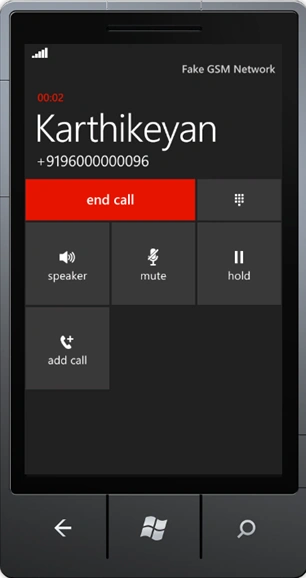
pctask.DisplayName = "Karthikeyan";
pctask.PhoneNumber = "+9196000000096";
pctask.Show();
}
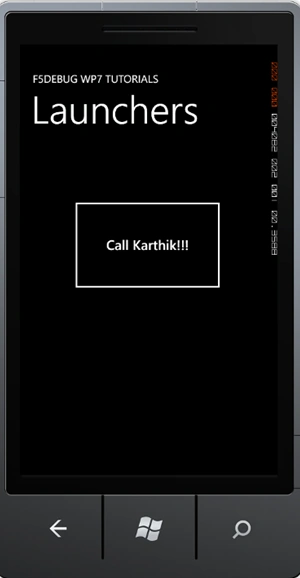
Now we are done with the code, build
and execute the project by pressing F5 and we can see the application opened in
Windows Phone 7 Emulator as shown in the screens below.
Conclusion
So in this article we have seen what Launchers are in Windows Phone 7
development and the list of Launchers available. Also we have seen a sample on
What PhoneCallTask is and how to use it practically with the Windows Phone 7
application development.
Arun ChoudharyPosted Apr 16, 2012, 7:18 PM
Hi Karthikeyan How can we use touch event in Windows Phone ?
Rocson kookPosted Apr 3, 2012, 3:38 PM
thanks Karthikeyan for posting this kind of article.