

In this article we will be seeing how to create, modify and delete scope display group using powershell script in SharePoint 2010.
Create scope display group:
In the SharePoint site you can create a new display group for the search scope and associate the scope with the group.
Through UI you can go to Site Actions => Site Settings =>Site Administration => Search Scopes => Display group => Create a new display group.

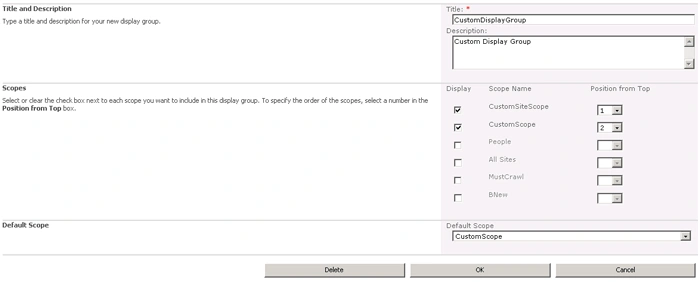
The same thing can be achieved using powershell script
$siteURL="http://servername:1111/"
$site=get-spsite $siteURL
$displayName="CustomDisplayGroup"
$displayDescription="Custom Display Group"
$owningSiteURL=New-Object System.Uri($site.URL)
$displayInAdminUI=$true
$scope1="CustomSiteScope"
$scope2="CustomScope"
$defaultScope=$scope2

$searchContext=[Microsoft.Office.Server.Search.Administration.SearchContext]::GetContext($site)
$scopes=New-Object Microsoft.Office.Server.Search.Administration.Scopes($searchContext)
$displayGroupColl=$scopes.AllDisplayGroups
$displayGroup=$displayGroupCOll.Create($displayName,$displayDescription,$owningSiteURL,$displayInAdminUI)
$displayGroup.Add($scopes.GetSharedScope($scope1))
$displayGroup.Add($scopes.GetSharedScope($scope2))
$displayGroup.Default=$scopes.GetSharedScope($defaultScope)
$displayGroup.Update()
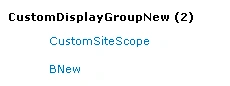
Modify scope display group:
Here we will be modifying the existing display group using powershell script.
$siteURL="http://servername:1111/"
$site=get-spsite $siteURL
$displayName="CustomDisplayGroup"
$newDisplayName="CustomDisplayGroupNew"
$newDisplayDescription="Custom Display Group New"
$owningSiteURL=New-Object System.Uri($site.URL)
$displayInAdminUI=$true
$removeScope="CustomSiteScope"
$addScope="BNew"

$searchContext=[Microsoft.Office.Server.Search.Administration.SearchContext]::GetContext($site)
$scopes=New-Object Microsoft.Office.Server.Search.Administration.Scopes($searchContext)
$displayGroup=$scopes.GetDisplayGroup($owningSiteURL,$displayName)
$displayGroup.Name=$newDisplayName
$displayGroup.Description=$newDisplayDescription
$displayGroup=$displayGroupCOll.Create($displayName,$displayDescription,$owningSiteURL,$displayInAdminUI)
$displayGroup.Remove($scopes.GetSharedScope($removeScope))
$displayGroup.Add($scopes.GetSharedScope($addScope))
$displayGroup.Update()
Delete scope display group:
$siteURL="http://servername:1111/"
$site=get-spsite $siteURL
$displayName="CustomDisplayGroupNew"

$searchContext=[Microsoft.Office.Server.Search.Administration.SearchContext]::GetContext($site)
$scopes=New-Object Microsoft.Office.Server.Search.Administration.Scopes($searchContext)
$displayGroup=$scopes.GetDisplayGroup($owningSiteURL,$displayName)
$displayGroup.Delete()
Gowtham RajamanickamPosted Apr 28, 2016, 2:13 AM
good work..