

In my last article "Getting started with ADO.NET Entity Framework in .NET 3.5", we have done select and add operations, now let us extend with update and delete operations.
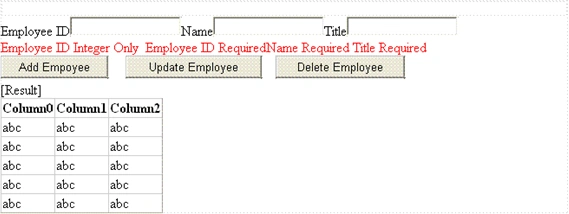
Now I have added there textboxes fro employee ID, name and title as follows. (you can find it with attached project)
Update:
There is no change in Data layer
In the business layer add the UpdateEmployee method
public string UpdateEmployee(Payroll.Entities.Employee e1)
{
PayrollDAO payrollDAO = new PayrollDAO();
try
{
Employee e2 = null;
e2 = (from emp in payrollDAO.Employee
where emp.EmployeeID == e1.EmployeeID
select emp).First();
e2.Name = e1.Name;
e2.Title = e1.Title;
payrollDAO.SaveChanges();
}
catch
{
return "ERROR";
}
return "SUCCESS";
}
In the Presentation layer, add the following code in update button click
protected void Button2_Click(object sender, EventArgs e)
{
EmployeeService es = new EmployeeService();
DateTime dt = new DateTime(2008, 12, 12);
Payroll.Entities.Employee e1 = Payroll.Entities.Employee.CreateEmployee(Convert.ToInt32(empID.Text), empName.Text, empTitle.Text, dt, "M", "M", dt);
Result.Text = es.UpdateEmployee(e1);
GridView1.DataSource = es.GetEmployee();
GridView1.DataBind();
}
Delete:
There is no change in Data layer
In the business layer add the DeleteEmployee method
public string DeleteEmployee(Payroll.Entities.Employee e1)
{
try
{
PayrollDAO payrollDAO = new PayrollDAO();
Employee e2 = (from emp in payrollDAO.Employee
where emp.EmployeeID == e1.EmployeeID
select emp).First();
payrollDAO.DeleteObject(e2);
payrollDAO.SaveChanges();
}
catch
{
return "ERROR";
}
return "SUCCESS";
}
In the Presentation layer, add the following code in delete button click
protected void Button3_Click(object sender, EventArgs e)
{
EmployeeService es = new EmployeeService();
DateTime dt = new DateTime(2008, 12, 12);
Payroll.Entities.Employee e1 = Payroll.Entities.Employee.CreateEmployee(Convert.ToInt32(empID.Text), "", "", dt, "M", "M", dt);
Result.Text = es.DeleteEmployee(e1);
GridView1.DataSource = es.GetEmployee();
GridView1.DataBind();
}
Now our CRUD operations are over, in next article we will try to include more tables with relationships.
Aah! Another bug! Well, it's the life.
Vithal WadjePosted Sep 27, 2014, 11:44 AM
super
MA BariPosted Feb 27, 2011, 4:31 AM
I am new but I think Its a better way for developer.
Krishna ReddyPosted Apr 12, 2010, 7:00 AM
good
baktash ahmedPosted May 8, 2009, 7:36 AM
I am trying to create a new test project i dont get the ADO.NET Enttity Frame option in VS 2008 though i have .NET 3.5 with Service Pack 1.
ihtesham qaziPosted May 3, 2009, 6:09 AM
I can not compile this project for few errors.
David NelsonPosted Jan 8, 2009, 5:13 PM
I am new to C# and am trying to follow the Example but am not sure what to do to add a Static Main. I could use a little help. "Payroll.exe does not contain a Static Main suitable for an entry point"