

In this article we learn what a jagged array is and how we use jagged arrays in our applications.
A jagged array is an array of arrays.
Problem
Suppose I run an institute and I have 4 students and all 4 students have enrolled in 2 courses.
Let's make a table for better visualization.
Student Name Subject Name.
| Student Name | Subject Name |
| Pramod | C# SQL Server Java jQuery |
| Ravi | C# |
| Rahul | Android Window Phone Development iOS development |
| Deepak | Html5 CSS3 |
Solution
We can do this to use a jagged array.
First create a string array to store student names.
- string[] studentArray = new string[4];
- studentArray[0] = "Pramod";
- studentArray[1] = "Ravi";
- studentArray[2] = "Rahul";
- studentArray[3] = "Deepak";
- string[][] jaggedArray = new string[4][];
- jaggedArray[0] = new string[4];
- jaggedArray[1] = new string[1];
- jaggedArray[2] = new string[3];
- jaggedArray[3] = new string[2];
- jaggedArray[0][0] = "C#";
- jaggedArray[0][1] = "SQL Server";
- jaggedArray[0][2] = "Java";
- jaggedArray[0][3] = "jQuery";
- jaggedArray[1][0] = "C#";
- jaggedArray[2][0] = "Android";
- jaggedArray[2][1] = "Window Phone Development";
- jaggedArray[2][2] = "iOS development";
- jaggedArray[3][0] = "Html5";
- jaggedArray[3][1] = "CSS3";
- for (int i = 0; i < jaggedArray.Length; i++)
- {
- string[] anotherArray =jaggedArray[i];
- Console.WriteLine(studentArray[i]);
- Console.WriteLine();
- for (int j = 0; j < anotherArray.Length; j++)
- {
- Console.WriteLine(anotherArray[j]);
- }
- Console.WriteLine("=========================");
- }
- Console.ReadLine();
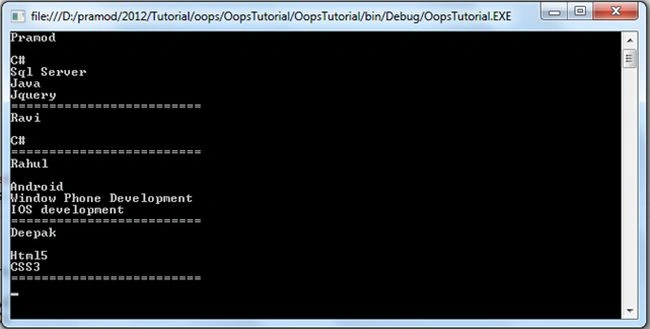
Pramod ThakurPosted Mar 23, 2016, 3:29 AM
tnx kinjal patel..
kinjal patelPosted Mar 23, 2016, 3:03 AM
ok
Pramod ThakurPosted Mar 21, 2016, 10:44 AM
You can't declare like that..
kinjal patelPosted Mar 21, 2016, 7:46 AM
what do u mean if i am declaring like above post?
Pramod ThakurPosted Feb 5, 2016, 11:41 PM
i can't understand what you are talking about kinjal patel.. Can you briefly tell your problem so that i can try to figure out...
Pramod ThakurPosted Feb 5, 2016, 11:38 PM
thx Manju lata Yadav..
kinjal patelPosted Nov 11, 2014, 11:13 PM
what do mean if array a=[[[]]]; please one have correct reply to mail id [email protected]
Manju lata YadavPosted Oct 9, 2014, 1:55 AM
nice and step by step description.