

Ranking functions provide a very good feature of assigning numbering to the records in the result set in SQL. Row_Number in SQL is one of these functions available in that allows us to assign rankings or numbering to the rows of the result set data. Different values are assigned to different rows, based on the type of ranking function used. They are basically of the following types:
- Row_Number
- Rank
- Dense_Rank
- NTile
In this article, we discuss the use of the Row_Number in SQL.
To understand this concept of ranking, we need to first understand the syntax of it. The syntax is :
- Rank() Over ( {Partition_By_Clause} Order_By_Clause)
First of all, Rank() is the function to assign the numbering or ranking to the result set data. Next, the Over keyword is used along with the conditions specified in the '(' brackets (in other words the Partition and Order by clause), to decide how the ranking or numbering is started and implemented on the result set data. Here, these two keywords are also very important to be understood, before we proceed.
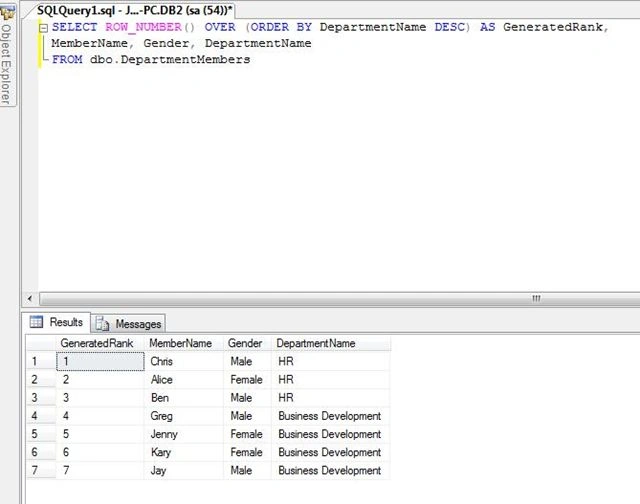
Order_By_Clause : This clause decides how the ranking or numbering of the data starts. For example, if we specify Order By EmployeeID desc, it will result in ordering the data in descending order by EmployeeID and then assign the rank to the records, starting from 1 to n, based on the type of ranking function we use (in other words rank, dense rank and so on).
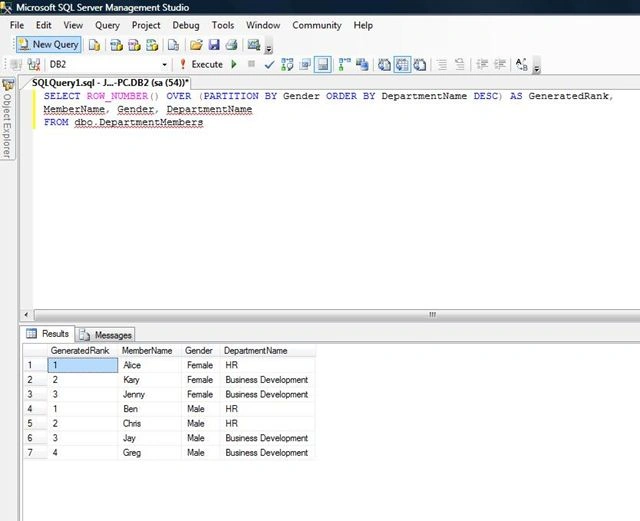
Partition_By_Clause : This clause basically provides the grouping functionality on the result set data. When used in combination with the order by clause, it results in grouping the data and then the ranking of the rows is done, based on the type of ranking function we use (in other words rank, dense rank and so on).
So its the over keyword, along with these two clauses, that handle the ranking process of the records, when using the ranking functions.
The Row_Number function
This function works by assigning continuous ranking to the records, without skipping any number in the result set, whether it is partitioned or not. At the end of the discussion, we will see what we mean by continuous ranking and not skipping any record.
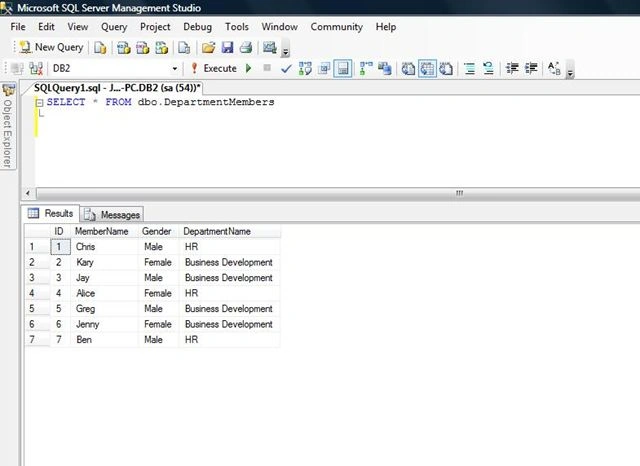
For this, we will create a table named DepartmentMembers, that stores names of the members, along with their DepartmentName. I know this is not a perfect database structure, but just a sample table with some records inserted into it, to discuss the concept. So our setup table will be like the following:
Cipher CoderPosted Aug 8, 2019, 7:49 AM
As I was scrolling down, I thought you would be explaining the other ranking functions as well.. :) Very well explained though..
Kaustav basuPosted Aug 4, 2018, 8:13 AM
It can be done by case quary select (case when gender='Female' then 1 else 2 end) 'Rank',Id,EmployeeName,Gender,Designation from tblEmp
Muhammad UmerPosted Jul 19, 2018, 1:55 AM
What If I want Generated Rank 1 for all the Females and 2 for all the Males?
Sharmila babuPosted May 17, 2018, 7:21 AM
Well explained with examples!!!
chaitra sPosted Feb 22, 2018, 4:53 AM
Nice Article ... Well explained and easy to understand