

Microsoft Messaging Queue (MSMQ) technology is used for asynchronous communication using messages. MSMQ also can be considered to be an Inter- process communication capability.
Whenever two processes want to communicate with each other in a "Fire and Forget" manner, MSMQ is very useful for that.
Usage
For example what if Billing software needs to process 1000 bills at midnight and must send mail to all those users. Such as when the operator runs the software he wants immediate notification. The operator can't wait for all the bills to be processed and gets email.
Here MSMQ plays an important role for communication by Billing software to send those 1000's of customer email information into the Queue and the Queue event handler will handle the requests. In this way the Operator gets instant notification of the processes instead of knowing the "Behind the Scene" process.
So let's have a code walkthrough of how to create the process behind the scenes:
Step 1: Need to ensure MSMQ is properly installed in the computer.
1. How to check?
- Type "compmgmt.msc" in the Run window or right-click on MyComputer and select "Manage Computer".
- The following screen shot shows the MSMQ installed in the computer, if its not listed then follow Step "c" else done.
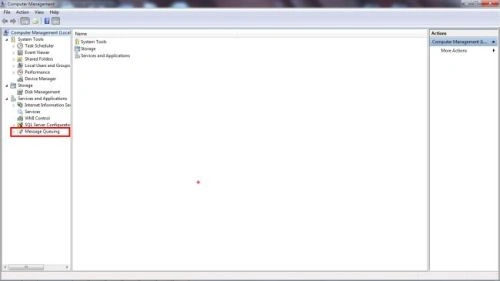
- Go to the Control Panel and select "Add or remove programs" under "Programs and Features"
- After clicking on "Add or remove programs" again click "Turn Windows features on or off" displayed on left side.
- Check (as in the following screenshot) whether MSMQ is enabled or not; if not then select "Enable" and press "OK"; see:
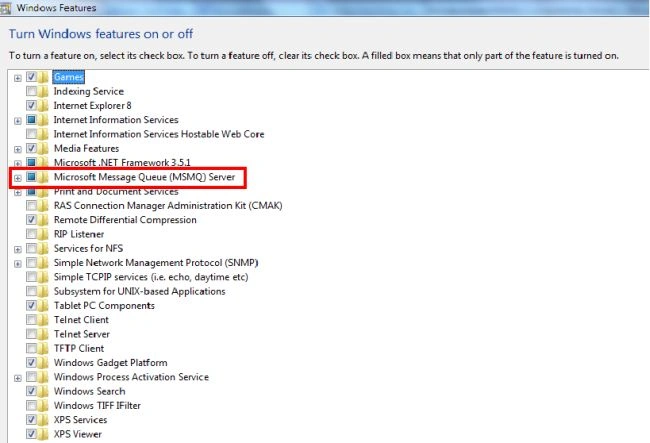
2. Once MSMQ is installed expand the MSMQ feature; there will be the following queues:
- Private queues are queues that are not published in the Active Directory Domain Services and are displayed only on the local computer that contains them.
- Public queues: In a domain environment, public queues are queues that are published in Active Directory Domain Services and hence are replicated throughout your Windows Server® 2008 family forest. Note that only the properties for these queues are replicated, not the actual queues themselves or their contents.
3. Now we have to create the queues programmatically as per our requirements. So now its time to code.
4. How to create a MSMQ using C#:
- First we will check if the queue exisits; if it does then ok else we will create the queue as in the following.
Declare the queue instance as follows:
Now to check Queue existence:MessageQueue billingQ = new MessageQueue(); //Setting the QueuPath where we want to store the messages. billingQ.Path = @".\private$\Bills";If(MessageQueue.Exists(billingQ.Path)) { //Exists } Else { // Creates the new queue named "Bills" MessageQueue.Create(billingQ.Path); } - Now that the queue is created, the next step is to send data to the "Bills" queue.
- The following code/function sends data/message to the "Bills" Queue:
private void sendData2Queue()
{
billingQ.Formatter = new XmlMessageFormatter(new Type[] { typeof(string) });
billingQ.ReceiveCompleted += billingQ _ReceiveCompleted;
billingQ.Send("Desired Messages");
billingQ.BeginReceive();
billingQ.Close();
}
The above function helps us to send data to the queue which is asynchronous because the operator or user using this application is not aware of the actual process happening behind the scenes.
Now once the data has arrived, the MSMQ callback handler will receive the messages and will do the actual process of "Sending the mails with the appropriate data".
billingQ.ReceiveCompleted += billingQ _ReceiveCompleted;
The above line of code tells MSMQ to receive the messages as soon as the new entry or message is placed in this queue.
The following function is used to receive the message sent by the front end (the application):
void billingQ _ReceiveCompleted(object sender, ReceiveCompletedEventArgs e)
{
try
{
var msg = billingQ.EndReceive(e.AsyncResult);
string data = msg.Body.ToString();
// Process the logic be sending the message
//Restart the asynchronous receive operation.
billingQ.BeginReceive();
}
catch(MessageQueueException qexception)
{}
}
So that few lines of code makes your application communicate asynchronously and very easily.
In future articles we will learn about the Transactional Queue, so that we are assured that our sent messages are not lost.
I hope you enjoyed the article and provide me your valuable inputs.
ANKIT SHARMAPosted Jan 1, 2022, 12:18 PM
Some time application get stuck while sending message. any idea about this issue ?
Gyan PrakashPosted May 26, 2020, 4:05 PM
Message is not visible in queue message
Arjun DhilodPosted Oct 19, 2018, 12:57 AM
Good one but i have tested you are project i am not able to add MSG in MSMQ why ?is it code working fine
IpelengPosted Nov 8, 2015, 6:17 AM
Hi, just want to add something, this may help someone who comes here looking for a solution. This solution works very well, however, I'd like to add - move billingQ.ReceiveCompleted += billingQ_ReceiveCompleted and billingQ.BeginReceive() from the send2Queue method to the form constructor. I struggled with this when first testing the project. What happens is each time you click Send, you create a new event handler. So after the second time you click Send, you get 2 messageboxes showing, after 3 clicks, 3 messageboxes. Moving these to the constructor ensures only one handler is created, so you only get 1 messagebox showing for every 1 click of send. Thanks for the article, though, it helped me a lot.
philip montgomeryPosted Jun 27, 2013, 11:24 AM
I encounted an error using the MSMQ with private queues , If I try{}catch{} OnReceiveCompleted for reading (works perfect) but then delete the queue to simulate the server disconnecting , the exeption is unhandled and crashes the application. Found an old article here which seems to a similar if not the same issue: https://connect.microsoft.com/VisualStudio/feedback/details/684503/unhandled-exception-deletion-of-a-private-queue-during-an-asynchronous-event-wait-beginpeek-receive , Has anyone else encountered this? or know a workaround?.
Kamal RawatPosted Sep 24, 2012, 2:45 PM
Thanks Mahesh...Will definitely add in my next article...!
Mahesh ChandPosted Sep 24, 2012, 12:26 PM
Good start Kamal. It will be nice to also add points like what operating system you need to work with MSMQ and other configurations. Or point out on the page where readers can learn more about how to install and configure MSMQ on their machines. Cheers!
Kamal RawatPosted Sep 24, 2012, 9:43 AM
@sharad: Yes we can implemetn security as well, we se d encrypted messages...Will write article on that too for sure...
Kamal RawatPosted Sep 24, 2012, 9:38 AM
@Sachin: As i already mentioned when two processes need async or an inter communication.. its very handy.. I will also making second article illustrating the another advantage of MSMQ... Thanks for reading the article..
Sachin BhardwajPosted Sep 24, 2012, 7:08 AM
What is main advantage of msmq?
Sharad GuptaPosted Sep 24, 2012, 7:08 AM
Really nice article, can i use any security technique with MSMQ.
Prabhakar MauryaPosted Sep 24, 2012, 6:59 AM
Nice description about MSMQ. How to integrate MSMQ for web application.
Kamal RawatPosted Sep 24, 2012, 2:29 AM
Hi deepak, u can implement the same logic for web applications too. First you need to add System.Messaging namespace.. if u find any difficulty while implementing...plz let me know..
Deepak MiddhaPosted Sep 24, 2012, 12:24 AM
Hi Kamal Rawat nice description. How to integrate msmq with ASP.Net?