

Introduction
The geolocation object can provides access to the device's GPS sensor. It provides the location information such as latitude and longitude. The common source of location information is the GPS (that is, Global Positioning System) and the location inferred from the network signals, such as IP address, WiFi etc. There are various methods that we use for Geolocation; they are described in the following.
1 ) geolocation.getCurrentPosition
This method can be used to return the device's current position as a position object. This method take three parameters:
geolocationSuccess: When the location of the geolocation position is available then it calls the user's callback function, that means if the location is found or available then their is a success, it take one parameter that returns the geolocation position returned by the device.
geolocationError: When the location is not available then the user callback function that shows the error for geolocation functions takes one parameter that returns the error that is returned by the device.
geolocationOption: It is an optional parameter to customize the retreval of the geolocation position.
The geolocation.getCurrentPosition is an asynchronous function that supports the platform such as Android, BlackBerry WebWorks (OS 5.0 and higher), iOS, Window Phone 7 (Mango), Bada 1.2 & 2.x and webOS. The syntax is:
navigator.geolocation.getCurrentPosition( geolocationSuccess, [geolocationError],[ geolocationOption]);
Example
<!DOCTYPE html>
<html>
<head>
<meta name="viewport" content="width=device-width, height=device-height, initial-scale=1.0, maximum-scale=1.0, user-scalable=no;" />
<meta http-equiv="Content-type" content="text/html; charset=utf-8" />
<title>Cordova WP7</title>
<link rel="stylesheet" href="master.css" type="text/css" media="screen" title="no title"
charset="utf-8" />
<script type="text/javascript" charset="utf-8" src="cordova-1.9.0.js"></script>
<script type="text/javascript">
// Wait for Cordova to load
document.addEventListener("deviceready", onDeviceReady, false);
// Cordova is ready
function onDeviceReady() {
navigator.geolocation.getCurrentPosition(onSuccess, onError);
}
// onSuccess Geolocation
function onSuccess(position) {
var element = document.getElementById('geolocation');
element.innerHTML = 'Latitude: ' + position.coords.latitude + '<br />' +
'Longitude: ' + position.coords.longitude + '<br />' +
'Altitude: ' + position.coords.altitude + '<br />' +
'Accuracy: ' + position.coords.accuracy + '<br />' +
'Altitude Accuracy: ' + position.coords.altitudeAccuracy + '<br />' +
'Heading: ' + position.coords.heading + '<br />' +
'Speed: ' + position.coords.speed + '<br />' +
'Timestamp: ' + position.timestamp + '<br />';
}
// onError Callback receives a PositionError object
function onError(error) {
alert('code: ' + error.code + '\n' +
'message: ' + error.message + '\n');
}
</script>
</head>
<body>
<p id="geolocation">
Finding geolocation...</p>
</body>
</html>
In this example I use the same properties like:
latitude : Used to give the latitude information in decimal degrees (numbers).
longitude : Longitude information in decimal degrees.
altitude : It denotes the height of the position in meters.
accuracy : Accuracy level of the latitude and longitude cordinates in meters.
altitudeAccuracy : Accuracy level of the altitude coordinate in meters.
heading : It denotes the direction of travel, specified in degrees counting clockwise relative to north.
speed : It denotes the current speed of the device that is specified in meters per second.
The output of the above code is: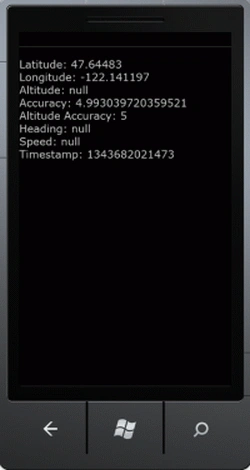
2) geolocation.watchPosition
This method watches for the changes to the device's current position; it returns the string that is a watch id that references the watch position interval. It is an asynchronous function that supports the platform such as Android, BlackBerry WebWorks (OS 5.0 and higher) ,iOS, Window Phone 7(Mango), Bada 1.2 & 2.x and webOS. It also has the three parameters geolocationSuccess, geolocationError and geolocationOption. The syntax is:
var watchId= navigator.geolocation.watchPosition( geolocationSuccess,[geolocationError],[geolocationOptions]);
Example
<!DOCTYPE html>
<html>
<head>
<meta name="viewport" content="width=device-width, height=device-height, initial-scale=1.0, maximum-scale=1.0, user-scalable=no;" />
<meta http-equiv="Content-type" content="text/html; charset=utf-8" />
<title>Cordova WP7</title>
<link rel="stylesheet" href="master.css" type="text/css" media="screen" title="no title"
charset="utf-8" />


Rahat YasirPosted Dec 2, 2014, 9:50 AM
useful, will be happy to see pin in the map as well
ekta aroraPosted Aug 1, 2012, 1:50 AM
so usefull :)