

INTRODUCTION
Delegates are function pointers. Delegates can be chained together; for example, multiple methods can be called on a single event. There are two types of delegates.
- Single Cast Delegate
- Multi Cast Delegates
A Singlecast delegate can return any datatype and contain the address of one function. It is derived from the System.Delegate class. It contains the reference of one method at a time. A Multicast delegate does not return any value and contains addresses of multiple functions. It is derived from the System.MulticastDelegate class.
The foillowing steps are used to create delegates.
Step 1: Open Visual Studio 2010 and click on file->new->project->and click console application.
Step 2: Write the following code for a Singlecast delegate.
namespace ConsoleApplication2
{
class Program
{
static void Main(string[] args)
{
singlecast ob = new singlecast(abc.mul);//delegate instantiation
int a = ob(4, 2);
Console.WriteLine("The multiplication is"+a);
ob = new singlecast(abc.add);
int b = ob(10, 2);
Console.WriteLine("The addition is:" + b);
ob = new singlecast(abc1.div);
int c = ob(6, 3);
Console.WriteLine("The division is:"+b);
}
}
delegate int singlecast(int x, int y); //Delegate declaration
class abc
{
internal static int add(int a,int b)//return type should be match with the delegate return type.and same number of arguments as in the delegates.
{
return a+b;
}
internal static int mul(int a,int b)
{
return a*b;
}
}
class abc1
{
internal static int div(int a,int b)
{
return a/b;
}
}
}
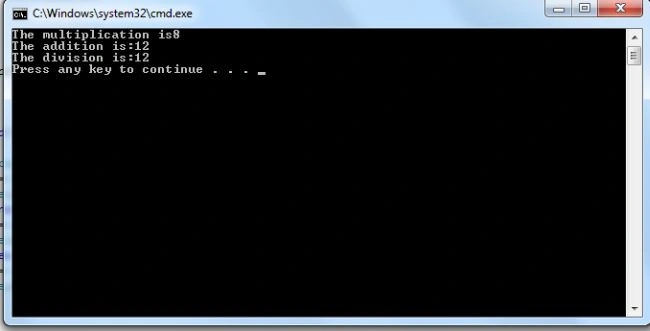
Step 3: Now to run the program by pressing Ctrl+F5, and the output is as:
Step 4: Add the following code for a multicast delegate:
delegate void Notifier(int i,int j); //declare delegate
class calculation
{
public void add(int a, int b) //method declaration
{
Console.WriteLine("Addition is " + (a + b));
}
public void substraction(int x, int y)
{
Console.WriteLine("substraction is " + (x - y));
}
}
class MTest
{
public static void Main()
{
calculation obj = new calculation();
Notifier number;
number = new Notifier(obj.add);
number += new Notifier(obj.substraction);
number(10, 2);
number -= new Notifier(obj.substraction);
number(4, 2);
Console.ReadLine();
}
}
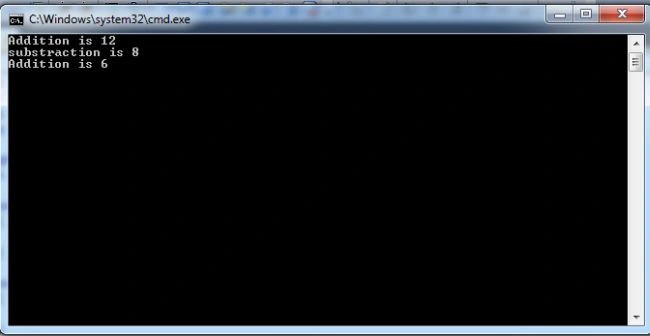
Step 5: Run the application by pressing F5 and the output is as:
Summary: In this article I explain the singlecast delegate and the multicast delegate. I hope this will be helpful for you.
Richa GargPosted Oct 22, 2012, 5:53 AM
Thanks.
Praveen VRPosted Oct 20, 2012, 12:54 AM
Good :)