

Introduction : This is a simple ASP.NET MVC application that shows bound data on a Gridview through a database. This is simple application for beginners to learn how to create the database in MVC ASP.NET application and bind the data on Gridview. The MVC (Model-View-Controller) architecture is a way of decomposing an application into three parts the model, the view and the controller. It was originally applied in the graphical userinteraction model of input, processing and output. A model represents an application data and contains the logic for accessing and manipulating that data. The view is responsible for rendering the state of the model. The controller is responsible for intercepting and translating user input into actions to be performed by the model. Some simple steps to bind the data on a Gridview in a MVC ASP.NET that is given below.
Step 1:
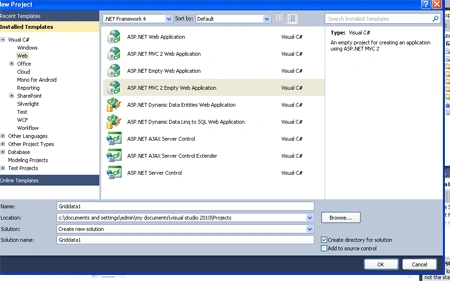
- Open Visual Studio 2010.
- Click file ->New->Projects.
- Add MVC ASP.NET 2 Empty Web application
Step 2 :
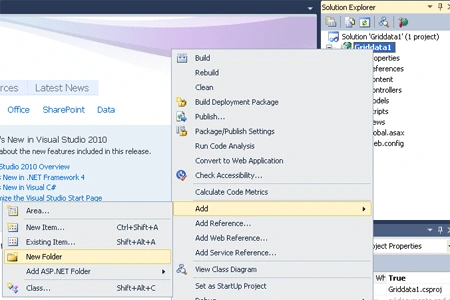
- Right Click on Solution Explorer add a Folder.
- Right Click on Solution Explorer->Add->Folder.
- Name of folder "App_Data".
Step 3 :
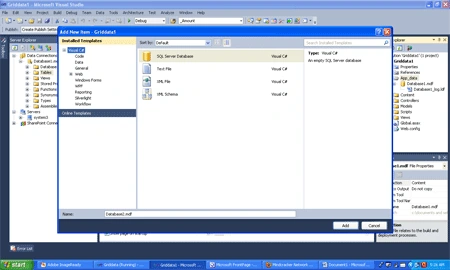
- In a App_Data folder add SQL Server Database.
- Right Click on App_Data Folder->Add New Item-> add "Sql Server Database" class.
Step 4 : After adding the Sql Server Database two file create in folder.
- First is "Ram.mdf".
- Second is "Ram_log.ldf".
Step 5 :
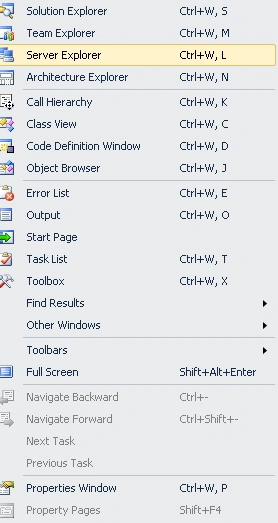
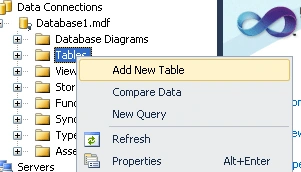
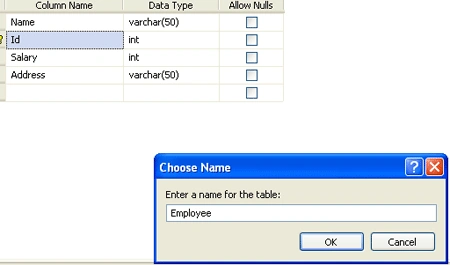
- Right Click of "Ram.mdf"->Add Table Schema.Set the fields "Name,Id,Salary,Address".Set table name "Employee".
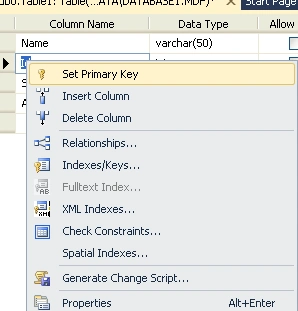
Step 6 : If you want to set the Primary key and Relationship.
- Right click on "ID" Fields and set Primary key.
- In same way set Relationship.
- Close and Save the name of the table just like a "Person".
Step 7 :
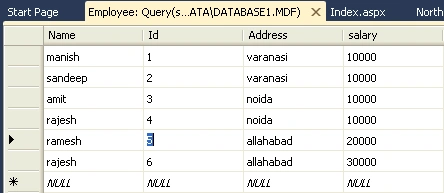
- Right click on Employee and open "Show table data".
- Insert data from a table.
Step 8 :
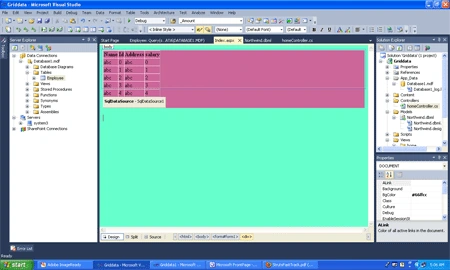
- Open a "index.aspx" page drag and drop a Gridview.
- Bind the data on the gridview.
Code:
<%@
Page Language="C#"
%>
<!DOCTYPE
html PUBLIC
"-//W3C//DTD XHTML 1.0 Transitional//EN"
"http://www.w3.org/TR/xhtml1/DTD/xhtml1-transitional.dtd">
<html
xmlns="http://www.w3.org/1999/xhtml"
>
<head
runat="server">
<title>Index</title>
</head>
<body
style="height:
106px" bgcolor="#66ffcc">
<form
id="form1"
runat="server">
<div
style="background-color:
#CC6699">
<asp:GridView
ID="GridView1"
runat="server"
AutoGenerateColumns="False"
DataSourceID="SqlDataSource1">
<Columns>
<asp:BoundField
DataField="Name"
HeaderText="Name"
SortExpression="Name"
/>
<asp:BoundField
DataField="Id"
HeaderText="Id"
SortExpression="Id"
/>
<asp:BoundField
DataField="Address"
HeaderText="Address"
SortExpression="Address"
/>
<asp:BoundField
DataField="salary"
HeaderText="salary"
SortExpression="salary"
/>
</Columns>
</asp:GridView>
<asp:SqlDataSource
ID="SqlDataSource1"
runat="server"
ConnectionString="<%$
ConnectionStrings:ConnectionString %>"
SelectCommand="SELECT
[Name], [Id], [Address], [salary] FROM [Employee]">
</asp:SqlDataSource>
</tr>
</div>
</form>
</body>
</html>
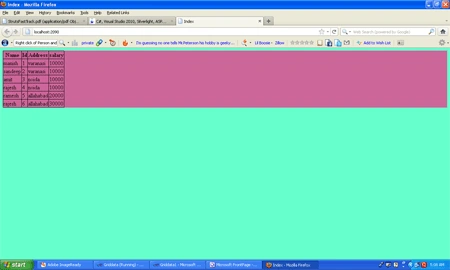
Step 9 : Press crtl+f5 run the program.
Output:
Manav PandyaPosted Jan 11, 2017, 6:33 AM
But how to bind datatable in mvc inside view ??
Manav PandyaPosted Jan 11, 2017, 6:32 AM
Thanks for sharing this one sir @manish
Hemant PanchalPosted May 18, 2015, 2:58 AM
Display Data in GridView Using MVC http://www.c-sharpcorner.com/UploadFile/32bcb2/display-data-in-grid-view-through-mvc/
nilesh mondePosted Mar 11, 2013, 6:31 AM
using mvc i wants to show gridview . how can i achieve? using contoller , model and view ... or it is nt ossible in mvc 2 or can we need to download telerik gridview etcetc .
nilesh mondePosted Mar 11, 2013, 6:19 AM
hey its not working?
Arun KumarPosted Apr 7, 2012, 1:28 AM
We need the connection settings and here where is the MVC architecture?
Dorababu MekaPosted Mar 15, 2012, 11:59 AM
Are you sure this one is done using MVC architecture fully.
Krishna GaradPosted Dec 1, 2011, 6:31 AM
In ASp.net MVC will paging feature work of gridview? If yes how we can handle the pageindexchnaging event.