

Introduction
This article rxplains how to apply Foreach Binding in ASP.NET using Knockoutjs.
My previous article was about many types of bindings that are possible with various kinds of HTML Controls. In this article I will show you one more type of binding that can be very useful in reducing the code, you just need to pass it for the first time and it will create the controls and the binding of it's own.
Let's see the procedure to use foreach binding.
Step 1
First of all you need to add an external Knockout js file into your application, you can either download it from the internet or can download my application that is available at the start of this article in ZIP Format and then use the file attached with this ZIP file.
After downloading the file you need to call it in the head section of your application.
<head runat="server">
<title></title>
<script src="knockout-2.1.0.js"></script>
</head>
Step 2
Now we can work on our application. First we will work on the ViewModel; for this you need to add a Script tag under the body section and then need add this code:
<script type="text/javascript">
ko.applyBindings({
PersonName: [
{ firstName: 'Anubhav', lastName: 'Chaudhary' },
{ firstName: 'Mohit', lastName: 'Singh' },
{ firstName: 'S.P', lastName: 'Singh' }
]
});
</script>
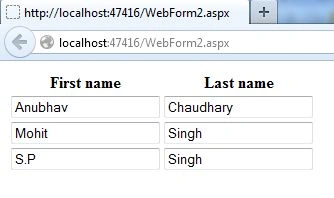
In this article we just need some data that is to be bound with the HTML controls, so I passed the data in the form of a Name and Surname.
You will be wondering why I did not use a function to describe the data. As I had already told you, here we just need some data to be called in the HTML controls so I declared the data under the applyBinding.
Step 3
Now the work on the ViewModel is now completed so we can now move towards the view or design of our application.
You need to write this code in the ASP.NET page:
<table >
<thead>
<tr><th>First name</th><th>Last name</th></tr>
</thead>
<tbody data-bind="foreach: PersonName">
<tr>
<td >
<input data-bind="value: firstName" />
</td>
<td >
<input data-bind="value: lastName" />
</td>
Join the conversation! Your thoughts help the community grow.