

Introduction
In my previous articles I told you about:
- ng-click and ng-blur Directive of AngularJS
- ng-init and ng-repeat Directive of AngularJS
- ng-change Directive of AngularJS
- ng-BindHtml Directive of AngularJS
- ng-bind-template directive of AngularJS.
- ngClassOdd and ngClassEven Directive of AngularJS
- ng-cut, ng-copy and ng-paste Directive of AngularJS
This article explains the ng-disabled directive of AngularJS.
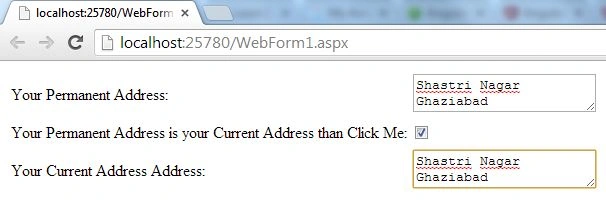
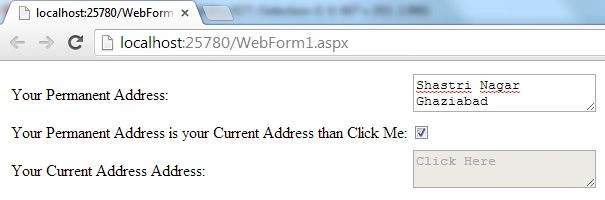
In many websites you must have seen that if your permanent address is also your current address then you just need to provide one of them and the other becomes disabled. This article will help you to create a similar application using the AngularJS ng-disabled directive.
Step 1
First of all you need to add an external Angular.js file to your application, "angular.min.js".
For this you can go to the AngularJS official site or can download my source code and then fetch it or you can click on this link and can download it: ANGULARJS.
After downloading the external file you need to add this file to the Head section of your application.
<head runat="server">
<title></title>
<script src="angular.min.js"></script>
</head>
Step 2
Now after adding the external JS file the first thing you need to do is to add ng-app in the <HTML> Tag otherwise your application will not run.
<html ng-app xmlns="http://www.w3.org/1999/xhtml">
Now I will work on the ViewModel.
In the View Model I am taking two Text Areas and one Checkbox, the first Text Area will be for the Permanent Address and the second is for the Current Address, if the user's Permanent Address and Current Address are the same then the user will check the checkbox then in that case the second Text Area will become disabled.
Let's see the code for this:
<body>
<form id="form1" runat="server">
<table>
<tr>
<td>
<label>Your Permanent Address:</label>
</td>
<td>
<textarea placeholder="Click Here"></textarea>
</td>
</tr>
<tr>
<td>
<label>Your Permanent Address is your Current Address than Click Me: </label>
</td>
<td>
<input type="checkbox" />
</td>
</tr>
<tr>
<td>
<label>Your Current Address Address:</label>
</td>
<td>
<textareaplaceholder="Click Here"></textarea>
</td>
</tr>
</table>
</form>
</body>
Asfend YarPosted Feb 29, 2016, 2:05 PM
thanks