Introduction
We all know a view state value cannot be accessed in a different page because the life span of a view state object is within the page only. That means directly we can’t access a view state value in another page but indirectly it is possible.
These are some ways using which we can access a view state value in another page.
- Using Query String
- Using Session State
- Using cookies
- Using cross Page Postback
Let us go with all the above cases one by one with some real time example. For example, I am taking C# Corner websites article section.
When you open an article you will find some fields like Page Views, Likes and Downloads. Here's the image:
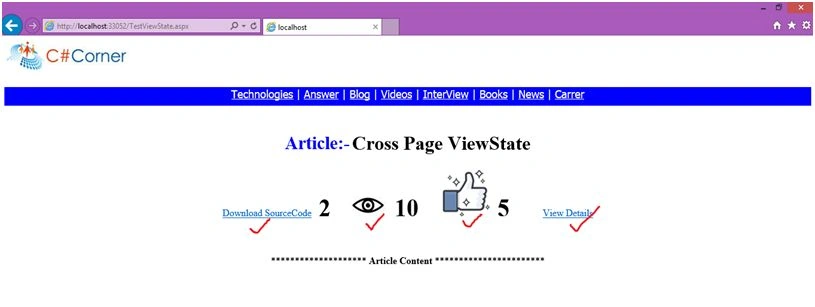
Figure 1: Like Page Views
In the above screenshot there are four fields such as:
- Download Source code
- Page Views
- Likes
- View Details
- When you click on Download Source code link it will increment the counter by one, that means it will count number of people downloading that article.
- When you Refresh/Reload the page it will increment the counter by one, that means it will count number of people reading that article.
- When you click on like button it will increment the counter by one, that means it will count number of people like that page.
- And when you click on ViewDetails link button, it will redirect you to another page showing all the details.
Let us design our page like the above screenshot.
- Open VS, New Project, then ASP.NET Empty Website. Name it “CrossPageViewState”.
- Right click on project head, Add, WebForm, then name it “TestViewState”.
Write the following code inside it.
TestViewState.aspx
- <%@ Page Language="C#" AutoEventWireup="true" CodeBehind="TestViewState.aspx.cs" Inherits="CrossPageViewState.TestViewState" %>
- <!DOCTYPE html>
- <html xmlns="http://www.w3.org/1999/xhtml">
-
- <head runat="server">
- <title></title>
- </head>
-
- <body>
- <form id="form1" runat="server">
- <asp:Image ID="img1" runat="server" ImageUrl="~/Images/c-sharp-corner-c-corner-logo-icon.jpg" ToolTip="CSharpCorner" />
- <p style="height:30px; width:100%; background-color:blue; color:white; text-align:center; font-size:18px; font-family:Tahoma"> <a href="#" style="color:white">Technologies</a> | <a href="#" style="color:white">Answer</a> | <a href="#" style="color:white">Blog</a> | <a href="#" style="color:white">Videos</a> | <a href="#" style="color:white">InterView</a> | <a href="#" style="color:white">Books</a> | <a href="#" style="color:white">News</a> | <a href="#" style="color:white">Carrer</a> </p>
- <div align="center">
- <table>
- <tr style="text-align:center">
- <td> <b style="color:blue; font-size:30px">Article:-</b> </td>
- <td>
- <h1>Cross Page ViewState</h1> </td>
- </tr>
- </table>
- <asp:LinkButton ID="lnkDownload" runat="server" Text="Download SourceCode" OnClick="lnkDownload_Click"></asp:LinkButton>
- <asp:Label ID="lblDownload" runat="server" Font-Bold="true" Font-Size="40px" />
- <asp:Image ID="imgView1" runat="server" ImageUrl="~/Images/view.jpg" ToolTip="View" />
- <asp:Label ID="lblView" runat="server" Font-Bold="true" Font-Size="40px" />
- <asp:ImageButton ID="imgLike" runat="server" ImageUrl="~/Images/like.png" ToolTip="likes" OnClick="imgLike_Click" />
- <asp:Label ID="lblLike" runat="server" Font-Bold="true" Font-Size="40px" />
- <asp:LinkButton ID="lnkViewDetails" runat="server" Text="View Details" OnClick="lnkViewDetails_Click" /> <br /><br /><br />
- <p>********************<b> Article Content </b>*********************** </p>
- </div>
- </form>
- </body>
-
- </html>
Now we will store all the field values of the above form in view state and will access it in some other page. To do this add the following code view to the above webform. We can do this task in so many ways. Firstly, we will use Query string approach to do this.
1. Using Query String
TestViewState.aspx.cs
- using System;
- using System.Collections.Generic;
- using System.Linq;
- using System.Web;
- using System.Web.UI;
- using System.Web.UI.WebControls;
- namespace CrossPageViewState
- {
- public partial class TestViewState: System.Web.UI.Page
- {
- protected void Page_Load(object sender, EventArgs e)
- {
- if (!Page.IsPostBack)
- {
- ViewState["Download"] = 0;
- lblDownload.Text = ViewState["Download"].ToString();
- View();
-
-
- ViewState["Like"] = 0;
- lblLike.Text = ViewState["Like"].ToString();
- }
- }
- public void View()
- {
- if (Application["View"] == null)
- {
- Application["View"] = 1;
- }
- else
- {
- int Temp = (int) Application["View"];
- Temp += 1;
- Application["View"] = Temp;
- }
- lblView.Text = Application["View"].ToString();
- }
- protected void lnkDownload_Click(object sender, EventArgs e)
- {
- int count = (int) ViewState["Download"];
- count += 1;
- ViewState["Download"] = count;
- lblDownload.Text = ViewState["Download"].ToString();
- }
- protected void imgLike_Click(object sender, ImageClickEventArgs e)
- {
- int count = (int) ViewState["Like"];
- count += 1;
- ViewState["Like"] = count;
- lblLike.Text = ViewState["Like"].ToString();
- }
- protected void lnkViewDetails_Click(object sender, EventArgs e)
- {
- int download = (int) ViewState["Download"];
- int like = (int) ViewState["Like"];
- Response.Redirect("ViewDetails.aspx?download=" + download + "&like=" + like);
- }
- }
- }
Now add another webform to the project and name it “
ViewDetails.aspx”. Write the following code inside it.
ViewDetails.aspx
- <!DOCTYPE html>
- <html xmlns="http://www.w3.org/1999/xhtml">
-
- <head runat="server">
- <title></title>
- </head>
-
- <body>
- <form id="form1" runat="server">
- <div>
- <p style="height:45px; width:100%; background-color:yellowgreen; color:white; text-align:center; font-size:30px; font-family:Tahoma">Article Details</p> <br /><br />
- <div align="center">
- <asp:Label ID="lblArticleStatus" runat="server" /> </div>
- </div>
- </form>
- </body>
-
- </html>
ViewDetails.aspx.cs
- using System;
- using System.Collections.Generic;
- using System.Linq;
- using System.Web;
- using System.Web.UI;
- using System.Web.UI.WebControls;
- namespace CrossPageViewState
- {
- public partial class ViewDetails: System.Web.UI.Page
- {
- protected void Page_Load(object sender, EventArgs e)
- {
- if (Request.QueryString["download"] != null && Request.QueryString["like"] != null)
- {
- lblArticleStatus.Text = "<table border='1' width=40%><tr><th>Title</th><td>Cross Page ViewState</td><tr><th>Page Views</th><td>" + Application["View"] + "</td></tr><tr><th>Likes</th><td>" + Request.QueryString["like"].ToString() + "</td></tr><tr><th>Downloads</th><td>" + Request.QueryString["download"].ToString() + "</td></tr></table>";
- }
- else
- {
- Response.Redirect("TestViewState.aspx");
- }
- }
- }
- }
Now go to TestViewState.aspx page and run it by pressing ctrl+f5 .you will find pageview=1, downloads=0, like=0.now how many times you will refresh the page the pageview value will be increase by one. When you click on download/like button the corresponding value will increase.
Finally click on ViewDetails link, when you click on this button it will redirect you to ViewDetails page by appending all the viewstate values on the url.
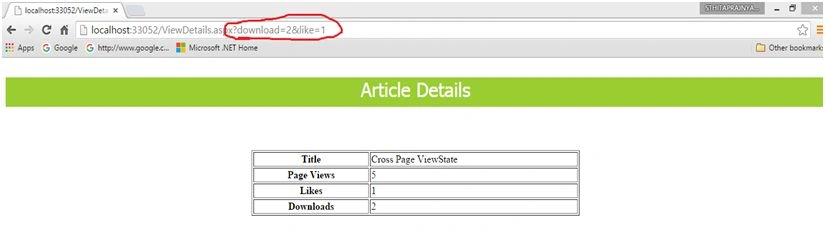 Figure 2:
 Showing all the article details
2. Using Session State
Using session state we can transfer view state value from one page to another page.
To store value in session state use the following technique,
- int download = (int)ViewState["Download"];
- int like = (int)ViewState["Like"];
- Session["download"] =download;
- Session["like"] = like;
To retrieve:
- lblArticleStatus.Text = "<table border='1' width=40%><tr><th>Title</th><td>Cross Page ViewState</td><tr><th>Page Views</th><td>" + Application["View"] + "</td></tr><tr><th>Likes</th><td>" + Session ["like"].ToString() + "</td></tr><tr><th>Downloads</th><td>" + Session ["download"].ToString() + "</td></tr></table>";
3. Using Cookies
Using cookies also we can transfer the view state values from one page to another.
To store value in cookie:
- HttpCookie objCookie1 = new HttpCookie("download");
- objCookie1.Value = ViewState["Download"];
- HttpCookie objCookie1 = new HttpCookie("like");
- objCookie1.Value = ViewState["Like"];
- Response.Cookies.Add(objCookie1);
- Response.Cookies.Add(objCookie2);
To retrieve from cookie:
- if (Request.Cookies["download"] != null && Request.Cookies["like"] != null)
- {
- lblArticleStatus.Text = "<table border='1' width=40%><tr><th>Title</th><td>Cross Page ViewState</td><tr><th>Page Views</th><td>" + Application["View"] + "</td></tr><tr><th>Likes</th><td>" + Request.cookies["like"].value + "</td></tr><tr><th>Downloads</th><td>" + Request.cookies["download"].value + "</td></tr></table>";
- }
Read more articles on View State:


susilkumar beheraPosted Jan 27, 2018, 8:56 AM
Hey D...Good Article....:)
Sthitaprajnya Debasis NayakPosted Feb 13, 2016, 7:18 AM
Thanks Kumaresh !!!
Kumaresh RajalingamPosted Feb 13, 2016, 4:35 AM
Nice share
Sthitaprajnya Debasis NayakPosted Feb 6, 2016, 2:33 AM
Thanks Manas...
Manas MohapatraPosted Feb 6, 2016, 1:23 AM
ViewState is state management object which holds values page specific. Your article is about how to access the value from one page to another page. Good to know more ways to access the value..Keep it up.
Santhakumar MunuswamyPosted Feb 5, 2016, 3:35 PM
Thanks for nice article