

In this article we are going to see, how to get the list of processes from the Process Explorer using System.Diagnostics in C#.
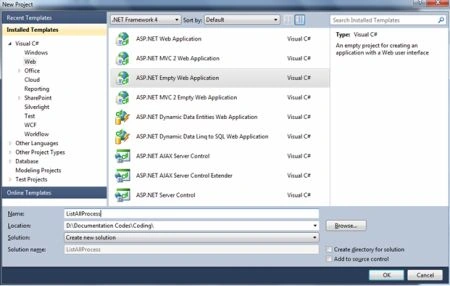
Step 1: Go to the File Menu and select New Project:
Step 2: Used Namespace:
System.Diagnostics
Step 3: Code Snippet:
using System;
using System.Collections.Generic;
using System.Linq;
using System.Web;
using System.Web.UI;
using System.Web.UI.WebControls;
namespace ListAllProcess
{
public partial class Default : System.Web.UI.Page
{
protected void Page_Load(object sender, EventArgs e)
{
foreach (System.Diagnostics.Process winProc in System.Diagnostics.Process.GetProcesses())
{
Response.Write("Process " + winProc.Id + ": " + winProc.ProcessName + " Thread Count :" + winProc.Threads.Count+"<br/>");
}
}
}
}
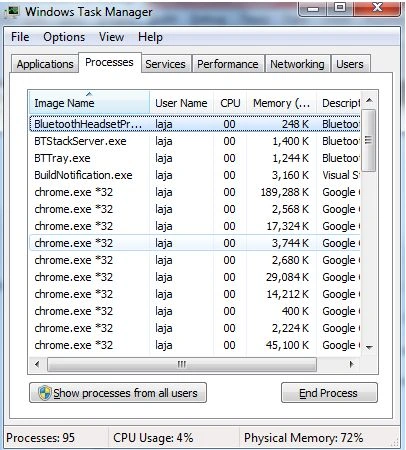
Step 4: Compare the output with the Process Explorer.
Use Shortcut CTRL + SHIFT +ESC.
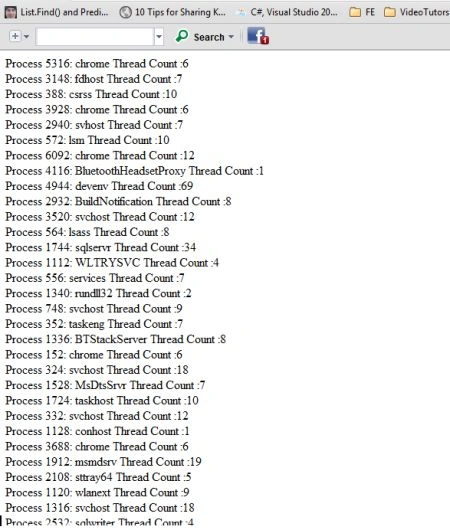
Step 5: OUTPUT
Join the conversation! Your thoughts help the community grow.