

Before reading this article kindly go through previous parts also.
Introduction
This article explains Tasks in asynchronous programming. If we follow the previous two articles, (or if you are already familiar with Tasks), then you will find that we are returning a Task from an asynchronous function. But the question is, what is a Task? Let me give a single-line answer: "A Task is a basic unit of the Task Parallel Library (TPL)". I know that a single-line answer is not enough for understanding what a Task is, but don't worry; we will dig into it more since this article is dedicated to Tasks. (Not office tasks, tasks of asynchronous programming!!) Ok, now let's be serious and proceed to the topic.
On a basic level, a task is nothing but a unit of work. Let's try to map them with real-life tasks to understand them better.
- A task can run/start: Real-life tasks can run/start (read proceed).
- A task can wait: Real-life tasks wait too (my friend waited for seven days to get feedback on his first proposal, though it was negative.)
- A task can cancel: No need to provide an example, you often cancel your task.
- A task can have a child Task: Yes, there are subtasks in people's lives.
- So, those are the features (better to say properties) of Tasks in asynchronous programming. A Task can only run from its start to its finish, you cannot run the same task object two times. Now, the question is, what is the solution for running the same task more than once? The answer is you will need to create another Task object to run the same task.
Ok, let's try one small example to understand Tasks.
Have a look at the following code. Here we will create an object of the Task class.
using System;
using System.Collections.Generic;
using System.Linq;
using System.Text;
using System.Threading.Tasks;

namespace Asynchronious    {
    class Program
    {
        public static void Main(String [] args)
        {
            Task t = new Task(
                () => {
                       System.Threading.Thread.Sleep(5000);
                       Console.WriteLine("Huge Task Finish");
                     }
                );

            //Start the Task
            t.Start();
            //Wait for finish the Task
            t.Wait();
            Console.ReadLine();
        }
    }
}
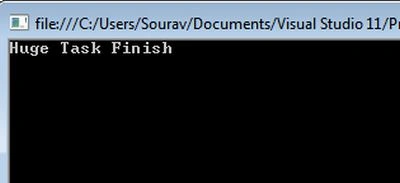
We are calling the Start() method to start the Task. After that, we are calling the Wait() method that implies we are waiting for the task to finish. Here is the sample output.
How to Wait for a Task?
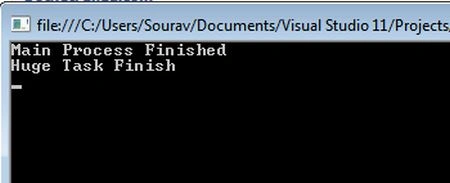
Let's try to understand how to delay (or sleep) a Task for a while. Have a look at the following example.
using System;
using System.Collections.Generic;
using System.Linq;
using System.Text;
using System.Threading.Tasks;

namespace Asynchronious
{
    class Program
    {
        public static void Main(String [] args)
        {
            Task t = new Task(
                () => {
                       System.Threading.Thread.Sleep(5000);
                       Console.WriteLine("Huge Task Finish");
                     }
                );

            //Start the Task
            t.Start();

            //Wait for 1 second
            bool rValue = t.Wait(1000);
            Console.WriteLine("Main Process Finished");
            Console.ReadLine();
        }
    }
}
BierbalPosted Jan 11, 2022, 1:36 PM
Nice! And yes, i will keep reading this series :) Looking foreward to your exception handling article!