

Introduction
I would like to share multiple ways to bind a DataGridView to a Window Forms form using C#.
We will learn the following ways to bind a DataGridView.
- Binding DataGridView using Generic List
- Binding DataGridView using DataTable
- Binding DataGridView using LINQ query result
- Binding DataGridView using Array
- Binding DataGridView using a two-dimension array
- Binding DataGridView manually
1. Binding DataGridView with Generic List
Add the following class to the project:
public class Emp
{
    public int ID { get; set; }
    public string Name { get; set; }
    public string City { get; set; }
    public Emp(int id, string name, string city)
    {
        this.ID = id;
        this.Name = name;
        this.City = city;
    }
}
Create List of Emp
protected List<Emp> GetEmpList()
{
    List<Emp> lEmp = new List<Emp>();
    Emp oemp = new Emp(1234, "Devesh Omar", "GZB");
    lEmp.Add(oemp);
    oemp = new Emp(1234, "ROLI", "GZB");
    lEmp.Add(oemp);
    oemp = new Emp(1235, "ROLI", "MainPuri");
    lEmp.Add(oemp);
    oemp = new Emp(1236, "ROLI", "Kanpur");
    lEmp.Add(oemp);
    oemp = new Emp(1237, "Manish Omar", "GZB");
    lEmp.Add(oemp);
    oemp = new Emp(1238, "ROLI1", "MainPuri");
    lEmp.Add(oemp);
    oemp = new Emp(1239, "ROLI2", "MainPuri");
    lEmp.Add(oemp);
    oemp = new Emp(1230, "ROLI3", "CNB");
   lEmp.Add(oemp);
   oemp = new Emp(1231, "ROLI4", "CNB-UP");
   lEmp.Add(oemp);
   oemp = new Emp(1232, "ROLI5", "GHAZIABAD");
   lEmp.Add(oemp);
   oemp = new Emp(1233, "ROLI6", "UP");
   lEmp.Add(oemp);
   return lEmp;
}
Binding Grid
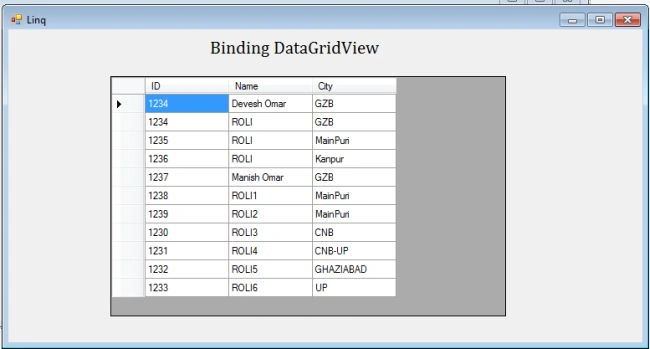
dataGridView1.DataSource = GetEmpList();
The following will be the screen.
2. Binding DataGridView using DataTable
Create a DataTable and define the columns as in the following:
DataTable table = new DataTable();
table.Columns.Add("ID", typeof(int));
table.Columns.Add("NAME", typeof(string));
table.Columns.Add("CITY", typeof(string));
Add Rows
table.Rows.Add(111, "Devesh", "Ghaziabad");
table.Rows.Add(222, "ROLI", "KANPUR");
table.Rows.Add(102, "ROLI", "MAINPURI");
table.Rows.Add(212, "DEVESH", "KANPUR");
Binding DataGridView
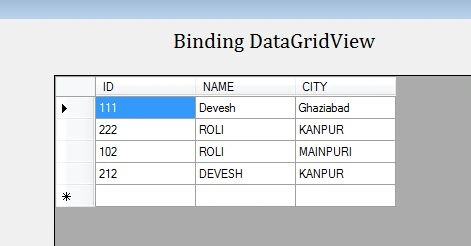
dataGridView1.DataSource=table;
Running the code, the following will be the screen.
3. Binding DataGridView using LINQ query result
First we need to create a Generic list, the following is the sample code:
protected List<Emp> GetEmpList()
{
    List<Emp> lEmp = new List<Emp>();
    Emp oemp = new Emp(1234, "Devesh Omar", "GZB");
    lEmp.Add(oemp);
    oemp = new Emp(1234, "ROLI", "GZB");
    lEmp.Add(oemp);
    oemp = new Emp(1235, "ROLI", "MainPuri");
    lEmp.Add(oemp);
    oemp = new Emp(1236, "ROLI", "Kanpur");
    lEmp.Add(oemp);
    oemp = new Emp(1237, "Manish Omar", "GZB");
    lEmp.Add(oemp);
    oemp = new Emp(1238, "ROLI1", "MainPuri");
    lEmp.Add(oemp);
    oemp = new Emp(1239, "ROLI2", "MainPuri");
    lEmp.Add(oemp);
    oemp = new Emp(1230, "ROLI3", "CNB");
    lEmp.Add(oemp);
    oemp = new Emp(1231, "ROLI4", "CNB-UP");
    lEmp.Add(oemp);
    oemp = new Emp(1232, "ROLI5", "GHAZIABAD");
    lEmp.Add(oemp);
    oemp = new Emp(1233, "ROLI6", "UP");
    lEmp.Add(oemp);
    return lEmp;
}
Writing a LINQ query for the list above:
List<Emp> Lstemp = GetEmpList();
var columns = from t in Lstemp
orderby t.Name
select new
{
    EmpID = t.ID,
    Name = t.Name,
    City = t.City
};
Binding Grid
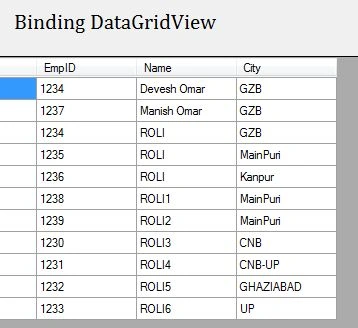
dataGridView1.DataSource = columns.ToList();
Running the code.
Adding Row_number to the LINQ query:
List<Emp> Lstemp = GetEmpList();
int Srno = 0;
var columns = from t in Lstemp
orderby t.Name
select new
{
    Row_number=++Srno,
    EmpID = t.ID,
    Name = t.Name,
    City = t.City
};
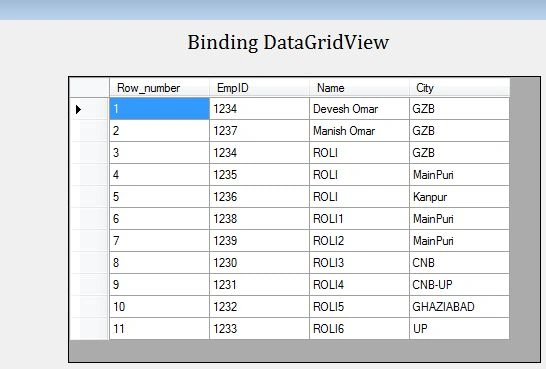
In this query, we have Row_number=++Srno that would result in an auto-increment row and act as a row number.
4. Binding DataGridView using Array
Add the following class to the project:
public class Emp
{
    public int ID { get; set; }
    public string Name { get; set; }
    public string City { get; set; }

    public Emp(int id, string name, string city)
    {
       this.ID = id;
       this.Name = name;
       this.City = city;
    }
}
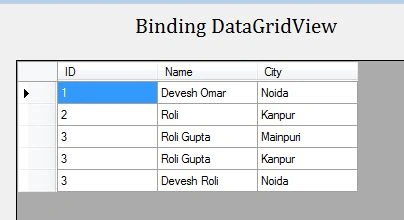
Defining Array
var arrEmp = new[] {
    new Emp( 1, "Devesh Omar", "Noida"),
    new Emp( 2, "Roli", "Kanpur"),
    new Emp( 3, "Roli Gupta", "Mainpuri"),
    new Emp( 3, "Roli Gupta", "Kanpur"),
    new Emp( 3, "Devesh Roli ", "Noida"),
};
Binding Grid
dataGridView1.DataSource = arrEmp;
5. Binding DataGridView using Two dimension Array
Declaring Array
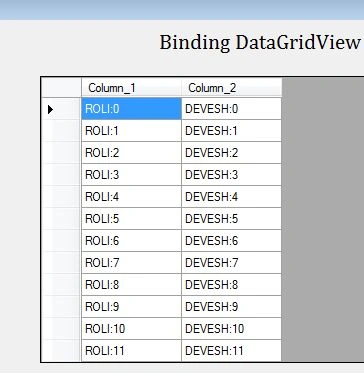
string[][] Array = new string[100][];
Adding values to the array:
for(int i = 0; i < 100; i++)
Array[i] = new string[2] { "ROLI:"+i, "DEVESH:"+i };
Defining LINQ for array:
var data = (from arr in Array select new { Column_1 = arr[0], Column_2 = arr[1] });
Binding data
dataGridView1.DataSource = data.ToList();
6. Binding DataGridView Manually
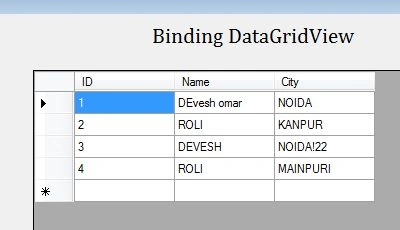
Defining columns
dataGridView1.ColumnCount = 3;
dataGridView1.Columns[0].Name = "ID";
dataGridView1.Columns[1].Name = "Name";
dataGridView1.Columns[2].Name = "City";
Adding Rows
string[] row = new string[] { "1", "DEvesh omar", "NOIDA" };
dataGridView1.Rows.Add(row);
row = new string[] { "2", "ROLI", "KANPUR" };
dataGridView1.Rows.Add(row);
row = new string[] { "3", "DEVESH", "NOIDA!22" };
dataGridView1.Rows.Add(row);
row = new string[] { "4", "ROLI", "MAINPURI" };
dataGridView1.Rows.Add(row);
Running the code:
Conclusion
We have learned various ways to bind a DataGridView to a C# Windows Forms form.
Omar Vcitor BacoPosted Apr 16, 2020, 6:20 PM
Hello. I am interested in using Datagridview for data entry.
Omar Vcitor BacoPosted Apr 16, 2020, 6:07 PM
Nice Tutorials. Please keep it coming.
Purvesh SanganiPosted Nov 17, 2016, 2:21 AM
Which one method is faster than to other method?
Manish kumarPosted Jan 7, 2016, 5:23 AM
Nice article and thanks for sharing.
Devesh OmarPosted Dec 8, 2014, 9:54 AM
yes. we can
wasim adddPosted Dec 5, 2014, 11:02 AM
We Can Also Bind GridView From XML file .
EnosPosted Nov 24, 2014, 4:29 AM
Good tutorials but i want to bind it from the database no manually. how can you do that?