

LongListSelector in Windows Phone 8 is a very flexible control. You can use this control to implement Grouping of Items in the list.
Let us say we have some Categories and associated Sub-Categories as shown in the emulator snapshot below:
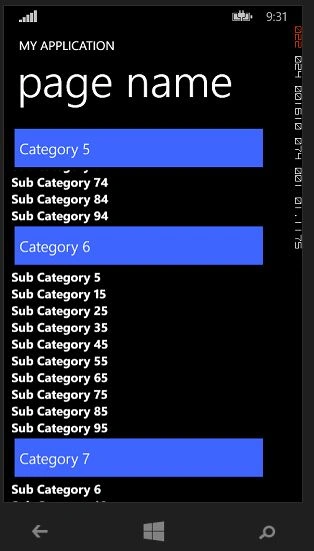
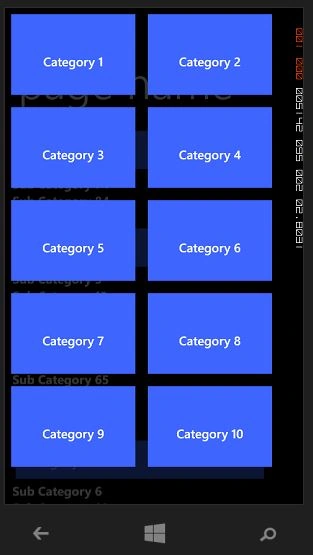
XAML
Add a DataContext to phone:PhoneApplicationPage, I have used the MVVM Pattern.
- DataContext="{Binding CatSubCat, Source={StaticResource Locator}}"
LongListSelector:
- <phone:LongListSelector ItemsSource="{Binding Categories}"
- JumpListStyle="{StaticResource CategoryJumpListStyle}"
- Background="Transparent"
- GroupHeaderTemplate="{StaticResource CategoryHeaderTemplate}"
- ItemTemplate="{StaticResource SubCategoryItemTemplate}"
- LayoutMode="List"
- IsGroupingEnabled="true"
- HideEmptyGroups ="true"/>
So we need CategoryJumpListStyle, CategoryHeaderTemplate, and SubCategoryItemTemplate.
Add them in PhoneApplicationPage.Resources as in the following:
- <phone:PhoneApplicationPage.Resources></phone:PhoneApplicationPage.Resources>
- <phone:JumpListItemBackgroundConverter x:Key="BackgroundConverter"/>
- <phone:JumpListItemForegroundConverter x:Key="ForegroundConverter"/>
- <Style x:Key="CategoryJumpListStyle" TargetType="phone:LongListSelector">
- <Setter Property="GridCellSize" Value="220,150"/>
- <Setter Property="LayoutMode" Value="Grid" />
- <Setter Property="ItemTemplate">
- <Setter.Value>
- <DataTemplate>
- <Border Background="{Binding Converter={StaticResource BackgroundConverter}}" Height="150" Margin="10" >
- <TextBlock TextWrapping="Wrap" Text="{Binding CategoryName}" FontFamily="{StaticResource PhoneFontFamilySemiBold}" FontSize="20" Padding="6"
- Foreground="{Binding Converter={StaticResource ForegroundConverter}}" TextAlignment="Center" VerticalAlignment="Center"/>
- </Border>
- </DataTemplate>
- </Setter.Value>
- </Setter>
- </Style>
CategoryHeaderTemplate :
- <DataTemplate x:Key="CategoryHeaderTemplate">
- <Border Background="Transparent" Padding="5">
- <Border Background="{StaticResource PhoneAccentBrush}" BorderBrush="{StaticResource PhoneAccentBrush}" BorderThickness="2" Width="400"
- Height="62" Margin="0,0,18,0" HorizontalAlignment="Left">
- <TextBlock Text="{Binding CategoryName}" Foreground="{StaticResource PhoneForegroundBrush}" FontSize="24" Padding="6"
- FontFamily="{StaticResource PhoneFontFamilySemiLight}" HorizontalAlignment="Left" VerticalAlignment="Center"/>
- </Border>
- </Border>
- </DataTemplate>
SubCategoryItemTemplate:
- <DataTemplate x:Key="SubCategoryItemTemplate">
- <StackPanel VerticalAlignment="Top">
- <TextBlock FontWeight="Bold" Text="{Binding SubCategoryName}" />
- </StackPanel>
- </DataTemplate>
Code:
LongListSelector for grouping needs an object of type: List<List<T>>.
In our case we use List<T> as in the following:
- public class SubCategoryGroup : List<SubCategory>
- {
- public string CategoryName { get; set; }
- public SubCategoryGroup(IEnumerable<SubCategory> subCategoryList,string Name)
- {
- this.CategoryName = Name;
- this.AddRange(subCategoryList);
- }
- }
And our View Model should return List<List<T>> (in our case List<SubCategoryGroup>) as in the following:
- public class CatSubCatViewModel : ViewModelBase
- {
- IRepository db;
- public List<SubCategoryGroup> Categories { get; set; }
- public CatSubCatViewModel(IRepository _db)
- {
- db = _db;
- Categories = new List<SubCategoryGroup>();
- var allCategories = db.GetAllCategories();
- var allSubCategories = db.GetAllSubCategories();
- foreach (var categoryItem in allCategories)
- {
- Categories.Add(new SubCategoryGroup(allSubCategories.Where(p => p.CategoryId == categoryItem.CategoryId),categoryItem.CategoryName));
- }
- }
- }
So we have used the Categories Property to contain a List<SubCategoryGroup> that we directly bind to our LongListSelector.
That's all about the basics, you can customize it more depending on your requirements. I hope the article is helpful. Happy WP Coding!
Join the conversation! Your thoughts help the community grow.