

The MVC pattern and the ASP.Net MVC have made web development rapid and easier. This pattern helps creating applications that separate the various aspects of the application (input logic, business logic, and UI logic), while providing a loose coupling among these elements. This example will demonstrate how to populate a dropdown list from a database.
Populate Drop Down in ASP.Net MVC (ASPX and Razor)
Let's assume you would want to populate the Country dropdown list from the database on your web site Register page.
Sample Code
-
I'll be using the sample ASP.Net MVC web application (ships with MVC installation) for this example.
Country Table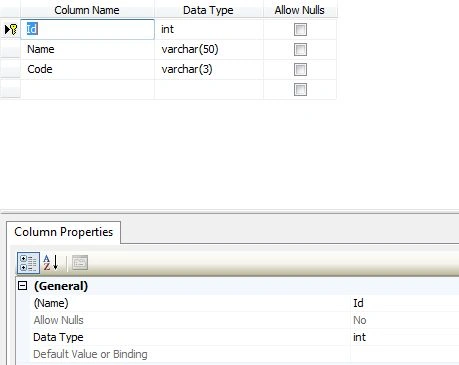
Create the Country table mapping class as shown below:
/// <summary>
/// Country Class
/// </summary>
[System.Data.Linq.Mapping.Table(Name = "Country")]
public class CountryLookupEntity
{
[System.Data.Linq.Mapping.Column(IsPrimaryKey = true, IsDbGenerated = true )]
[Display(Name = "Id")]
public int Id { get; set; }
[System.Data.Linq.Mapping.Column]
public string Name { get; set; }
[System.Data.Linq.Mapping.Column]
public string Code { get; set; }
}
Inside your Account controller, create a new ViewBag or ViewData property:
public ActionResult Register()
{
ViewBag.CountryList = new SelectList(new User().GetCountryList(),"Code","Name");
ViewBag.PasswordLength = MembershipService.MinPasswordLength;
return View();
}
The following is the GetCountryList method that brings the data from your database table using LINQ to SQL or the Entity Framework, whichever you prefer to use.
public IEnumerable<CountryLookupEntity> GetCountryList()
{
string conn = ConfigurationManager.ConnectionStrings["str"].ConnectionString;
dbContext = new DataContext(conn);
Table<CountryLookupEntity> cntTable = dbContext.GetTable<CountryLookupEntity>();
return cntTable.ToList();
}
Now in your .aspx or .cshtml page place a control for the dropdown list with the same viewdata or viewbag property defined in the ActionResult method of your Account Controller.
@model QPQ.Web.Models.UserEntity
@{
ViewBag.Title = "Register";
}
@using (Html.BeginForm()) {
<div>
<fieldset>
<div class="editor-label">
@Html.LabelFor(m => m.Country )
</div>
<div class="editor-field">
@Html.DropDownList("CountryList")
@Html.ValidationMessageFor(m => m.Country )
</div>
<p>
<input type="submit" value="Go" />
</p>
</fieldset>
</div>
}
Amit KaryekarPosted Jul 18, 2015, 6:59 AM
ViewBag.CountryList = new SelectList(new User().GetCountryList(),"Code","Name"); can someone plz explain me the context of user() in the above line i didnt understood it gives a compilation error i m rookie to mvc
twp saddamPosted Oct 20, 2012, 5:36 AM
great job
twp saddamPosted Oct 20, 2012, 5:36 AM
great job.....
Subal MishraPosted Jul 26, 2012, 11:36 PM
Richa, for Linq to SQL yes...
Richa GargPosted Jul 26, 2012, 11:04 PM
Is it is necessary to use the lamda expression when I use any controls like textbox,label etc in Razor view?