

Introduction
In this article, we will learn about the Execution order of Triggers In SQL Server.
Triggers in SQL Server
Triggers are stored programs that are automatically executed or fired when a specified event occurs. It is a database object that is bound to a table and is executed automatically. We cannot call triggers explicitly. Triggers provide data integrity and are used to access and check data before and after modification using DDL or DML queries.
Find more about SQL Queries here: SQL Queries
Triggers are used mainly in the following events
- Insert Data into a table
- Delete data from the table
- Update table record
We can create more than one trigger for the same event (in other words an INSERT, DELETE, or UPDATE transaction). There is one problem, however. Triggers don't have a specified execution order. Execution of triggers is performed randomly. Sometimes the business logic dictates that we need to define two triggers on a table that must fire in a specific order on the same table action. For example, when we insert rows in a table (INSERT statement) two triggers must fire and the second must fire after the first one for our logic to be implemented correctly.
Today we learn how to define the execution order of triggers.
First, we create a table as follows
GO

CREATE TABLE [dbo].[Employee](
    [Emp_ID] [int] NOT NULL,
    [Emp_Name] [nvarchar](50) NOT NULL,
    [Emp_Salary] [int] NOT NULL,
    [Emp_City] [nvarchar](50) NOT NULL,
 CONSTRAINT [PK_Employee] PRIMARY KEY CLUSTERED
(
    [Emp_ID] ASC
)WITH (PAD_INDEX = OFF, STATISTICS_NORECOMPUTE = OFF, IGNORE_DUP_KEY = OFF, ALLOW_ROW_LOCKS = ON, ALLOW_PAGE_LOCKS = ON) ON [PRIMARY]
) ON [PRIMARY]

GO
Now insert some values into the table
Insert into Employee
Select 1,'Pankaj',25000,'Alwar' Union All
Select 2,'Rahul',26000,'Alwar' Union All
Select 3,'Sandeep',25000,'Alwar' Union All
Select 4,'Sanjeev',24000,'Alwar' Union All
Select 5,'Neeraj',28000,'Alwar' Union All
Select 6,'Naru',20000,'Alwar' Union All
Select 7,'Omi',23000,'Alwar'
Select all the values from the table
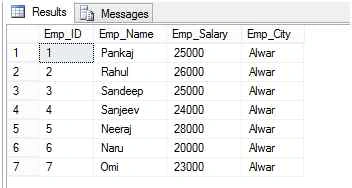
Now we create two triggers for the insert event.
Create the first trigger
CREATE TRIGGER TRIGGER_SECOND
ON Employee
AFTER INSERT

AS
BEGIN

    PRINT ' MY EXECUTE ORDER IS SECOND'
END
Now create another trigger
CREATE  TRIGGER TRIGGER_FIRST
ON Employee
AFTER INSERT

AS
BEGIN

    PRINT ' MY EXECUTE ORDER IS FIRST'
END
Now we insert data into the employee table.
INSERT INTO Employee VALUES(11,'DIV',24000,'JAIPUR')
Output
MY EXECUTE ORDER IS SECOND
MY EXECUTE ORDER IS FIRST
(1 row(s) affected)
We can see that the order of execution of the triggers may depend upon the order of their creation. By default, multiple triggers on a SQL Server table for the same action are not fired in a guaranteed order.
Now we learn how to define the execution order of triggers.
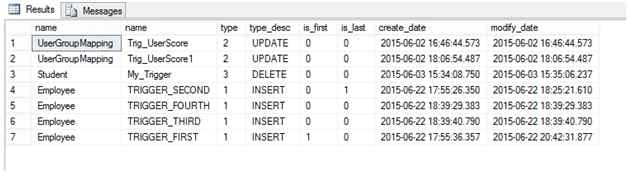
SQL Server contains a sp_settriggerorder Stored Procedure for defining the execution orders of triggers.
Syntax of sp_settriggerorder
sp_settriggerorder [ @triggername = ] ‘[ triggerschema. ] triggername‘
, [ @order = ] ‘value‘
, [ @stmttype = ] ‘statement_type‘
[ , [ @namespace = ] { ‘DATABASE’ | ‘SERVER’ | NULL } ]
A brief explanation of the arguments follows.
[ @triggername= ] '[ triggerschema.] triggername'- It defines the trigger name and schema name to which it belongs. @order- defines the execution order of a trigger. The value is a varchar(10) and it can be any one of the following values.
@stmttype- defines the type of trigger, whether insert, delete or update trigger, LOGON, or any Transact-SQL statement event listed in DDL Events.
Upendra Pratap ShahiPosted Jun 23, 2015, 3:02 AM
Good article Pankaj Kumar Choudhary
Former memberPosted Jun 23, 2015, 2:33 AM
Superb
Debendra DashPosted Jun 23, 2015, 1:31 AM
Good one....
Debasis SahaPosted Jun 23, 2015, 12:55 AM
Good One
Jaipal ReddyPosted Jun 23, 2015, 12:54 AM
nice one pankaj
RakeshPosted Jun 23, 2015, 12:03 AM
Good one
Gopi ChandPosted Jun 22, 2015, 11:53 PM
Good article