

- MongoDB - Day 1 (Introduction To MongoDB)
- MongoDB - Day 2 (Install MongoDB in Windows)
- MongoDB - Day 3 (Database Basics)
- MongoDB - Day 4 (Basics of Collection)
- MongoDB - Day 5 (Data Types in MongoDB)
- MongoDB - Day 6 (Insert Method)
- MongoDB - Day 7 (Find Method Part 1)
- MongoDB - Day 8 (Find Method Part 1)
- MongoDB - Day 9 (Update Method)
- MongoDB - Day 10 (Remove Method)
- MongoDB - Day 11 (Collection Methods)
- MongoDB - Day 12 (Cursor Methods)
- MongoDB - Day 13 (Indexing)
- MongoDB - Day 14 (Aggregations)
Data replication is the concept of having data within a system be geo-distributed, preferably using a non-interactive, reliable process. In traditional RDBMS databases, implementing any sort of replication is a struggle because these systems were not developed with horizontal scaling in mind. Most NoSQL databases support automatic replication. MongoDB provides automatic replication.
Introduction to Replication
Replication is a process or method to synchronize the data across multiple servers. Replication in MongoDB is done by a replica set. A replica set in MongoDB is a group of MongoDB processes that maintain the same data set. Replica sets provide redundancy and high availability with multiple copies of data on different database servers. Replication removes dependencies from a single server so replication protects a database from the loss of a single server. Replication provides a mechanism to recover from hardware failure and service interruptions. Replication is also used to increase the read capacity. Replication provides choices for the client so he can select a different server for read and write operations. Replication maintains copies in different data centers to increase the locality and availability of data for distributed applications.
Important terms in Replication
Now we consider some terms used in replication.
Primary and Secondary Instance
MongoDB does replication using replica sets. A replica set is a group of mongod instances that host the same data set.
A replica set contains two types of MongoDB instances.
Primary Instance: The primary instance receives all write operations.
Secondary Instance: The secondary instance applies operations from the primary so that they have the same data set.
In a replica set, only one primary instance is allowed and all other instances are secondary instances. This primary instance accepts all write operations from clients. A replica set is a group of two or more nodes (generally a minimum of 3 nodes are required).
When a primary instance receives a write operation from a user then it updates its oplog (operation log). The oplog is a special kind of capped collection for storing all the operations that modify the data of the database. MongoDB first applies the operation on the primary instance then records the operation in the primary’s operation log (oplog). Now, the secondary instance copies the operations and applies them asynchronously. All secondary replica sets contain a copy of the primary instance’s oplog.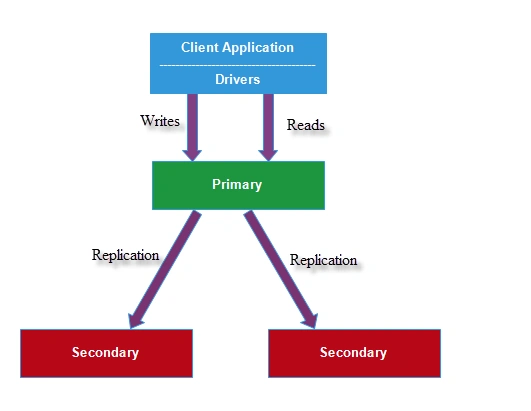
Figure 1: Primary Instance
A secondary instance copies the oplog of the primary instance and performs operations on their data sets such that the secondary instance’s dataset reflects the primary instance’s datasets. The following three-member replica set has two secondary members. The secondary instance replicates the primary’s oplog and applies the operations to their data sets.
Arbiter Instance: All datasets of mongod are present in the primary and secondary instances. But sometimes mongod contains another instance known as the arbiter. The arbiter instance doesn’t contain any replica set but it maintains a quorum in the replica set by presenting to a heartbeat and an election request by other replica sets.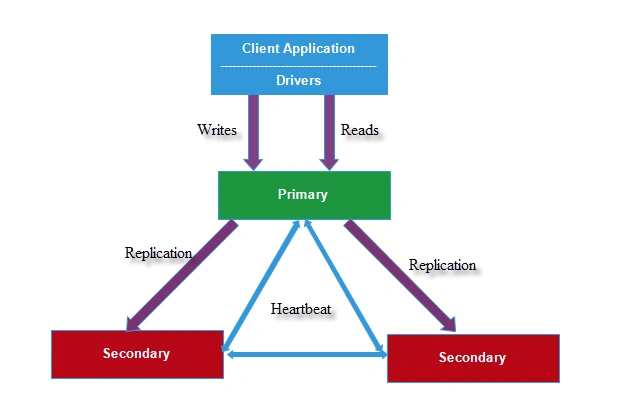
Figure 2: Arbiter Instance
The arbiter is mainly used in the election of the primary. Sometimes, due to automatic failover or maintenance, the election establishes a primary and a new primary node is elected among all the secondary nodes. If there is an even number of replica sets then an arbiter is added to obtain a majority of votes. 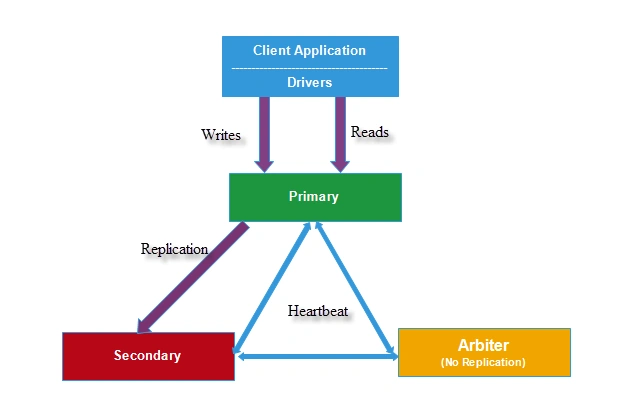
Figure 3: Arbiter
Automatic Failover: During automatic failover or maintenance of a primary instance, the primary instance doesn’t communicate with the secondary instance. If for more than 10 seconds the primary instance doesn’t communicate with the secondary or arbitrary instance, the replica set attempts to select a secondary member to become a new primary.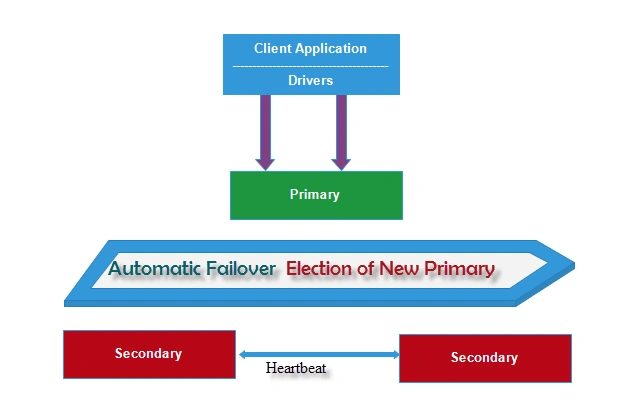
Figure 4: Automatic Failover
The first secondary instance that receives the first majority of votes becomes the new primary.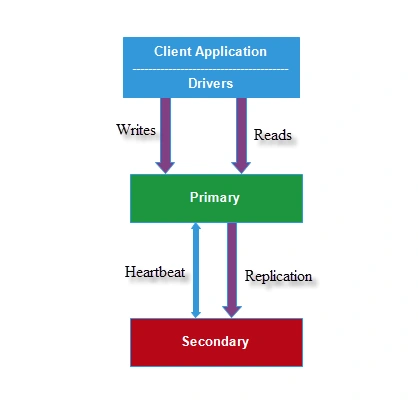
Figure 5: New Primary
Create Replica Set
Now I will explain how to create a simple replica set. We create a three-member replica set from an existing mongod instance. This three-member replica set contains enough redundancy to survive network partitioning and other system failures.
The following is the procedure to deploy a replica set.
Step 1
We create a three-member replica set so we must create the three data directories for each running member. For this, run the following command in a command prompt. Before running this command, close all running mongod server instances.
- md \srv\mongodb\rs0-0 \srv\mongodb\rs0-1 \srv\mongodb\rs0-2
This command will create a directory named “rs0-0”, “rs0-1”,”rs0-2”, as in the following.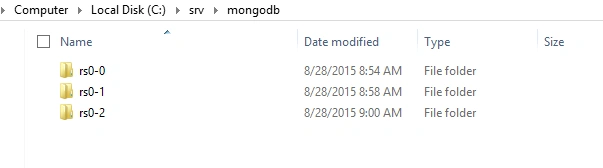
Figure 6: MongoDB Folder
Step 2
Now close this command prompt, open another command prompt, and run the following command.
First Member
- mongod --port 27017 --dbpath /srv/mongodb/rs0-0 --replSet Rpset0 --smallfiles --oplogSize 128

Second Member
Open another command prompt and run the following command:
- mongod --port 27018 --dbpath /srv/mongodb/rs0-1 --replSet Rpset0 --smallfiles --oplogSize 128

Third Member
Open another command prompt and run the following command:
- mongod --port 27019 --dbpath /srv/mongodb/rs0-2 --replSet Rpset0 --smallfiles --oplogSize 128

In the above procedure, we start 3 instances. Each instance runs on a separate port.
Step 3
Now we connect a mongod instance using a mongo shell. Open another command prompt and execute the command “mongo –-port Port_Number”. Port_Number specifies the instance to connect to. We can choose any port number among 27017,27018,27019. Here I selected port number 27017.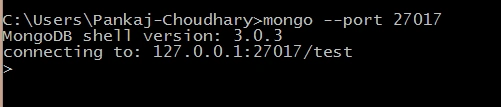
The preceding image shows that port number 27017 of localhost is becoming active.
Step 4
Now execute the “rs.initiate()” command. This command is used to initiate an instance.
Command: mongo –port 27017
Output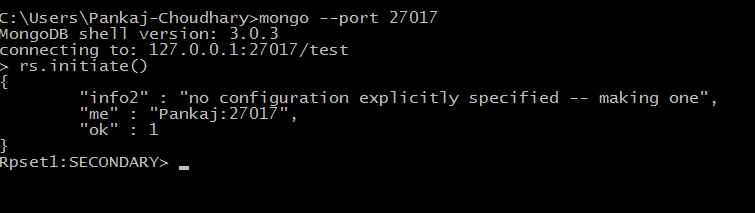
Step 5
Now run the rs.conf() command. This command shows the current replica set configuration object assembly.
Command: mongo --port 27017
Output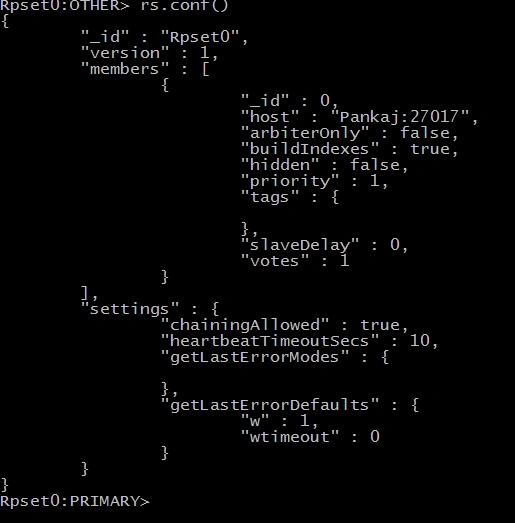
Now we can see that the mongo shell is connected to the primary.
Step 6
Now we add the remaining two mongod instances in the replica set using the “rs.add()” method.
Syntax
rs.add(<hostname>:<PortNumber>)
You can find your hostname using “rs.conf()” method.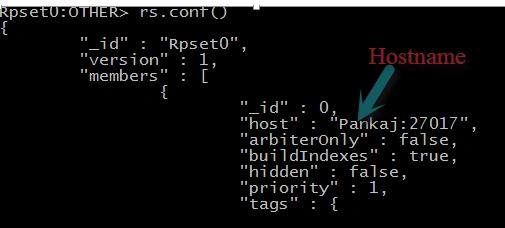
Here my hostname is “Pankaj”.
Now we add remaining mongod instances to the replica set.
Command
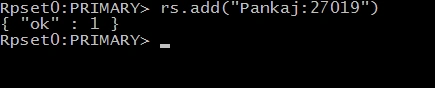
rs.add(“Pankaj:27018”)
Output
In the above command, we add a second mongod instance to the replica set. If I check the replica set using the rs.conf() method, then I will find the following data.
Pankaj Kumar ChoudharyPosted Aug 31, 2015, 12:40 AM
Thanks Hashim Shafiq Sir............
Pankaj Kumar ChoudharyPosted Aug 31, 2015, 12:39 AM
Thanks Sibeesh Venu Sir.......
Hashim ShafiqPosted Aug 30, 2015, 9:49 PM
nice
Sibeesh VenuPosted Aug 30, 2015, 1:15 AM
Nice Share
Pankaj Kumar ChoudharyPosted Aug 29, 2015, 6:01 AM
Thanks Santhakumar Munuswamy Sir............
Pankaj Kumar ChoudharyPosted Aug 29, 2015, 6:00 AM
Thanks Mohammed Ibrahim Sir........
Pankaj Kumar ChoudharyPosted Aug 29, 2015, 6:00 AM
Thanks Gopi Chand Sir.......
Pankaj Kumar ChoudharyPosted Aug 29, 2015, 6:00 AM
Thanks Karthikeyan K Sir..........
Pankaj Kumar ChoudharyPosted Aug 29, 2015, 5:59 AM
Thanks Gowtham K Sir.........
Santhakumar MunuswamyPosted Aug 29, 2015, 4:29 AM
Great article. Thanks for very good series...
Mohammed IbrahimPosted Aug 29, 2015, 1:52 AM
Nice work
Gopi ChandPosted Aug 28, 2015, 11:44 PM
Excellent Pankaj :)
Gowtham KPosted Aug 28, 2015, 8:54 PM
Good one, Thanks for sharing
Sam HobbsPosted Aug 28, 2015, 5:42 PM
What is the difference between distributed databases and replication of databases? IBM was doing distributed databases before they invented relational databases. IBM's database systems (such as DB2) are definitely designed with distributed data as a possibility. Is the purpose of the replication of databases to make a backup of the data? I assume not. Is it to support data in multiple locations? That is what distributed databases are. Please help us understand what the difference is between distributed databases and replication of databases.